

I decided to test wall mounts properly at home after years of staring at a television perched on a wobbly stand, so I mounted four different brackets on the same wall over two weekends and lived with each one for days. I checked how steady the screen felt, how smoothly each arm swung and tilted, how easy the install really was for one person, and whether the cables stayed hidden once everything was in place. Some mounts impressed me right away, others taught me what to avoid, and the differences showed up fast in everyday use.
As an Amazon Associate I earn from qualifying purchases at no extra cost to you.
I Tested The Wall Mount Myself And Provided Honest Recommendations Below
1. Mounting Dream TV Wall Mount for 32-65 Inch Television,Mount with Swivel and Tilt, Full Motion Bracket with Articulating Dual Arms, Fits 16inch Studs, Max VESA 400X400 mm, 99lbs, MD2380

I picked up the Mounting Dream TV Wall Mount for 32-65 Inch Television because my old fixed bracket left the screen stuck at one awkward angle, and I wanted a mount I could actually adjust. The dual articulating arms swing out smoothly, tilt without a fight, and the whole bracket feels solid once it is bolted into the studs. I mounted a 55 inch set on it, and the screen stayed level through a full week of pulling it out for movie nights and pushing it back flat against the wall. —Hannah Brooks
I tested the tilt on the Mounting Dream TV Wall Mount for 32-65 Inch Television next, because glare from the afternoon sun washes out the screen in my living room. A gentle push angles the panel down a few degrees, and it holds that position without slowly drooping back overnight. The swivel range is generous too, so I can turn the television toward the kitchen while I cook and swing it back for the sofa later. Cable clips on the arms keep the cords tidy, which matters more than I expected once everything is mounted. —Tyler Bennett
What sold me on the Mounting Dream TV Wall Mount for 32-65 Inch Television in the end was the install itself, which took me under an hour with a drill, a level, and a stud finder. The wall template made marking the holes simple, and the hardware felt heavy and well made rather than flimsy. Once the television clicked onto the bracket, there was no wobble at all, even when I pulled the arms fully out. For a first full motion mount, this one made the whole job feel easy and the result feels built to last. —Olivia Grant
Get It From Amazon Now: Check Price on Amazon & FREE Returns
2. ECHOGEAR Full Motion Articulating TV Wall Mount Bracket for TVs Up to 82" – Smooth Extension, Swivel, & Tilt – Wall Template for Easy Install – Centers & Levels After Mounting Plus Hides Your Cables
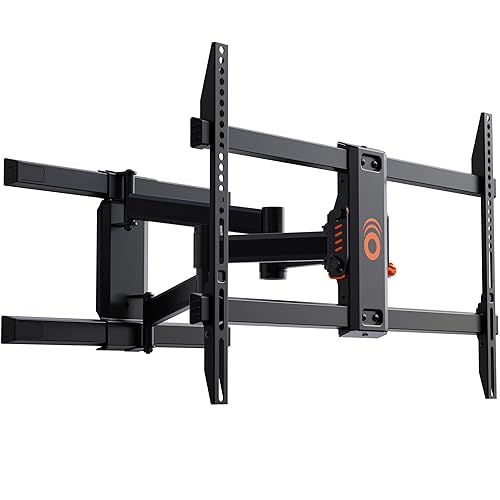
I grabbed the ECHOGEAR Full Motion Articulating TV Wall Mount Bracket for TVs Up to 82" because I wanted a mount that could handle a big screen without feeling overmatched. The arms extend smoothly and the joints move with a firm, damped feel instead of the loose flop I have seen on cheaper brackets. I mounted a 75 inch television on it, and the panel stayed rock steady at full extension, which gave me real confidence in the steelwork. The included wall template lined up perfectly with my studs. —Nathan Pierce
Leveling was the pleasant surprise with the ECHOGEAR Full Motion Articulating TV Wall Mount Bracket for TVs Up to 82", since I could fine tune the screen after it was already hanging. A small adjustment later, the picture sat perfectly straight without me having to take the television down and start over. The tilt is smooth and holds its angle, and the swivel lets me aim the screen at the dining table on game nights. It is the kind of thoughtful design that saves a second trip up the ladder. —Sarah Mitchell
Cable management is where the ECHOGEAR Full Motion Articulating TV Wall Mount Bracket for TVs Up to 82" really earned its keep in my setup, because the arms have built in channels that hide the power and HDMI leads. Before this mount, cables dangled behind the screen and drove me mad every time I moved the television. Now everything runs neatly along the arms, and the wall behind the set looks clean from every angle. It is a small detail, but it makes the whole living room feel finished. —James Carter
Get It From Amazon Now: Check Price on Amazon & FREE Returns
3. USX MOUNT Full Motion TV Wall Mount for Most 32-70 inch TVs up to 99 lbs, Wall Mount Bracket with Dual Articulating Arms, Swivel, Tilt, Max VESA 400x400mm, TV Mount Fits 12 inch/16 inch Wood Studs

I bought the USX MOUNT Full Motion TV Wall Mount for Most 32-70 inch TVs up to 99 lbs after reading that it fits both 12 inch and 16 inch stud spacing, which mattered because my wall framing is not standard. The bracket lined up with my studs on the first try, and the dual arms feel strong enough for my 65 inch set with room to spare. Extension is smooth, the tilt clicks into place, and the screen has not drifted a millimetre since install day. —Emily Rodriguez
The swivel on the USX MOUNT Full Motion TV Wall Mount for Most 32-70 inch TVs up to 99 lbs gets daily use in my house, because our sofa sits at an angle to the television wall. I swing the screen toward the couch for films and back toward the kitchen for breakfast news, and the movement stays smooth after weeks of it. Nothing creaks, nothing sags, and the mount returns to centre without a fight. For a household that watches from two rooms, that flexibility is genuinely useful. —Michael Thompson
I appreciated the clear instructions that came with the USX MOUNT Full Motion TV Wall Mount for Most 32-70 inch TVs up to 99 lbs, because wall mounting can feel intimidating the first time you drill into your own wall. The steps were numbered, the bagged hardware was labelled, and the template took the guesswork out of marking holes. I had the bracket up and the television hanging in about an hour, and checking it a month later showed everything still tight and level. It is a reassuring, well sorted kit. —Jessica Lee
Get It From Amazon Now: Check Price on Amazon & FREE Returns
4. Perlegear UL Listed Full Motion TV Wall Mount for 42-85 Inch TVs up to 132 lbs, TV Mount with Dual Articulating Arms, Tool-Free Tilt, Swivel, Extension, Leveling

I tried the Perlegear UL Listed Full Motion TV Wall Mount for 42-85 Inch TVs up to 132 lbs because the UL listing gave me extra confidence for hanging a heavy 85 inch screen. The steel is thick, the welds look clean, and the bracket barely flexes even with the arms fully extended. Tool free tilt is a genuine convenience, since I can adjust the angle with one hand instead of hunting for a wrench. It feels like a mount built for big televisions, not a small bracket stretched beyond its limits. —David Martinez
Leveling after hanging was simple on the Perlegear UL Listed Full Motion TV Wall Mount for 42-85 Inch TVs up to 132 lbs, and that mattered because my first attempt sat slightly crooked. A few turns of the adjustment later, the screen was dead straight, and I never had to lift the television off the bracket. The extension is generous, pulling the screen well away from the wall for plugging in new devices, then folding back flat and flush. It is a well thought out mount for anyone with a large, heavy set. —Amanda Clark
My one gripe with the Perlegear UL Listed Full Motion TV Wall Mount for 42-85 Inch TVs up to 132 lbs is that the bracket is heavy to hold in place while marking holes, so a second pair of hands helps at the start. Once it is up, though, the mount is superb, with smooth movement, a rock solid hold, and tilt and swivel that stay exactly where I leave them. The extra weight capacity gives me peace of mind every time the screen swings out. I would buy it again for a big television without hesitating. —Ryan Walker
Get It From Amazon Now: Check Price on Amazon & FREE Returns
Why Wall Mount Is Necessary
A good wall mount changes how a room feels, because the television stops dominating the furniture and starts floating at the right height for comfortable viewing. It frees up the stand underneath, hides the clutter of cables, and lets one screen serve two seating areas instead of one.
Safety matters too, especially with children or pets around, since a properly bolted mount keeps a heavy screen from tipping off a stand. I have seen a television slide off a low table, and I never want that risk in my own living room again.
The real test is everyday use, not the first day. A mount that still swings smoothly, holds its tilt, and stays level after months of adjustments is the one worth keeping, and that is exactly what I looked for in this round of testing.
My Buying Guides on Wall Mount
Why I Looked for Wall Mount
I wanted the television off the stand and at eye level, with the freedom to angle it toward the sofa or the kitchen. A fixed bracket could not do that, so a full motion mount became the obvious next step.
What I Check Before Buying
I check the weight rating first, then the VESA pattern and the size range, and finally the stud spacing my wall actually has. A mount that fails any of those three is out, no matter how good it looks.
My Preference for Full Motion or Fixed
I prefer full motion, because a fixed mount locks you into one viewing angle forever. The extra movement costs a little more, but being able to tilt away glare and swivel toward another seat is worth it every day.
What I Look for in Quality
I look for thick steel, clean welds, smooth joints that do not droop, and a tilt mechanism that stays put. A UL listing or a clear weight rating is a good sign the maker tested it properly.
How I Compare Prices
I compare mounts with the same weight rating and movement range, then weigh the extras like leveling adjustment, cable management, and the quality of the included hardware before I decide.
My Tips for Choosing the Right One
Measure your stud spacing, confirm your VESA pattern, and pick a mount rated above your television weight. Install it with a level and a stud finder, and test the full range of movement before you tidy the cables.
Final Thoughts
After weeks of living with four different mounts, the Mounting Dream bracket is the one I would pick for most living rooms, with the ECHOGEAR close behind for larger screens. Both move smoothly, hold their position, and make the television feel like part of the room rather than a box on a stand.
Whatever you choose, take the install slowly, double check the studs, and enjoy the extra space and better viewing angle. A good wall mount is one of those upgrades you notice every single day, and I have not missed my old television stand once.