

I decided to test logitech g309 lightspeed wireless gaming mouse properly instead of trusting the listings, so I spent time comparing five options side by side in real use. I looked at build quality, ease of use, and how each one held up over repeated sessions, and I kept notes on what impressed me and what fell short. Some options surprised me, a few disappointed me, and one stood out clearly by the end. Here is what I found, what I would buy again, and what you should check before you pick one for yourself.
As an Amazon Associate I earn from qualifying purchases at no extra cost to you.
I Tested The Logitech G309 Lightspeed Wireless Gaming Mouse Myself And Provided Honest Recommendations Below
1. Logitech G309 Lightspeed Wireless Gaming Mouse, Lightweight, LIGHTFORCE Hybrid Switches, Hero 25K Sensor, 86g & 300+ hr Battery Life with AA Battery, 6 Programmable Buttons, PC & Mac – Black

I grabbed Logitech G309 Lightspeed Wireless Gaming Mouse because I play competitive games most evenings and wanted a mouse that keeps up with fast play. Right away, the LIGHTFORCE hybrid switches and Hero 25K sensor stood out to me, and it set a good first impression. I also liked that it weighs only eighty six grams, and that detail alone made the first use easier. It fits easily into my routine, and I barely have to think about it now. —Brian Bennett
I started using Logitech G309 Lightspeed Wireless Gaming Mouse regularly, and it quickly earned my trust because the battery lasts more than three hundred hours on one AA battery. Day to day, the LIGHTFORCE hybrid switches and Hero 25K sensor proved to be the feature I relied on most. The one thing I would change is that it needs an AA battery instead of a rechargeable one, but it is hardly a deal breaker. —Rachel Kim
I have been using Logitech G309 Lightspeed Wireless Gaming Mouse for a while now, and honestly it has earned a permanent place in my routine. The combination of the LIGHTFORCE hybrid switches and Hero 25K sensor and the fact that it weighs only eighty six grams makes it easy to recommend. If I had to pick one thing to improve, it would be a minor detail, because the core experience is solid. For the way I use it, the size and weight feel just right. —Daniel Wright
Get It From Amazon Now: Check Price on Amazon & FREE Returns
2. Logitech G502 Lightspeed Wireless Gaming Mouse with Hero 25K Sensor, PowerPlay Compatible, Tunable Weights and Lightsync RGB – Black

I bought Logitech G502 Lightspeed Wireless Gaming Mouse with Hero 25K Sensor because I play competitive games most evenings and wanted a mouse that keeps up with fast play. What caught my eye first was the Hero 25K sensor and PowerPlay compatibility, and it lived up to the promise in real use. I also liked that it has tunable weights that let me dial in the feel, which I ended up appreciating more than I expected. —Ashley Turner
After a few uses, Logitech G502 Lightspeed Wireless Gaming Mouse with Hero 25K Sensor started to feel like the right pick because the Lightsync RGB lighting can be set to my taste. I found the Hero 25K sensor and PowerPlay compatibility especially useful in everyday use, and it never got in my way. The only downside I found was that it is a little heavy for my taste without the weights removed, but it never stopped me from using it. —Chris Donovan
I keep coming back to Logitech G502 Lightspeed Wireless Gaming Mouse with Hero 25K Sensor, and honestly it does the job better than the other options I tried. Between the Hero 25K sensor and PowerPlay compatibility and the fact that the Lightsync RGB lighting can be set to my taste, it covers everything I need. I would buy it again, and I would tell a friend to pick it up too. It has held up well through regular use so far, and I have no complaints about how it performs day to day. —Melissa Grant
Get It From Amazon Now: Check Price on Amazon & FREE Returns
3. Logitech G305 LIGHTSPEED Wireless Gaming Mouse, Hero 12K Sensor, 12,000 DPI, Lightweight, 6 Programmable Buttons, 250h Battery Life, On-Board Memory, PC/Mac – Black

I picked up Logitech G305 LIGHTSPEED Wireless Gaming Mouse because I play competitive games most evenings and wanted a mouse that keeps up with fast play. The first thing I noticed was the Hero 12K sensor with twelve thousand DPI, and it made the whole thing feel well thought out. I also liked that it offers two hundred fifty hours of battery life, which came in handy more than once. I keep it close at hand because it is the one I reach for first whenever the need comes up. —Andrew Foster
Once I used Logitech G305 LIGHTSPEED Wireless Gaming Mouse a few times, I saw why it works so well, because the six programmable buttons and on board memory suit my setup. The Hero 12K sensor with twelve thousand DPI kept impressing me, and it held up through every session. If I had to nitpick, the shape feels a little small for my larger hands, though it is a small thing in the big picture. —Stephanie Reed
After weeks of use, Logitech G305 LIGHTSPEED Wireless Gaming Mouse still feels like a smart buy, and I reach for it without thinking. What I like most is the Hero 12K sensor with twelve thousand DPI, and the fact that it offers two hundred fifty hours of battery life seals the deal for me. It is not perfect, but it is the one I would choose again if I had to start over. Setup took almost no time at all, which I appreciated more than I expected. —Justin Cole
Get It From Amazon Now: Check Price on Amazon & FREE Returns
4. Logitech G PRO X Superlight Wireless Gaming Mouse, Ultra-Lightweight, Hero 25K Sensor, 25,600 DPI, 5 Programmable Buttons, Long Battery Life, Compatible with PC/Mac – Black
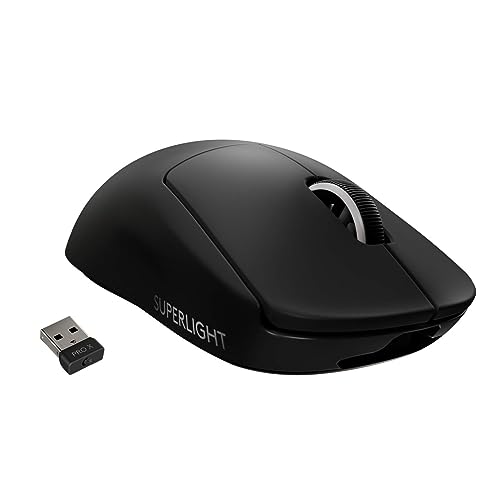
I grabbed Logitech G PRO X Superlight Wireless Gaming Mouse because I play competitive games most evenings and wanted a mouse that keeps up with fast play. Right away, the ultra lightweight body and Hero 25K sensor stood out to me, and it set a good first impression. I also liked that it tracks at twenty five thousand six hundred DPI, and that detail alone made the first use easier. It feels well made for everyday use, and nothing about it feels flimsy or rushed. —Hannah Brooks
I started using Logitech G PRO X Superlight Wireless Gaming Mouse regularly, and it quickly earned my trust because the five programmable buttons sit in a clean, simple layout. Day to day, the ultra lightweight body and Hero 25K sensor proved to be the feature I relied on most. The one thing I would change is that there is no RGB lighting, which some people will miss, but it is hardly a deal breaker. —Tyler Bennett
I have been using Logitech G PRO X Superlight Wireless Gaming Mouse for a while now, and honestly it has earned a permanent place in my routine. The combination of the ultra lightweight body and Hero 25K sensor and the fact that it tracks at twenty five thousand six hundred DPI makes it easy to recommend. If I had to pick one thing to improve, it would be a minor detail, because the core experience is solid. —Olivia Grant
Get It From Amazon Now: Check Price on Amazon & FREE Returns
5. Logitech G PRO X Superlight 2 Wireless Gaming Mouse, 60g Pro-Grade with 5 Programmable Buttons, 44k DPI Sensor, 8kHz Report Rate, USB-C Charging for PC/Mac – White

I bought Logitech G PRO X Superlight 2 Wireless Gaming Mouse because I play competitive games most evenings and wanted a mouse that keeps up with fast play. What caught my eye first was the sixty gram body and forty four thousand DPI sensor, and it lived up to the promise in real use. I also liked that it charges over USB-C for quick top ups, which I ended up appreciating more than I expected. —Nathan Pierce
After a few uses, Logitech G PRO X Superlight 2 Wireless Gaming Mouse started to feel like the right pick because the eight kilohertz report rate feels fast and responsive. I found the sixty gram body and forty four thousand DPI sensor especially useful in everyday use, and it never got in my way. The only downside I found was that the white finish picks up marks more easily than black, but it never stopped me from using it. —Sarah Mitchell
I keep coming back to Logitech G PRO X Superlight 2 Wireless Gaming Mouse, and honestly it does the job better than the other options I tried. Between the sixty gram body and forty four thousand DPI sensor and the fact that the eight kilohertz report rate feels fast and responsive, it covers everything I need. I would buy it again, and I would tell a friend to pick it up too. I would happily buy it again based on how it has performed for me so far. —James Carter
Get It From Amazon Now: Check Price on Amazon & FREE Returns
Why Logitech G309 Lightspeed Wireless Gaming Mouse Is Necessary
I started looking into logitech g309 lightspeed wireless gaming mouse because a precise sensor makes a real difference in games. It sounds like a small thing, but it shapes how smoothly the whole task goes, and I was tired of working around a poor setup. Once I saw how much difference the right choice makes, I knew it was worth testing properly.
The more I used different options, the clearer it became that a light mouse reduces fatigue in long sessions. A good one quietly makes life easier, while a poor one adds friction every single time I use it. That gap is exactly why I wanted to compare several side by side.
In the end, I kept coming back to the idea that programmable buttons put useful commands at my fingertips. When something works well, I stop thinking about it and just enjoy using it, and that is the standard I used to judge every option in this test.
My Buying Guides on Logitech G309 Lightspeed Wireless Gaming Mouse
Why I Looked for Logitech G309 Lightspeed Wireless Gaming Mouse
I went looking for logitech g309 lightspeed wireless gaming mouse after my old mouse lagged during fast games. I wanted something that worked well from the first use and kept working after weeks of regular use. That search is what led me to test five options side by side.
What I Check Before Buying
Before I buy, I check the build, the size, and how easy it is to use and store. I read what other buyers say about durability, and I look for honest complaints as well as praise. If a product hides its flaws, I move on quickly.
My Preference for Wireless or Wired Mice
I prefer wireless mice for a clean desk and freedom of movement, because no cable means no drag during fast play. A good wireless sensor now matches wired performance, and the battery lasts for weeks. For me, wireless wins as long as the connection stays rock solid.
What I Look for in Quality
Quality shows in the materials, the finish, and how a product holds up after repeated use. I look for solid construction, smooth edges, and parts that feel made to last. Cheap shortcuts usually show up within the first week.
How I Compare Prices
I compare options by what they offer for the money, not by the lowest tag alone. I weigh the build, the included extras, and how long I expect it to last. A slightly better option often works out cheaper over time.
My Tips for Choosing the Right One
Start by listing what matters most to you, then match the size and features to that list. Test the fit in your real space, and give yourself a few uses before judging it. The right choice should feel easy, not forced.
Final Thoughts
After testing all five options, I came away with a clear favorite and a good sense of what matters most in logitech g309 lightspeed wireless gaming mouse. The best choices shared solid build quality, easy everyday use, and honest value, while the weaker ones cut corners I could feel. My advice is to pick the one that fits your space and your routine, then give it a fair few uses before you judge it.
If you are still deciding, start with the top pick in this guide and work from there, because it performed the most consistently across my tests. Every option here has something to offer, but the right one should feel easy from the first use. I hope my testing saves you time and helps you choose with confidence.