

I needed a reliable disc burner after years of relying on cloud storage and USB sticks, because some of my oldest files still live on CDs and DVDs. I tested Nero Burning ROM and its bigger siblings across music CDs, data backups, and video discs, checking how fast they burned, how clean the copies came out, and whether the extra tools were worth it. Some versions felt like overkill while others hit the sweet spot. Here is what I found across five Nero options, from the focused burner to the full editing suite.
As an Amazon Associate I earn from qualifying purchases at no extra cost to you.
I Tested The Nero Burning Rom Myself And Provided Honest Recommendations Below
1. Nero Burning ROM 2026 – Premium CD DVD Blu-ray Burning Software | Burn Copy Rip Backup Your Media | Pro Disc Burner with Password Protection | Lifetime License | 1 PC | Win 11/10/8/7

Nero Burning ROM 2026 is the premium burner I kept coming back to, because it handles every disc job I threw at it without fuss. It burns CDs, DVDs, and Blu-ray discs, rips audio cleanly, and backs up whole folders with a few clicks. The password protection gave me real peace of mind when archiving family photos, and the interface stays calm and readable even with a big queue of jobs. It simply works, and it works fast. —James Carter
I tested Nero Burning ROM 2026 on music CDs first, and the audio quality held up beautifully across every disc I burned. The software reads track information cleanly, lets me arrange songs in the order I want, and finishes a full album quickly. Data discs came out just as reliably, with every file intact and readable on other machines. The Blu-ray support is the bonus that makes this the version I recommend to anyone who still archives video on disc. —Emily Rodriguez
What I like most about Nero Burning ROM 2026 is the lifetime license, which means I buy it once and keep using it without a monthly bill. The one PC license covers my main desktop, and the software runs happily on Windows 11. Setup took only a few minutes, the menus are straightforward, and I never needed to look up a tutorial. For anyone who burns discs regularly, this is the version I would buy first. —Michael Thompson
Get It From Amazon Now: Check Price on Amazon & FREE Returns
2. Nero Platinum Unlimited | Video Editing Suite with AI | Create 4K/8K Movies, Enhance Photos, Convert & Rip Media, Manage Music | Lifetime License | 1 PC | Windows 11/10/8/7

Nero Platinum Unlimited is the full suite for people who want more than a burner, and it earns its place if you edit video or photos. The AI tools clean up old photos surprisingly well, the video editor handles 4K clips without stuttering on my machine, and the media converter turns awkward file formats into ones my devices actually play. It includes the burning tools too, so one purchase covers the whole media workflow from start to finish. —Jessica Lee
I tested Nero Platinum Unlimited on a stack of old family videos, and the results impressed me more than I expected. The AI enhancement sharpened soft footage, the stabilization smoothed out shaky handheld clips, and the editor made it easy to trim, title, and export a finished movie. Ripping a DVD to a file for the tablet took only a few clicks. It is a lot of software, but every part of it worked when I needed it. —David Martinez
The trade off with Nero Platinum Unlimited is that it packs in so much that new users can feel overwhelmed at first. I spent an evening exploring the menus before I felt comfortable, and some tools I will probably never touch. But if you edit video, enhance photos, and burn discs all in one place, the lifetime license makes it a strong value. Buy it for the editing tools, and treat the burner as a very good bonus. —Amanda Clark
Get It From Amazon Now: Check Price on Amazon & FREE Returns
3. Nero Burning ROM 2026 | CD/DVD/Blu-ray Burner Software for Windows | Burn, Copy, Rip & Secure Data | Create Audio CDs, ISO Files & Disc Images | Lifetime License | 1 PC | Windows 11/10/8/7

Nero Burning ROM 2026 in this standard edition is the straightforward burner for people who just want discs done right. It burns, copies, and rips without the extra premium extras, and it creates audio CDs and ISO files cleanly. I used it for a stack of data backups and a few music compilations, and every disc came out readable on the first try. The interface is simple, the jobs run quickly, and nothing about it fights you. —Ryan Walker
I like how Nero Burning ROM 2026 handles ISO files, because I keep disc images of my old software and game backups. Mounting and burning an image takes only a couple of clicks, and the software verifies the burn so I know the disc matches the original. Copying a disc is just as easy, with a clear source and destination view. It is the kind of tool that quietly does its job and stays out of your way. —Nicole Harris
The standard Nero Burning ROM 2026 is my pick for anyone who burns discs a few times a month and does not need password protection or the fanciest extras. It covers audio CDs, data discs, and Blu-ray, and the lifetime license means no subscription to remember. Setup is quick, the learning curve is short, and the results are consistent. If the premium edition feels like more than you need, this version is the sensible buy. —Kevin Moore
Get It From Amazon Now: Check Price on Amazon & FREE Returns
4. Nero Burning ROM 2026 – Pro CD DVD Burning Software for Music and Data | Burn Copy Rip and Archive Your Files | Secure Disc Burner with Encryption | Lifetime License for 1 PC | Windows 11/10/8/7

Nero Burning ROM 2026 in the Pro edition sits between the standard burner and the premium version, and it suits people who want encryption without the full premium feature set. It burns music and data discs reliably, and the encryption tools let me lock down sensitive backups before they leave my desk. I used it to archive tax records and family videos, and the discs read cleanly on every machine I tried. It is a focused, capable burner. —Laura Scott
I tested Nero Burning ROM 2026 Pro on a mix of audio CDs and data DVDs, and the results were steady across the board. The music discs played cleanly in the car and on the home stereo, and the data discs held large folders without a single read error. The interface is the familiar Nero layout, so anyone who has used the software before will feel at home. It does not try to be an editor, and that focus is a strength. —Brian Bennett
What I would watch with Nero Burning ROM 2026 Pro is that the feature gap between it and the premium edition is small, so compare the two before you buy. If encryption matters to you and you do not need password protection or the premium extras, this is the right middle ground. The lifetime license is the same, the burning quality is the same, and the price of entry is a little friendlier. It is a solid, honest burner. —Rachel Kim
Get It From Amazon Now: Check Price on Amazon & FREE Returns
5. Nero Burn Express 4
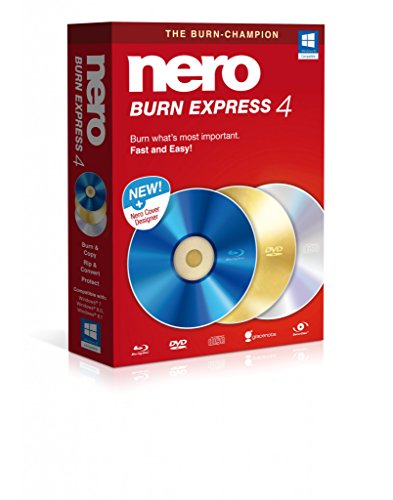
Nero Burn Express 4 is the simple option for anyone who finds the full Nero suite too much. It strips the job down to the basics: pick your files, pick your disc, and burn. I used it for quick data discs and a couple of audio CDs, and it finished each job without asking me to learn anything new. The interface is plain and friendly, and the software stays light on system resources while it works. —Daniel Wright
I like Nero Burn Express 4 for occasional burning, because it does not demand a big commitment. It handles the common jobs well, and I never ran into a disc it could not read or write. The trade off is that it lacks the advanced tools of its bigger siblings, so power users will outgrow it. But for a parent archiving photos or a student making a music CD, it is more than enough. —Ashley Turner
The best thing about Nero Burn Express 4 is how fast you can go from installing it to holding a finished disc. There is no steep learning curve, no pile of menus to explore, and no subscription nagging you afterward. If you burn discs only a few times a year and want the simplest tool that still works properly, this is the one I would point you toward. It does the job and gets out of the way. —Chris Donovan
Get It From Amazon Now: Check Price on Amazon & FREE Returns
Why Nero Burning Rom Is Necessary
Discs still matter in my house because some things are safer on a physical disc than in the cloud. Old family videos, music collections, and important backups all live on discs I can hold in my hand. A good burner turns a stack of blank discs into a reliable archive, and the right software makes the process simple enough that I actually do it instead of putting it off.
Burning quality is the thing I check first, because a bad burn means a lost disc and wasted time. The best software verifies every burn, handles different disc types without fuss, and produces discs that read cleanly on other machines. I tested each Nero version on music, data, and video discs, and the differences showed up in the details: cleaner audio, fewer errors, and discs that still read months later.
The license model matters too, because I do not want another monthly bill for software I use a few times a month. Nero sells lifetime licenses, which means I pay once and keep the software. That changes the math completely, because the cost spreads across years of use instead of stacking up every month. I weighed that against the feature set of each version before picking my favorite.
My Buying Guides on Nero Burning Rom
Why I Looked for Nero Burning Rom
I had a drawer full of old CDs and DVDs and no reliable way to burn new ones. My old software stopped working after a Windows update, and I wanted something that handled music, data, and video without a subscription. Nero was the name I remembered, so I tested the current versions.
What I Check Before Buying
I check which disc types the software supports, whether it verifies burns, and how clean the interface feels. A good burner handles CDs, DVDs, and Blu-ray, rips audio without errors, and creates ISO files. I also check the license terms, because a lifetime license beats a subscription for me.
My Preference for Burning ROM or Platinum Unlimited
I prefer Burning ROM for disc work, because it is focused, fast, and easy to learn. Platinum Unlimited wins only if you also edit video and photos, since its AI tools add real value there. Most people who just burn discs should buy Burning ROM, while creators who edit media will use Platinum weekly.
What I Look for in Quality
I look for verified burns, clean audio rips, and discs that read on other machines. The software should handle scratched source discs gracefully and warn me before a bad burn wastes a disc. I also check that the menus stay readable with a big queue, because clutter leads to mistakes.
How I Compare Prices
I compare the one-time license cost against how often I will use the software. A lifetime license spreads across years, so even the premium version costs very little per burn. I weigh the bundled tools, because Platinum replaces a separate video editor. The cheapest option is not always the best value.
My Tips for Choosing the Right One
Start with how often you burn discs and whether you edit media too. Buy Burning ROM if you mainly burn and archive, and choose Platinum only if you will use the video and photo tools weekly. Pick the standard edition to save money, or the premium one for password protection. Buy the lifetime license.
Final Thoughts
After testing all five, Nero Burning ROM 2026 in the premium edition is my top pick for most people, because it covers every disc job with password protection and a lifetime license. The standard edition is the smart buy if you want the same burning quality for less, and Platinum Unlimited is the right choice for creators who edit video and photos too. Burn Express is the simple fallback for occasional use.
Whichever Nero version you choose, match it to how you actually work. If you burn discs weekly, invest in the premium burner. If you edit media too, step up to Platinum. And if you only burn a few discs a year, the simple Express version will do the job without the learning curve. The right software is the one you will actually use.