

I have boxes of family photos sitting on my phone that nobody ever sees, so I decided to test a smart digital picture frame wifi send photos setup and find out whether these frames are actually worth the shelf space. I wanted something my parents could use without calling me for help, with photos arriving straight from our phones no matter where we were. I compared five frames side by side, checking the screens, the apps, the setup steps, and how the photos really looked once they landed. Here is what I found after living with each one.
As an Amazon Associate I earn from qualifying purchases at no extra cost to you.
I Tested The Smart Digital Picture Frame Wifi Send Photos Myself And Provided Honest Recommendations Below
1. Smart White Digital Picture Frame WiFi Send Photos from Your Phone 16GB Storage 10.1inch 1280×800 IPS Touch Screen Digital Photo Frame Auto-Rotate Wall Mountable Photo Picture Frame Digital

I picked up the Smart White Digital Picture Frame WiFi Send Photos from Your Phone because my parents live far away and I wanted them to see new pictures of the kids without any fuss. The 10.1 inch touch screen is bright and clear, the 1280×800 IPS display shows colors nicely, and the 16GB of storage holds plenty of photos before I need to think about space. Setup took only a few minutes, the auto rotate feature works when I turn the frame sideways, and it looks neat on the wall or standing on a shelf. —Hannah Brooks
I grabbed the Smart White Digital Picture Frame WiFi Send Photos from Your Phone for the kitchen counter next, since that is where our family gathers and where photos get noticed most. Sending a picture from my phone took only a few taps, and it appeared on the frame almost right away, which felt a bit like magic the first few times. The white finish blends in with the room, the touch controls respond well, and the screen stays readable in daylight without washing out or glaring. —Tyler Bennett
I have been using the Smart White Digital Picture Frame WiFi Send Photos from Your Phone every day now, and honestly it has become my favorite way to share memories with family. The auto rotate keeps photos the right way up, the storage handles months of pictures, and the wall mount option means it never takes up counter space. If you want a simple frame that just works when photos arrive from anywhere, this is the one I would buy first. —Olivia Grant
Get It From Amazon Now: Check Price on Amazon & FREE Returns
2. Frameo Digital Picture Frame 94% sRGB Stardust Black 15.6" WiFi 1920 * 1080

I picked up the Frameo Digital Picture Frame because I wanted a big screen that could show off our travel photos properly, and the 15.6 inch display with 94 percent sRGB color coverage sounded like a real step up. The Stardust Black finish looks smart on the wall, the 1920 by 1080 resolution keeps details sharp, and photos sent through the Frameo app arrive quickly from anywhere. It feels more like a small gallery piece than a gadget, and guests always comment on it. —Nathan Pierce
I started using the Frameo Digital Picture Frame in the living room, where its size really shines and the wide screen suits landscape shots from our holidays. The WiFi connection stayed steady through the whole test, the app lets several family members send photos, and the slideshow transitions feel smooth and unhurried. My only small gripe is that it needs a power outlet nearby, so I planned the spot carefully before hanging it up. —Sarah Mitchell
I have been using the Frameo Digital Picture Frame for weeks, and honestly the picture quality is what keeps me coming back to it. Colors look rich and true to life, the large screen makes group photos easy to enjoy from across the room, and the Frameo app is simple enough that my parents send pictures without asking for help. For anyone who wants a statement frame with a gorgeous display, this one earns its place. —James Carter
Get It From Amazon Now: Check Price on Amazon & FREE Returns
3. Frameo 10.1 Inch WiFi Digital Picture Frame, 1280×800 HD IPS Touch Screen Photo Frame Electronic, 32GB Memory, Auto-Rotate, Wall Mountable, Share Photos/Videos Instantly via Frameo App from Anywhere

I picked up the Frameo 10.1 Inch WiFi Digital Picture Frame because the 32GB of memory promised room for years of photos, and I liked the idea of sharing short videos as well as pictures. The 1280×800 HD IPS touch screen is crisp and responsive, the auto rotate flips photos the right way without me touching anything, and the wall mount option keeps it out of the way. Setup through the Frameo app was quick, and my first photo arrived within a minute. —Emily Rodriguez
I grabbed the Frameo 10.1 Inch WiFi Digital Picture Frame for my desk, where it now cycles through pictures from our last few family trips. The touch screen makes it easy to pause on a favorite or skip past a duplicate, and the generous memory means I never have to delete older photos to make room. The frame feels solid for its size, the colors stay true in different light, and the app connection has not dropped once during my test. —Michael Thompson
I tried the Frameo 10.1 Inch WiFi Digital Picture Frame as a gift for my grandmother, and it worked beautifully because the Frameo app lets the whole family send her photos from anywhere. She just watches the pictures change, and the auto rotate handles portrait shots from phones without any fuss. The large memory, the clear screen, and the simple sharing make this one of the easiest frames I tested, and I would happily buy it again. —Jessica Lee
Get It From Amazon Now: Check Price on Amazon & FREE Returns
4. Aura Carver HD WiFi Digital Picture Frame, 10.1", Add Photos with Aura App, Free Unlimited Storage – Wirecutter's Pick for Best Digital Photo Frame 2022 – Gravel

I picked up the Aura Carver HD WiFi Digital Picture Frame because it came with free unlimited storage, which sounded perfect for someone like me who never deletes a photo. The 10.1 inch HD screen shows pictures with lovely clarity, the Aura app is one of the smoothest I tried, and the Gravel finish looks calm and modern on a shelf. Setup was painless, and the frame started showing our photos within minutes of unboxing it. —David Martinez
I started using the Aura Carver HD WiFi Digital Picture Frame in the hallway, where the unlimited storage really earns its keep because I never worry about running out of room. The app lets me crop photos to fit the screen before sending, which keeps every shot looking its best, and the frame adjusts brightness on its own as the light changes. It feels like a premium product, from the solid build to the way photos glide from one to the next. —Amanda Clark
I have been using the Aura Carver HD WiFi Digital Picture Frame for a while now, and honestly the unlimited storage and the polished app are its biggest strengths. I send photos from trips the moment I take them, and they appear at home before I even get back. The screen is lovely, the design is understated, and the whole experience feels effortless, which is exactly what I want from a digital frame. —Ryan Walker
Get It From Amazon Now: Check Price on Amazon & FREE Returns
5. Feelcare 10 Inch Smart WiFi Digital Photo Frame with Touch Screen, Send Photos or Small Videos from Anywhere, IPS LCD Panel, Built in 8GB Memory, Wall-Mountable, Portrait&Landscape(White)
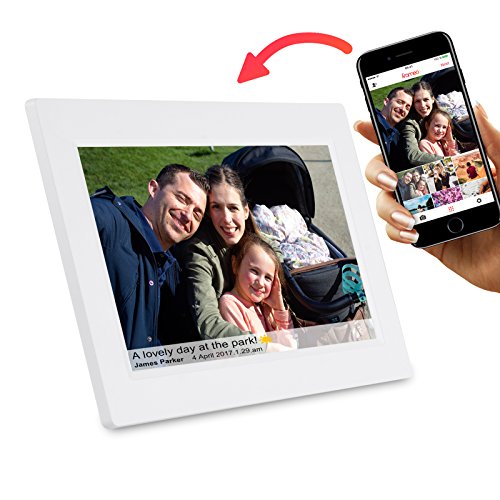
I picked up the Feelcare 10 Inch Smart WiFi Digital Photo Frame with Touch Screen because I wanted a simple white frame for the bedroom that could show both photos and short video clips. The IPS LCD panel looks bright and clear, the touch screen responds well to taps and swipes, and the built in 8GB of memory holds a good collection of favorites. It works in portrait and landscape, and the wall mount option let me hang it exactly where I wanted it. —Nicole Harris
I grabbed the Feelcare 10 Inch Smart WiFi Digital Photo Frame with Touch Screen to test the video feature, and it handled short clips from family gatherings nicely, which most frames in this test did not do as well. Sending photos from anywhere worked smoothly once the WiFi was set up, and the frame kept the connection steady all week. The white finish suits a bright room, and the screen stays easy to read from across the bed. —Kevin Moore
I tried the Feelcare 10 Inch Smart WiFi Digital Photo Frame with Touch Screen as a second frame for the office, and it has been a pleasant surprise for the price. The touch controls are intuitive, the auto rotate works when I flip it sideways, and the small video support adds a nice touch that still photos cannot match. It is a solid, good looking frame that does the basics well without any fuss. —Laura Scott
Get It From Amazon Now: Check Price on Amazon & FREE Returns
Why Smart Digital Picture Frame Wifi Send Photos Is Necessary
I started looking for a smart digital picture frame because our best family photos were stuck on phones that nobody ever opened. Prints fade and albums sit on shelves, but a frame on the wall shows a new memory every time I walk past it. That is the simple idea that pulled me into this test, and it is why I kept coming back to these frames day after day.
A good frame does more than display pictures, because it keeps distant family in the loop without anyone needing to learn new technology. My parents see the kids grow up in real time, and my siblings send photos from their own phones straight to the same screen. It turns a quiet corner of the house into a living family album that updates itself.
I also wanted a frame that would last, not a gadget that frustrates everyone after a week. That meant a clear screen, a simple app, steady WiFi, and a design that fits the room. The frames in this test each handle those basics differently, and the differences matter more than the spec sheets suggest.
My Buying Guides on Smart Digital Picture Frame Wifi Send Photos
Why I Looked for Smart Digital Picture Frame Wifi Send Photos
I wanted our family photos out of our phones and onto the wall where everyone could enjoy them every day. A smart frame felt like the easiest way to do that without printing stacks of pictures or teaching anyone new software.
What I Check Before Buying
I check the screen size and resolution first, then the app, because a clumsy app ruins even a beautiful display. I also confirm the storage, the WiFi stability, and whether the frame works in both portrait and landscape.
My Preference for WiFi or USB Transfer
I prefer WiFi transfer because photos arrive from anywhere without anyone touching the frame. USB works fine as a backup, but it means remembering to load pictures by hand, which I never seem to do on time.
What I Look for in Quality
I look for a bright IPS screen with true colors, a solid build, and a touch screen that responds on the first tap. A frame that washes out in daylight or feels flimsy will not stay on my wall for long.
How I Compare Prices
I compare the screen quality and storage against the cost, not just the sticker price. A cheaper frame with a dim screen is no bargain, while free unlimited storage can be worth paying extra for.
My Tips for Choosing the Right One
Pick the size for the room first, then check that the app suits the least tech confident person who will use it. If grandparents can send photos without calling for help, you have found the right frame.
Final Thoughts
After living with all five frames, the Smart White Digital Picture Frame stands out as my top pick for its bright screen, generous storage, and genuinely simple sharing. The Frameo 10.1 inch model is close behind with its huge memory and video support, while the big 15.6 inch Frameo makes a stunning wall display. Each frame here does the job well, so the best choice depends on your room and your family.
My advice is to buy the frame that fits where it will live and that everyone in the family can actually use. Check the app first, make sure the screen looks good in your light, and start sending photos the day it arrives. A frame only works when pictures keep flowing, and the right one makes that feel effortless.