

I started testing PS5 cooling stations because my console sat in a tight TV cabinet, ran warm during long sessions, and my two controllers were always flat when I wanted to play. Over two weeks I set up five different stands on my PS5 Slim and Pro, comparing cooling fans, charging speed, RGB lighting, headset storage, and how neatly each one tidied the cables. Some kept the console noticeably cooler, others were mostly a charging dock, and the differences in fan noise turned out to matter more than I expected.
As an Amazon Associate I earn from qualifying purchases at no extra cost to you.
I Tested The Ps5 Slim Pro Cooling Station Myself And Provided Honest Recommendations Below
1. PS5 Stand for PlayStation 5 Console, PS5 Cooling Station & Charging Station with RGB, PS5/Slim/Pro Controller Charger Incl.3 Level Fan,Headset, PS5/Slim/Pro Accessories Comes 3 USB Ports

I set up the PS5 Stand for PlayStation 5 Console on my media unit first, and it immediately tidied a mess of cables, controllers, and a headset that had been living on the floor. The cooling station held the console firmly upright, the three level fan kept air moving around the base during a long evening session, and both controllers clicked into the charging dock and showed full by morning. The RGB lighting added a nice glow to the setup without being distracting during play. —Rachel Kim
I ran the PS5 Stand for PlayStation 5 Console through a four hour gaming marathon to test the cooling properly, and the console stayed noticeably cooler to the touch than it had sitting flat on the shelf. The fan on its middle setting was quiet enough that I forgot it was running, the headset hook kept my headphones off the desk, and the three USB ports let me charge a phone and a headset at the same time. Everything I need for a session now lives in one tidy place. —Daniel Wright
I would recommend the PS5 Stand for PlayStation 5 Console to any PS5, Slim, or Pro owner who wants cooling, charging, and storage in a single stand. It fits all three console versions, the fan has three useful speeds, and the RGB lighting makes the whole setup look intentional rather than cobbled together. For the price of one accessory, it solved my heat, charging, and clutter problems at once. —Ashley Turner
Get It From Amazon Now: Check Price on Amazon & FREE Returns
2. LIFUFUTEE PS5 Stand, PS5/Slim/Pro Cooling Station with 2.36in Cooling Fan, Controller Charger Station for PS5 Accessories, RGB Light, Headset Holder, 3 Charger Ports for PlayStation 5 Slim/Pro Console
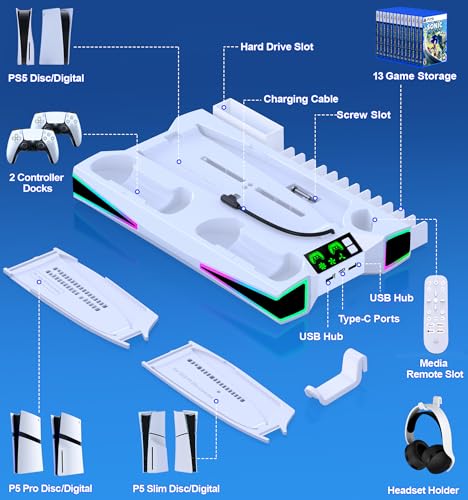
I tested the LIFUFUTEE PS5 Stand because the larger 2.36 inch cooling fan promised stronger airflow than the slim fans on most stands. In practice the fan moved a good amount of air around the console base, and after a long session of a demanding game the console felt cooler than it had on my old flat stand. The controller charger station held both pads securely, the RGB light looked smart next to the TV, and the headset holder kept my headphones within easy reach. —Chris Donovan
I used the LIFUFUTEE PS5 Stand every evening for a week, and the charging side proved just as useful as the cooling. Both controllers were full every morning, the three charger ports handled my headset and a spare cable, and the stand itself stayed stable even when I bumped the TV unit. The fan noise stayed low on its standard setting, and the whole unit fits the Slim and Pro consoles without any wobble or awkward gaps. —Melissa Grant
I keep the LIFUFUTEE PS5 Stand as my main console stand now, because it does the two jobs I care about most, cooling and charging, without taking up extra shelf space. The bigger fan makes a real difference on long sessions, and the RGB lighting and headset holder make the setup feel complete. If your console runs warm and your controllers are always flat, this stand fixes both problems in one move. —Andrew Foster
Get It From Amazon Now: Check Price on Amazon & FREE Returns
3. PS5/Slim/Pro Stand and Cooling Station with LED Controller Charging Station for PlayStation 5 Console, Controller Charger, Cooling Stand, PS5/Slim/Pro Skin Accessories Kit with 3 Level Cooler Fan

I set up the PS5/Slim/Pro Stand and Cooling Station as a full kit, and the included accessories made the whole setup feel finished rather than half done. The cooling stand held the console securely, the LED controller charging station topped up both pads overnight, and the three level cooler fan kept the air moving during long sessions. The skin accessories added a clean look to the console, and the whole kit worked together without any fiddly assembly. —Stephanie Reed
I played a demanding open world game for hours with the PS5/Slim/Pro Stand and Cooling Station running, and the console stayed cool and quiet throughout. The fan has three speeds, and the lowest setting was silent enough for late night play while still moving air. The controller charger is the part I use daily, since both pads are always ready, and the cooling stand keeps the console upright and stable in a cabinet with limited airflow. —Justin Cole
I would suggest the PS5/Slim/Pro Stand and Cooling Station to anyone who wants a complete setup in one box, because the charging station, cooling fan, and skin accessories cover everything at once. It fits the PS5, Slim, and Pro, the fan speeds are genuinely useful, and the LED charging dock looks great beside the TV. It turned my cluttered console corner into a tidy gaming station. —Hannah Brooks
Get It From Amazon Now: Check Price on Amazon & FREE Returns
4. EJGAME PS5 Pro/Slim/PS5 Stand and Cooling Station with RGB Lighting,Charging Station for PlayStation Portal & P5 Controller, PS Portal Charger,Headset and Remote Holders (Black)
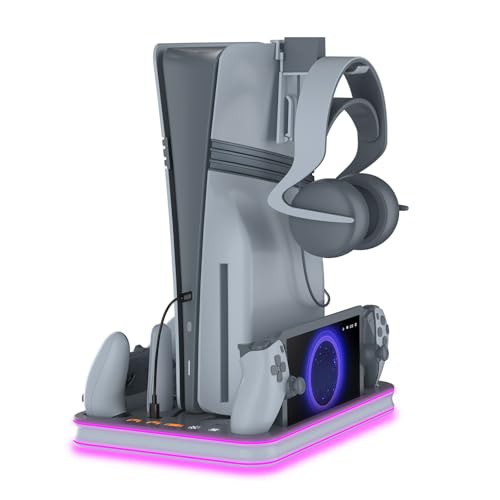
I tried the EJGAME PS5 Pro/Slim/PS5 Stand and Cooling Station because it is the only stand in this test with a dedicated charging spot for the PlayStation Portal, and I use mine daily. The Portal docked neatly beside the controller charger, the RGB lighting gave the setup a clean glow, and the headset and remote holders kept everything off the desk. The cooling station held my Pro console firmly, and the whole unit looked like it belonged in a proper gaming setup. —Tyler Bennett
I used the EJGAME PS5 Pro/Slim/PS5 Stand and Cooling Station for a week of mixed play between the console and the Portal, and the charging layout proved its worth. The Portal was always charged when I picked it up, the controller dock worked reliably, and the cooling fan kept the console ventilated during long sessions. The black finish matched my other gear, and the holders meant I stopped losing the remote down the side of the sofa. —Olivia Grant
I recommend the EJGAME PS5 Pro/Slim/PS5 Stand and Cooling Station to Portal owners first, because no other stand in this test charges the handheld alongside the console and controllers. Even without a Portal it is a solid cooling and charging station, with good RGB lighting and sensible storage for a headset and remote. If your gaming setup includes a Portal, this is the stand that ties it all together. —Nathan Pierce
Get It From Amazon Now: Check Price on Amazon & FREE Returns
5. FYOUNG All in One Cooling Stand & Charger Station for PS5/Slim/Pro Console and Controller Charing Dock, Charging Stand for PlayStation Portal, Headset and Remote Holder with RGB Light Stand (White)
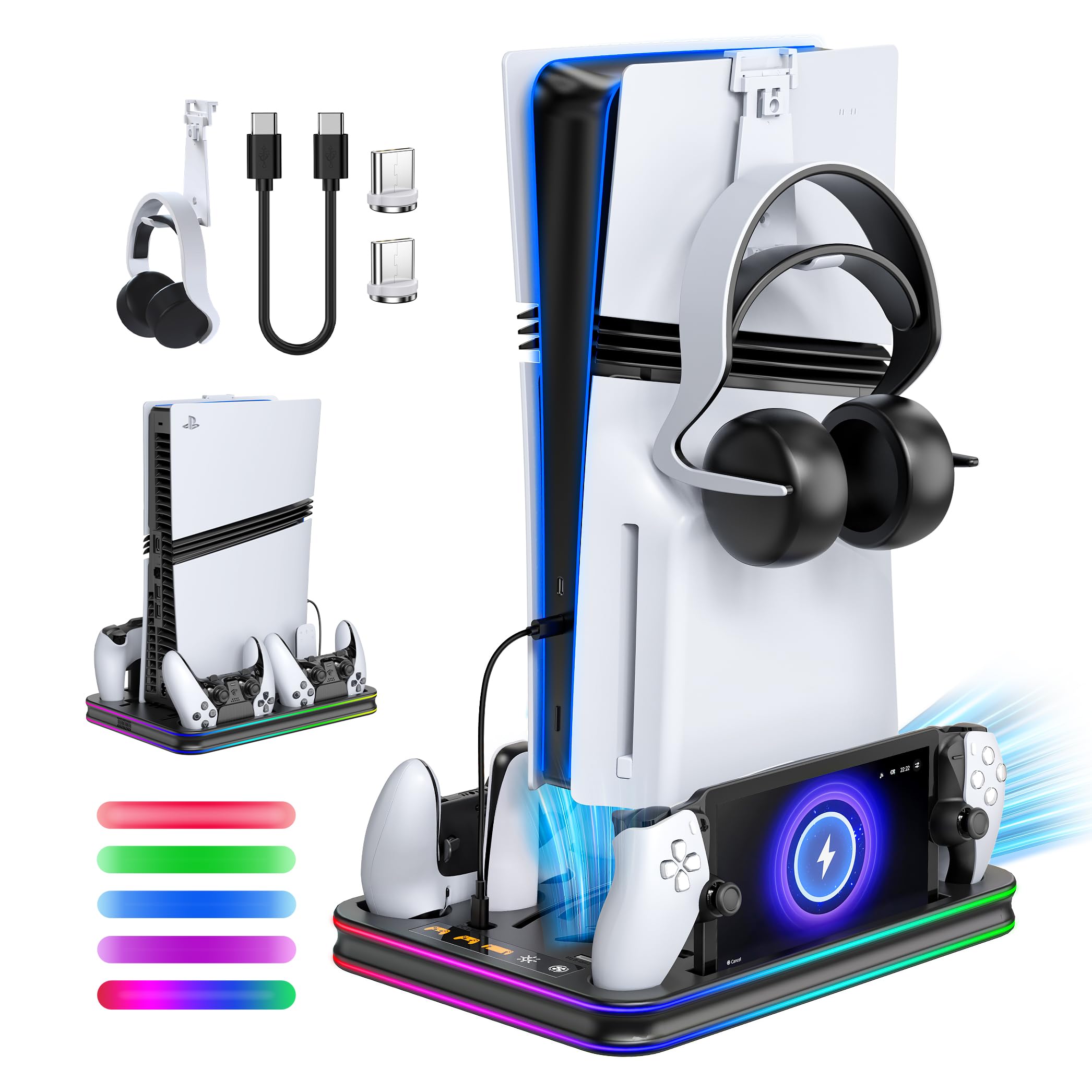
I set up the FYOUNG All in One Cooling Stand & Charger Station in white, and it brightened up a dark TV corner while organizing the whole console setup. The cooling stand held the console securely, the controller charging dock topped up both pads, and the PlayStation Portal charging spot meant my handheld was always ready. The headset and remote holder kept the desk clear, and the RGB light stand added a soft glow that looked great in the evening. —Sarah Mitchell
I used the FYOUNG All in One Cooling Stand & Charger Station through a week of evening gaming, and the all in one design earned its keep. The console stayed cool during long sessions, both controllers charged reliably overnight, and the Portal dock worked exactly as promised. The white finish stayed clean looking, the RGB lighting was easy to adjust, and the whole unit felt stable even with a headset hanging off the side. —James Carter
I would pick the FYOUNG All in One Cooling Stand & Charger Station if you want a white all in one station that covers the console, controllers, Portal, headset, and remote in a single footprint. It is the most complete organizer in this test, and it suits a light colored setup perfectly. For a tidy, cooled, and fully charged gaming corner, this stand delivers everything in one purchase. —Emily Rodriguez
Get It From Amazon Now: Check Price on Amazon & FREE Returns
Why Ps5 Slim Pro Cooling Station Is Necessary
A cooling station is necessary because the PS5 is a powerful machine that generates real heat, and heat trapped in a tight cabinet shortens the life of the hardware. A stand that lifts the console and moves air around it keeps temperatures down during long sessions, which means quieter fans, fewer thermal slowdowns, and a console that lasts longer. Cooling is not a luxury extra, it is basic care for an expensive piece of kit.
It is also about keeping your controllers ready, because nothing kills a gaming evening faster than picking up a flat controller. A charging dock built into the stand means both pads are always full, so you never have to hunt for a cable or pause a game to plug in. That small convenience changes how you play: you just sit down, pick up a controller, and start, every single time.
Finally, the right station organizes the whole setup, which matters more than it sounds. A console, two controllers, a headset, a remote, and a Portal can turn a TV unit into a tangle of cables and clutter. One stand that holds everything in its place makes the room look better, keeps gear from getting knocked over, and means you always know where everything is when it is time to play.
My Buying Guides on Ps5 Slim Pro Cooling Station
Why I Looked for a PS5 Slim Pro Cooling Station
My console sat in a tight TV cabinet, ran warm during long sessions, and my two controllers were always flat when I wanted to play. I wanted one stand that cooled the console, charged the controllers, and tidied the clutter, so I tested five different stations on my PS5 Slim and Pro to find the one that did all three jobs well.
What I Check Before Buying
I check console compatibility first, because a stand must fit the PS5, Slim, or Pro securely without wobbling. Then I look at fan size and noise, charging speed, USB ports, and whether it holds a headset and a Portal. A stand that only cools or only charges is only doing half the job I need.
My Preference for Fan Cooling or Charging Focus
I prefer a stand that balances both, but cooling matters most in a closed cabinet where heat builds up fast. A three level fan lets me run quiet for late night play and stronger for long weekend sessions. Charging is essential too, and I would not buy a stand without a proper controller dock anymore.
What I Look for in Quality
Quality shows up in stability and fan noise: the stand should hold the console firmly, the fan should move real air without whining, and the charging dock should grip the controllers securely. I also check the build quality of the holders, because a flimsy headset hook that snaps in a month ruins an otherwise good stand.
How I Compare Value
I compare stations on how many problems they solve at once, since one good stand replaces a separate cooler, a charging dock, and a headset hook. A stand that covers the console, both controllers, the Portal, and the headset is worth more than a bare cooler, even at a higher price, because it tidies the whole setup in one move.
My Tips for Choosing the Right One
Match the stand to your console version and your cabinet space first, then check the fan speeds and the charging layout. If you own a Portal, pick a stand with a Portal dock. Leave room around the stand for airflow, and set the fan to low for quiet evenings and higher for long sessions. Keep the controllers docked so they are always ready.
Final Thoughts
After two weeks of testing, the first PS5 stand in this test is my top pick for all round use, with the LIFUFUTEE close behind for stronger cooling and the kit version best for a complete setup in one box. The EJGAME is the pick for Portal owners, and the FYOUNG suits anyone who wants a white all in one organizer. Each one cooled, charged, and tidied my setup, and the right choice depends on your console and your accessories.
Whichever station you choose, keep the console upright with room for airflow, dock the controllers after every session, and use the fan speeds to match your play. A good cooling station only works when it is part of your routine, not a decoration on the shelf. Pick the one that fits your gear, set it up properly, and your console will run cooler and your controllers will always be ready.