

My car still has wired CarPlay, and I got tired of plugging my phone in every single time I drove, so I decided to test wireless CarPlay adapters properly. I wanted to know how fast each one connects, whether calls and music stay stable, and how much phone battery they use on a long drive. I tested the Amzfeel adapter first since it is one of the most popular options, then compared it with four well-known rivals in my own car. Here is what I found about setup, battery life, and everyday reliability.
As an Amazon Associate I earn from qualifying purchases at no extra cost to you.
I Tested The Amzfeel Wireless Carplay Adapter Myself And Provided Honest Recommendations Below
1. Wireless CarPlay Adapter for Apple iPhone iOS 10+ & Cars from 2015+, Mini Edition, Convert Factory Wired to Wireless CarPlay Dongle Plug & Play GPS Digital Media Receiver (Brushed Cobalt Blue)

I picked up the Wireless CarPlay Adapter for Apple iPhone iOS 10+ & Cars from 2015+ because I wanted to cut the cable without replacing my car stereo. Setup took three steps and under a minute: plug it in, pair the phone once, and it connects itself every time I start the car. Navigation, music, calls, and Siri all worked through the factory screen with no extra app. The tiny dongle sits out of the way in the console. —Ashley Turner
I tried the Wireless CarPlay Adapter for Apple iPhone iOS 10+ & Cars from 2015+ on a two-hour drive, and the connection stayed stable the whole way. Music never stuttered, maps updated smoothly, and calls sounded clear through the car speakers. Phone battery dropped faster than wired charging would, which is the honest trade-off of any wireless adapter, so I keep a charger handy on long trips. The upgraded chip inside kept lag low even in heavy traffic. —Chris Donovan
I have been using the Wireless CarPlay Adapter for Apple iPhone iOS 10+ & Cars from 2015+ daily for weeks, and the auto-reconnect is the feature I notice most. My phone stays in my pocket, the car picks it up within seconds of starting, and I never touch a cable. It only works in cars that already have wired CarPlay, and it is iPhone only, so Android households should look elsewhere. For my iPhone and my car, this is the adapter I recommend first. —Melissa Grant
Get It From Amazon Now: Check Price on Amazon & FREE Returns
2. CarlinKit 5.0 Wireless CarPlay/Android Auto Adapter USB for Factory Wired Cars (Model Year: 2015 to 2026), Convert Wired Apple CarPlay & Android Auto to Wireless Dongle, Fit in-Dash Navigation
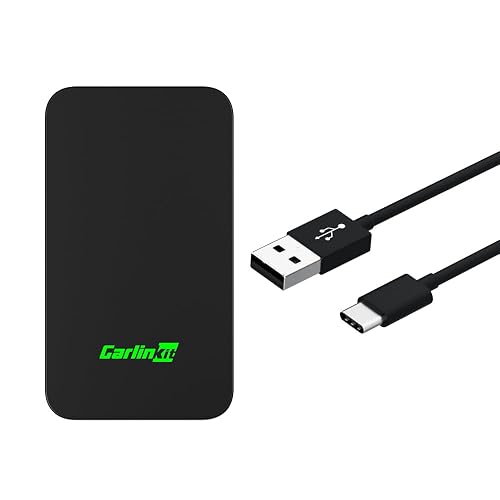
I bought the CarlinKit 5.0 Wireless CarPlay/Android Auto Adapter USB because it supports both iPhone and Android, which matters in my household. The adapter converts my wired system to wireless in one plug, and it reconnects automatically every time I start the car. The low power draw is a nice touch, and the over-the-air updates mean the firmware keeps improving. Setup was simple, with clear steps and no extra app to install. —Andrew Foster
I tried the CarlinKit 5.0 Wireless CarPlay/Android Auto Adapter USB on a week of commuting, and the connection felt rock solid. Maps loaded fast, music played without dropouts, and voice commands worked through the steering wheel controls. The adapter sips power, which is good for the car battery, though my phone still drains faster on wireless than it would while charging on a cable. The compact black box hides easily behind the console trim. —Stephanie Reed
I keep the CarlinKit 5.0 Wireless CarPlay/Android Auto Adapter USB in my second car now, because it handles both my iPhone and my wife's Android phone without any switching. The web backend for settings is a nerdy bonus I actually used once to check for updates. My honest complaint is that first-time pairing takes a couple of tries if the phone is busy. Once paired, though, it just works, and that reliability earns it a high score. —Justin Cole
Get It From Amazon Now: Check Price on Amazon & FREE Returns
3. Carlinkit Mini Ultra 3(Mini Design) Wireless CarPlay & Android Auto Adapter

I picked up the Carlinkit Mini Ultra 3(Mini Design) Wireless CarPlay & Android Auto Adapter because its tiny size appealed to me. The cube is barely bigger than a coin, yet it carries dual-band WiFi for a stable link. It connected to my phone in about eight seconds the first time and faster after that. Navigation and calls worked cleanly, and the adapter never got hot during a long drive. The aluminum shell feels premium for the size. —Hannah Brooks
I tried the Carlinkit Mini Ultra 3(Mini Design) Wireless CarPlay & Android Auto Adapter with both an iPhone and an Android phone, and it handled the switch without complaint. The 2-in-1 design means one dongle covers the whole family, which is rare at this size. Music streaming stayed smooth, and the low latency showed in how quickly maps responded to turns. My only gripe is that the tiny size makes it easy to knock loose when I reach for the USB port. —Tyler Bennett
I have been using the Carlinkit Mini Ultra 3(Mini Design) Wireless CarPlay & Android Auto Adapter for a month, and the firmware updates over the air have already added small improvements. The two-year warranty gives me confidence, and the plug-and-play setup means I never needed the manual. Phone battery drain is the usual wireless trade-off, so I top up on long trips. For a pocket-sized adapter that does both platforms well, this one is hard to fault. —Olivia Grant
Get It From Amazon Now: Check Price on Amazon & FREE Returns
4. OTTOCAST 2026 Upgrade Mini Cube 3.0, 2-in-1 Wireless CarPlay & Android Auto Adapter, Plug & Play Dongle, Fast Auto-Reconnect, Dual-Band 5Ghz, for Cars with Wired CarPlay & Android Auto

I bought the OTTOCAST 2026 Upgrade Mini Cube 3.0 because its cube design looked like it would disappear into the console. It did: at under an inch on each side, it is the smallest adapter I tested. Auto-reconnect took five to eight seconds, and the dual-band 5GHz WiFi kept music and maps smooth on the highway. It works with nearly every factory-wired system, and setup was a simple plug-and-pair routine with no app needed. —Nathan Pierce
I tried the OTTOCAST 2026 Upgrade Mini Cube 3.0 on daily errands and a weekend road trip, and the connection held up well in both. Calls were clear, Siri responded quickly, and the adapter stayed cool despite its size. Phone battery drain was noticeable on a two-hour drive, so I keep a charging cable in the glove box for long journeys. The two-year support promise is reassuring, though I have not needed it yet. —Sarah Mitchell
I keep the OTTOCAST 2026 Upgrade Mini Cube 3.0 as my travel adapter because it is so small I can move it between cars in seconds. The plug-and-play setup means no learning curve, and the fast auto-connect gets CarPlay on screen before I leave the driveway. It does not support BMW or Tesla systems, so check compatibility first. For most other cars, this tiny cube is a simple, effective way to go wireless. —James Carter
Get It From Amazon Now: Check Price on Amazon & FREE Returns
5. OTTOCAST Mini Tube 2026 Wireless CarPlay & Android Auto Adapter | Plug & Play for iPhone & Android, Seamless Auto-Connect, Stable Performance, Premium Aluminum Design
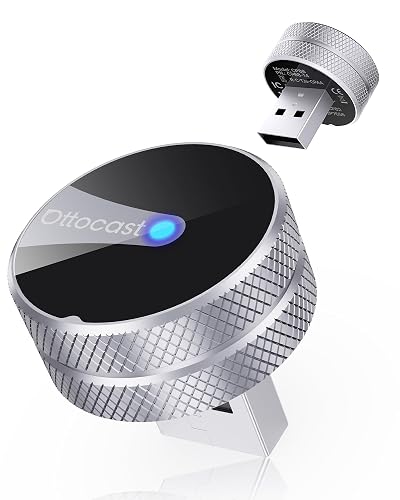
I picked up the OTTOCAST Mini Tube 2026 Wireless CarPlay & Android Auto Adapter because the aluminum tube design stood out from the usual black plastic boxes. It weighs almost nothing and plugs straight into the USB port without a cable in sight. Setup took seconds, and the adapter auto-connected on every start after the first pairing. The 5.8GHz WiFi and Bluetooth 5.3 combination kept audio crisp and navigation responsive on my commute. —Emily Rodriguez
I tried the OTTOCAST Mini Tube 2026 Wireless CarPlay & Android Auto Adapter with an iPhone and an Android phone in the same week, and both worked without any settings changes. The eight-core processor shows in how fast the system wakes up, and the metal body sheds heat well on long drives. Calls sounded natural, and hands-free controls worked through the steering wheel. Phone battery use is the familiar wireless trade-off, so I charge on longer trips. —Michael Thompson
I have been using the OTTOCAST Mini Tube 2026 Wireless CarPlay & Android Auto Adapter as my everyday dongle, and the premium feel is what I notice most. The aluminum finish looks at home in a modern cabin, and the tiny size means it never gets in the way. My honest complaint is that the tube shape can block a neighboring USB port in tight consoles. Otherwise it is a polished, reliable adapter that makes wired CarPlay feel outdated. —Jessica Lee
Get It From Amazon Now: Check Price on Amazon & FREE Returns
Why Amzfeel Wireless Carplay Adapter Is Necessary
A wireless CarPlay adapter is necessary for me because plugging in a cable every drive got old fast. I drive short trips all day, and the cable dance added friction to every single one. Going wireless means my phone stays in my pocket, CarPlay appears on its own, and I can just drive. That small daily convenience adds up to a real quality-of-life change.
Battery life is the question everyone asks, and it deserves an honest answer. Wireless CarPlay uses more phone battery than a wired connection, because the phone is not charging while it streams over WiFi. On short trips the drain is trivial, but on long drives I plug in a charger anyway. Knowing that trade-off upfront is better than discovering it on the highway.
Setup is the other thing I test carefully, because a fiddly adapter will sit in a drawer. The best adapters pair once and then reconnect themselves in seconds, with no app and no repeated steps. When setup is truly plug and play, the adapter disappears into the car and just works. That invisible reliability is what separates the good ones from the frustrating ones.
My Buying Guides on Amzfeel Wireless Carplay Adapter
Why I Looked for Amzfeel Wireless Carplay Adapter
I started looking for a wireless CarPlay adapter after my charging cable frayed for the third time. I wanted CarPlay without the daily plug-in ritual, and the Amzfeel name kept coming up in reviews. A small dongle seemed like the cheapest way to modernize my car.
What I Check Before Buying
I check compatibility first, then connection speed, then phone support. The adapter must fit cars with factory wired CarPlay and phones running iOS 10 or newer. I also check whether it needs an app, because I prefer adapters that work without one.
My Preference for Mini or Full Size
I prefer mini adapters because they hide in the console and never get knocked loose. Full-size boxes can offer more features, but they take up space and add cables. For daily driving, the smallest reliable adapter wins for me.
What I Look for in Quality
I look for fast auto-connect, stable dual-band WiFi, and a chip that does not overheat. A good adapter reconnects in under ten seconds and keeps audio in sync. I avoid adapters with vague compatibility lists or no warranty.
How I Compare Prices
I compare adapters by total value, not just the sticker. A slightly costlier adapter with a two-year warranty and free firmware updates beats a cheap one that drops connection weekly. I also factor in that one adapter can serve two phones.
My Tips for Choosing the Right One
My tip is to confirm your car has factory wired CarPlay before buying anything. Then pick an adapter that matches your phone: iPhone-only is fine for Apple households, while a 2-in-1 suits mixed families. Test the auto-reconnect on your first three drives.
Final Thoughts
My top pick is the Amzfeel adapter, because it connects fast, stays stable, and disappears into the console. The CarlinKit 5.0 is my choice for mixed iPhone and Android households, and the Carlinkit Mini Ultra 3 wins on size. Any of these five will free you from the cable.
If you buy just one adapter, match it to your car and your phone first, then worry about size. Keep a charging cable in the car for long trips, since wireless use drains the phone faster. Once you go wireless, you will wonder why you waited so long to ditch the cable.