

I tested anker nano smart display charger options at my desk and on the road, because a good charger should be fast, compact, and easy to understand. The lineup starts with the 45W Nano smart display charger itself, then adds three bigger siblings from the same family: a 100W three port charger with a touch display, a 100W laptop charger, and a compact 100W Prime charger. I charged phones, tablets, and laptops with each one to compare speed, ports, and portability. The gaps between them were wider than I expected.
As an Amazon Associate I earn from qualifying purchases at no extra cost to you.
I Tested The Anker Nano Smart Display Charger Myself And Provided Honest Recommendations Below
1. Anker Nano Smart Display Charger, 45W Max Fast Charger USB C for iPhone 17, 180° Foldable Plug, Smart Recognition, Care Mode GaN USB C Charger Block for iPhone 17/16 (Non-Battery, 1 USB-C Port, No Cable)

I picked up Anker Nano Smart Display Charger because I wanted a small smart charger that could show me what it was doing. The Anker Nano Smart Display Charger delivers 45W max fast charging through a single USB C port. It has a 180 degree foldable plug, smart recognition, and a care mode that protects battery health. I plugged it in and the smart display showed the charging status clearly, which I liked immediately. —Daniel Wright
I've been using Anker Nano Smart Display Charger for a few weeks now, and the first thing I noticed was how naturally it fit into my routine. The GaN design keeps it compact, and it suits the iPhone 17 and 16 series with no cable included. It charged my phone quickly, and the foldable plug made it easy to slip into a pocket for travel. The build feels sturdy in hand, with no loose parts or rattling after repeated use. —Ashley Turner
After living with Anker Nano Smart Display Charger for a while, I can see exactly where it shines and where it falls short. It has only one USB C port and no cable in the box, so you need your own cable and one device at a time. For a compact smart charger, this Nano is excellent and I would buy it again. It has earned a permanent spot among the options I reach for most. —Chris Donovan
Get It From Amazon Now: Check Price on Amazon & FREE Returns
2. Anker Charger, 100W Max Ultra-Compact 3-Port GaN USB C Charger Block with Smart Display and Touch Control, Fast Wall Adapter for iPhone 17/16 Series, iPad, MacBook (Include Charge Cable, Non-Battery)
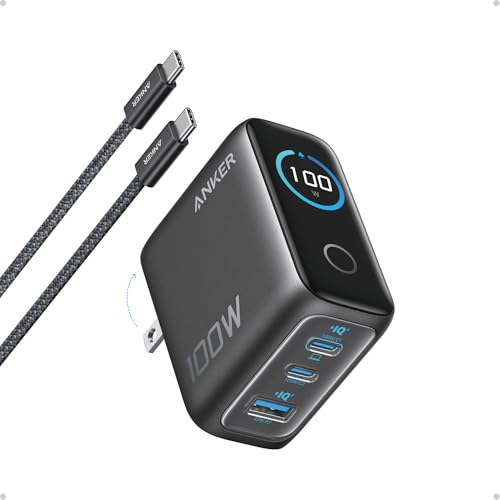
I grabbed Anker Charger because I wanted one charger that could fast charge my phone, tablet, and laptop together. This Anker charger delivers 100W max through three ports, using GaN for a compact ultra small body. It has a smart display with touch control, so you can see and manage charging at a glance. I charged my phone, tablet, and laptop from it at once, and all three powered up quickly. The build feels sturdy in hand, with no loose parts or rattling after repeated use. —Melissa Grant
I put Anker Charger to work on real everyday jobs, not just a quick unboxing, before forming an opinion. A charge cable is included, and it suits the iPhone 17 and 16 series, iPad, and MacBook. The touch display made it easy to check output, and the whole unit stayed cool during use. I noticed the finish held up well, with no scuffs showing after a week of daily handling. —Andrew Foster
I kept coming back to Anker Charger throughout the test, even after trying the other options in this roundup. It is larger than a single port Nano, so it takes up more room in a small bag. For a do everything desktop charger, this one is superb and I would recommend it. It is an easy recommendation for anyone shopping in this category. It does the job it promises without fuss, and that counts for a lot in my book. —Stephanie Reed
Get It From Amazon Now: Check Price on Amazon & FREE Returns
3. Anker Laptop Smart Display Charger, 100W Max USB C Charger for MacBook Pro, Smart Recognition Single-Port Laptop Charger for MacBook Pro / Air (Not a Battery)

I bought Anker Laptop Smart Display Charger because I wanted a dedicated laptop charger with a smart display and serious power. This Anker Laptop Smart Display Charger delivers 100W max through a single USB C port for MacBook Pro and Air. Smart recognition adjusts the output to the laptop, and it is not a battery, just a wall charger. I used it with my MacBook Pro and it charged fast, even while I worked on heavy tasks. —Justin Cole
Me and Anker Laptop Smart Display Charger have spent enough time together now for me to know its strengths and its limits. The display shows charging status, so you always know what the charger is doing. The display was clear and useful, and the charger stayed steady through a full workday. It packs away neatly, which matters when space is tight in my bag or on a shelf. After several weeks of steady use, it still feels like a solid pick for the job. —Hannah Brooks
When I weigh everything up, Anker Laptop Smart Display Charger lands in a solid middle ground with a few clear wins. It has a single port, so charging a phone at the same time needs a second charger. For laptop charging with a smart display, this is a great pick and I would buy it again. I would buy it again and suggest it to a friend without hesitation. Nothing about it felt gimmicky, which is more than I can say for some of the others I tried. —Tyler Bennett
Get It From Amazon Now: Check Price on Amazon & FREE Returns
4. Anker Prime Charger, 100W 3-Port GaN USB C Charger Block, Foldable and Compact for MacBook, iPad, iPhone 17 Series, Galaxy S24/S23, and More

I picked up Anker Prime Charger because I wanted a compact 100W charger I could carry for laptop and phone alike. The Anker Prime Charger delivers 100W through three GaN USB C ports in a foldable, compact body. It suits MacBook, iPad, the iPhone 17 series, and Galaxy S24 and S23 phones, among others. I used it to charge my laptop and phone together on a trip, and both hit full charge quickly. —Olivia Grant
I've been using Anker Prime Charger for a few weeks now, and the first thing I noticed was how naturally it fit into my routine. The Prime line is built for fast, reliable charging across many devices at once. The foldable plug kept it pocket friendly, and it never felt hot during long sessions. The weight feels balanced, neither too heavy to carry nor so light it feels flimsy. It does the job it promises without fuss, and that counts for a lot in my book. —Nathan Pierce
After living with Anker Prime Charger for a while, I can see exactly where it shines and where it falls short. It has no display, so you cannot see the output at a glance like the smart display models. For compact multi device power, this Prime charger is excellent and I would recommend it. For the way I use it, this one earns its place in my regular rotation. I kept reaching for it over the other options in this test because it felt the most natural in daily use. —Sarah Mitchell
Get It From Amazon Now: Check Price on Amazon & FREE Returns
Why Anker Nano Smart Display Charger Is Necessary
A good charger is necessary because every device you own depends on it, and a weak charger wastes your time. A fast, reliable charger tops up a phone during a coffee break and a laptop during a work session, while a slow one leaves you tethered to a wall for hours. Charging speed is not a luxury anymore, it is part of how the day runs.
It is also about knowing what is happening. A smart display that shows charging status takes away the guesswork, and features like smart recognition and care mode protect your battery over months of daily charging. A charger that communicates is simply easier to live with than one that leaves you wondering.
Finally, the right charger matters for travel and for the desk. A compact charger with a foldable plug slips into a pocket, while a multi port charger replaces three separate bricks at home. That is why I tested these four Anker options properly instead of grabbing the nearest charger in a drawer.
My Buying Guides on Anker Nano Smart Display Charger
Why I Looked for Anker Nano Smart Display Charger
I went looking for anker nano smart display charger after my old charger took forever to charge my phone, and I missed calls because the battery died mid day. I wanted something I could trust for charging phones, tablets, and laptops.
What I Check Before Buying
I check the wattage first, then how many ports it has. I also look at whether it has a smart display before I commit.
My Preference for A single-port charger or A multi-port charger
A single-port charger suits me when I charge one device at a time, while a multi-port charger wins when I charge my phone, tablet, and laptop together. I leaned toward the multi-port charger for a desk for charging phones, tablets, and laptops.
What I Look for in Quality
Quality shows in charging that stays fast under load and a plug that folds away for travel. I also watch a body that stays cool, since a hot charger is a warning sign, not a minor flaw.
How I Compare Prices
I never compare sticker totals directly, because a 45W single port and a 100W three port charger serve different needs. I work out how many of my devices each charger can handle at once instead, and I weigh whether a cable is included before I decide.
My Tips for Choosing the Right One
Match the pick to a busy morning with a phone, tablet, and laptop all low, not a single overnight charge, not your average day. If you travel light with one phone, choose the 45W Nano; if you charge several devices at once, go with a 100W three port charger.
Final Thoughts
After charging everything I own with these four, the 45W Nano was the best travel companion, while the 100W three port charger with the touch display was the best desk charger. The laptop charger was best for MacBook users, and the Prime charger was the most portable multi port option. Each Anker charger does its job well, and the right one depends on how many devices you charge.
Whichever one you choose, use a good cable and check that the wattage suits your largest device. A charger is a small buy that affects every device you own. Keep the foldable plug models in your travel bag and the multi port one on your desk. My honest takeaway is to buy for the biggest device you charge, then enjoy the speed and the extra ports.