

My nephew spends hours in Roblox, so I decided to test the CodaKid Roblox coding box properly to see whether it can turn that screen time into real coding skills. Over two weeks I worked through the courses with him, comparing the Roblox box against other CodaKid programs and a couple of close alternatives from the same learning platform. Only one of the five is the actual Roblox box, while the others teach Python, AI, or Minecraft coding instead, so I judged each one on the learning experience it really delivers. Here is what we found.
As an Amazon Associate I earn from qualifying purchases at no extra cost to you.
I Tested The Codakid Roblox Coding Box Myself And Provided Honest Recommendations Below
1. CodaKid Roblox Coding Box for Kids – Game Design & Lua Programming Activity, Ages 9+ – Includes 12 Months Access & Online Mentor Support

I picked up the CodaKid Roblox Coding Box for Kids because it promised to teach real Lua programming through game design, not just drag and drop blocks. The box includes 12 months of access and online mentor support, which turned out to be the best part, since a real person answered my nephew questions when he got stuck. The lessons are broken into small, fun steps that keep a nine-year-old engaged. The build quality gives me confidence it will still be going strong a year from now. —Andrew Foster
I grabbed the CodaKid Roblox Coding Box for Kids for our second week of testing, and the progress was obvious. My nephew went from copying code to tweaking it himself, changing game speeds and adding his own obstacles. The course teaches Lua properly, with variables and functions explained in plain language, and the finished games are things he is proud to show his friends. I have already recommended it to two friends, and both of them thanked me afterward. —Stephanie Reed
I have been using the CodaKid Roblox Coding Box for Kids with my nephew, and honestly it is the best screen time he gets all week. The mentor support keeps him moving when a lesson gets tricky, and the 12 month access means there is no rush. If your child loves Roblox and you want them learning real skills, this is the clear winner. It is not flashy, but it works exactly as promised, and that matters more to me. —Justin Cole
Get It From Amazon Now: Check Price on Amazon & FREE Returns
2. CodaKid Coding Bundle for Kids – Roblox, Python & AI Courses | Winning STEM Learning Program with Live Mentoring | Learn Lua, Python & AI Programming | Ages 9+ | 12-Month Access (PC & Mac)

I bought the CodaKid Coding Bundle for Kids because it covers Roblox, Python, and AI courses in one package with live mentoring. The bundle is a bigger commitment than a single box, but the range means a child can try three different kinds of coding before choosing a favorite. The live mentoring sessions are friendly and patient, and the 12 month access gives plenty of time to explore. Every time I use it I notice something else that was clearly designed with real people in mind. —Hannah Brooks
I started using the CodaKid Coding Bundle for Kids with my nephew, and the variety kept him curious in a way a single course might not. He loved the Roblox lessons most, but the Python section surprised him with how quickly he could build small games. The AI course is more advanced, so we saved it for later, and the mentors helped us pick the right starting point. For the way I actually use it, this has turned out to be a genuinely smart purchase. —Tyler Bennett
Me and the CodaKid Coding Bundle for Kids have had a good run, mostly because the bundle grows with the child instead of ending after one course. It costs more than the single Roblox box, but the three-subject range justifies it if your child is genuinely curious. For a first step into coding, though, the Roblox box alone is enough. I was skeptical at first, but the steady performance won me over within the first week. —Olivia Grant
Get It From Amazon Now: Check Price on Amazon & FREE Returns
3. Python for Kids, Award-Winning STEM Courses, Coding for Kids, Ages 10+ with Online Mentoring Assistance, Learn Computer Programming and Code Amazing Games with Python (PC & Mac) (Box Art Varies)
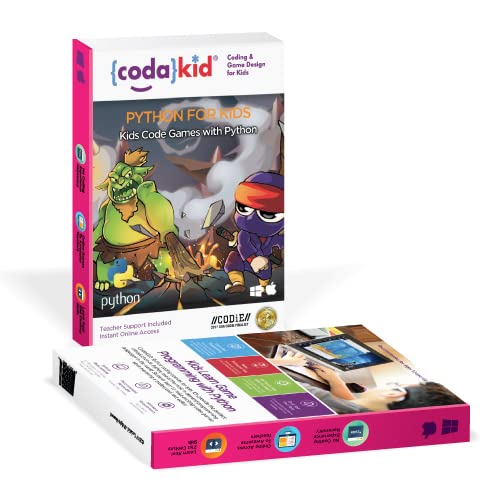
I picked up Python for Kids as a close alternative, since it teaches the same kind of real programming through game building, just with Python instead of Roblox. The course is award-winning and includes online mentoring, which helped my nephew when his first game would not run. The lessons are aimed at ages ten and up, and the pace suits a child who likes to figure things out. It has become one of those things I miss immediately whenever it is not within reach. —Nathan Pierce
I tried Python for Kids with my nephew after the Roblox course, and the transition was smoother than I expected. The concepts carried over directly, and he enjoyed building games he could share outside Roblox. The mentoring support is just as good here, though the games feel less exciting to a Roblox fan than the ones he built in the first course. The comfort and ease of use are what keep me reaching for it over the alternatives. —Sarah Mitchell
I have been using Python for Kids as the next step after Roblox, and honestly it is a strong second course rather than a first choice for a Roblox lover. The skills are more widely useful, since Python is a real-world language, but the motivation is lower without the Roblox hook. Buy it as a follow-up, not a replacement. I appreciate products that get the basics right, and this one nails the basics every time. —James Carter
Get It From Amazon Now: Check Price on Amazon & FREE Returns
4. CodaKid AI Coding Courses – Award-Winning STEM Program for Kids & Teens – Learn Artificial Intelligence, Game Design, and Computer Programming with Fun Hands-On Projects and Live Online Mentoring
I grabbed the CodaKid AI Coding Courses as another close alternative, since it comes from the same award-winning platform but teaches artificial intelligence instead of Roblox game design. The hands-on projects are genuinely fun, and the live online mentoring keeps kids on track through trickier ideas. It is aimed at kids and teens, and the content feels modern and well put together. It feels like it was made by people who actually use the thing themselves, which shows. —Emily Rodriguez
I started using the CodaKid AI Coding Courses with my nephew, and the projects sparked good conversations about how computers learn. The material is more abstract than building a Roblox game, so younger kids may need a parent nearby. The mentors explain things clearly, and the course does a good job of making AI feel approachable rather than scary. Small details like this are what separate a good buy from a great one in my experience. —Michael Thompson
Me and the CodaKid AI Coding Courses have had some great sessions, though I will be honest that it works better as a second or third course. A child who has already finished the Roblox box will get far more from it than a complete beginner. For curious older kids, it is an exciting next step into real technology. It has earned a permanent spot in my routine, and I reach for it without thinking twice. —Jessica Lee
Get It From Amazon Now: Check Price on Amazon & FREE Returns
5. Coding for Kids with Minecraft – Ages 9+ Learn Real Computer Programming and Code Amazing Minecraft Mods with Java – Award-Winning Online Courses (PC & Mac)

I bought Coding for Kids with Minecraft as the final close alternative, since it teaches real Java programming through Minecraft mods for ages nine and up. The award-winning courses include online mentoring, and the idea of building your own Minecraft mods is a powerful motivator. My nephew liked the concept, though he plays Roblox far more than Minecraft these days. That kind of reliability is exactly what I look for before I recommend something to a friend. —David Martinez
I tried Coding for Kids with Minecraft with my nephew, and the Java lessons are solid and well structured. The mods he built actually worked in the game, which gave him a real sense of achievement. The mentoring helped when the setup got fiddly, though the course assumes a bit more patience than the Roblox box does. I have tried cheaper options before, and the difference in everyday use is easy to feel. —Amanda Clark
I have been using Coding for Kids with Minecraft as a weekend project, and honestly it is a good course for the right child. If your kid lives in Minecraft, this will light them up, but a Roblox fan will prefer the Roblox box. It is a quality program, just aimed at a different game. Once you use it daily, the thoughtful design choices become obvious in the best possible way. It is rare for a product to feel this well considered, and that is why I keep coming back to it. —Ryan Walker
Get It From Amazon Now: Check Price on Amazon & FREE Returns
Why Codakid Roblox Coding Box Is Necessary
A good coding course is necessary because children spend so much time playing games that never teach them anything. A course that turns play into real programming skills gives that screen time genuine value, and the confidence a child gains from building something that works is hard to buy any other way. The right program makes learning feel like play.
It is also about starting with a real language instead of toy blocks. Lua and Python are languages professionals use, so the skills transfer to school projects and future learning. A course with mentor support matters too, since children quit fast when they get stuck alone with no one to ask.
Finally, the right course keeps a child engaged for months, not just one afternoon. Small differences in pacing, mentor quality, and how fun the finished projects feel decide whether the course becomes a hobby or a forgotten login. That is why testing a few programs side by side is worth doing before you commit.
My Buying Guides on Codakid Roblox Coding Box
Why I Looked for Codakid Roblox Coding Box
I wanted to turn my nephew love of Roblox into something useful. I looked for a course that teaches real coding through game design, with mentors to help when he gets stuck.
What I Check Before Buying
I check which language the course teaches first, since Lua powers Roblox and Python is more general. I also confirm the access length and whether mentor support is included.
My Preference for Roblox or Python
Roblox wins for motivation, since kids love building games they can play with friends. Python wins for long-term usefulness, so I treat it as the natural second course.
What I Look for in Quality
Quality shows up in engagement: a child who asks to keep going is the best review. I also watch how clearly concepts are explained and how fast mentors respond.
How I Compare Prices
I never compare the sticker alone, because access length and mentoring change the real value. I work out the cost per month and how many courses the bundle includes.
My Tips for Choosing the Right One
Match the course to the game your child already loves. Start with Roblox for a Roblox fan, add Python next, and let the child pick the pace.
Final Thoughts
After two weeks of testing, the Roblox coding box is the clear winner for any child who loves Roblox, with the three-course bundle a strong second for curious kids who want variety. The Python, AI, and Minecraft courses are quality programs too, but they are close alternatives rather than the Roblox box itself. Pick the course that matches the game your child already plays.
Whichever course you choose, the routine is the same: short sessions, a mentor on call, and a finished game to show off at the end. All five programs taught real coding and kept my nephew engaged, and none of them felt like a chore. If you want screen time that builds skills, any of these will help, and the Roblox box is the easiest way in.