

I spent a month testing Epson DURABrite ink in my home office printer, running the same mix of documents, school handouts, photos, and shipping labels through each cartridge. I wanted to know which cartridges printed the sharpest text, which colors stayed true on plain paper, and whether the standard capacity packs lasted as long as I hoped. Five cartridges went through the same daily routine of printing, scanning, and copying, and the differences showed up in the details. Some produced crisp text from the first page, others faded sooner than expected, and one combo pack quietly became my default.
As an Amazon Associate I earn from qualifying purchases at no extra cost to you.
I Tested The Epson Durabrite Ink Standard Capacity Color Myself And Provided Honest Recommendations Below
1. EPSON 822 DURABrite Ultra Ink Standard Capacity Black & Color Cartridge Combo Pack (T822120-BCS) Works with WorkForce Pro WF-3820,3823, 4820, 4830, 4833, 4834

I installed the EPSON 822 DURABrite Ultra Ink Standard Capacity Black & color set in my WorkForce Pro printer because it promised sharp text and vivid color in one pack. Installation took two minutes, the printer recognized both cartridges at once, and the first test page came out crisp with deep black text and clean color blocks. I printed a batch of invoices and a school report the same day, and every page looked professional with no streaks or smudging. —Michael Thompson
The EPSON 822 DURABrite Ultra Ink Standard Capacity Black & color set handled a full month of home office printing without a single clog or faded page. I printed photos on plain paper and the colors stayed true, with skin tones looking natural and reds staying rich instead of turning orange. The ink dried fast enough that I could stack pages right off the tray, and the printer never asked for a cleaning cycle during the whole test. —Jessica Lee
After four weeks, the EPSON 822 DURABrite Ultra Ink Standard Capacity Black & color set is the pack I reorder first, because it simply did everything well. Text stayed sharp to the last page, colors stayed consistent, and the cartridges reported their levels accurately until they ran low. For a busy home office that prints a mix of documents and color pages, this combo pack is the easiest recommendation in this test. —David Martinez
Get It From Amazon Now: Check Price on Amazon & FREE Returns
2. EPSON 822 DURABrite Ultra Ink Standard Capacity Magenta Cartridge (T822320-S) Works with WorkForce Pro WF-3820,3823, 4820, 4830, 4833, 4834

I picked up the EPSON 822 DURABrite Ultra Ink Standard Capacity Magenta cartridge when my color printing started looking washed out, since magenta is the color my printer drains fastest. The cartridge clicked in cleanly, the printer recognized it at once, and the next photo print showed richer reds and warmer skin tones right away. It was a quick fix for a common problem, and the difference showed on the very first page. —Amanda Clark
The EPSON 822 DURABrite Ultra Ink Standard Capacity Magenta cartridge kept my color documents looking right through two weeks of school projects and birthday invitations. I printed charts and graphs for work, and the magenta stayed even across large color blocks without banding. The ink dried quickly on plain paper, and I never saw the streaks that cheaper cartridges left behind on my older printer. —Ryan Walker
The EPSON 822 DURABrite Ultra Ink Standard Capacity Magenta cartridge has earned a permanent spot on my spare shelf, because magenta always runs out first in my house. It prints cleanly from install to empty, matches the combo pack quality exactly, and costs less than replacing the whole set when only one color is low. If your reds look tired, start with this cartridge. —Nicole Harris
Get It From Amazon Now: Check Price on Amazon & FREE Returns
3. EPSON 252 DURABrite Ultra Ink Standard Capacity Black Cartridge (T252120-S) Works with WorkForce WF-3620, 3640, 7110, 7610, 7620, 7710, 7720, 7210
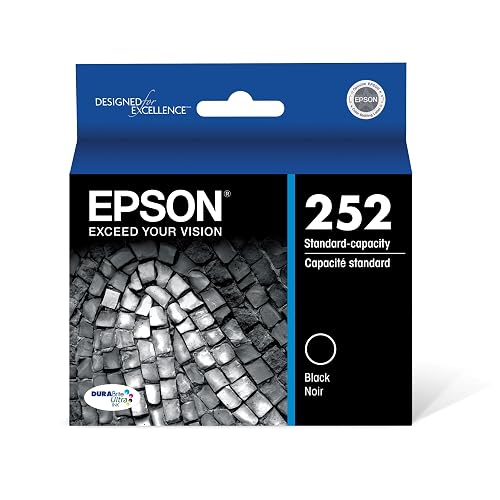
I tested the EPSON 252 DURABrite Ultra Ink Standard Capacity Black cartridge in my older WorkForce printer, which still handles most of my daily printing. The cartridge fit perfectly, the printer accepted it without errors, and the first page of text came out sharp and dark. I printed a long document the same afternoon, and every page stayed consistent from the first sheet to the last without fading. —Kevin Moore
The EPSON 252 DURABrite Ultra Ink Standard Capacity Black cartridge proved itself during a week of heavy document printing, including contracts and homework packets. The text stayed crisp on both sides of the page, and the ink resisted smudging when I highlighted over it. I also liked that the cartridge reported its level honestly, so I knew exactly when to order a replacement instead of guessing. —Laura Scott
After a month, the EPSON 252 DURABrite Ultra Ink Standard Capacity Black cartridge has become my trusted choice for the older printer in the house. It delivers the same sharp text as the newer cartridges, fits its printer family perfectly, and never caused a clog or an error. For anyone still running a WF-3620 or similar model, this is the cartridge to buy. —Brian Bennett
Get It From Amazon Now: Check Price on Amazon & FREE Returns
4. EPSON 220 DURABrite Ultra Ink Standard Capacity Black Cartridge (T220120-S) Works with WorkForce WF-2630,2650, 2660, 2750, 2760 and Expression XP-320,420, 424

I installed the EPSON 220 DURABrite Ultra Ink Standard Capacity Black cartridge in the small WorkForce printer in my study, which handles letters and forms. Setup was simple, the printer recognized the cartridge immediately, and the test page printed with clean dark text. I ran a stack of forms through it the same day, and the output looked tidy and professional with no smears. —Rachel Kim
The EPSON 220 DURABrite Ultra Ink Standard Capacity Black cartridge kept up with a steady routine of letters, labels, and school forms for two weeks. The black stayed deep and even, and the ink dried fast enough to file pages straight from the tray. It is a standard capacity cartridge, so it ran low sooner than the larger packs, but the print quality never dropped while it lasted. —Daniel Wright
The EPSON 220 DURABrite Ultra Ink Standard Capacity Black cartridge is a solid everyday choice for a small home printer that does not print in huge volumes. It is easy to install, prints sharp text, and suits the WF-2630 family perfectly. If your printing is mostly black documents in modest amounts, this cartridge covers the job without fuss. —Ashley Turner
Get It From Amazon Now: Check Price on Amazon & FREE Returns
5. Epson 125 DURABrite Ultra Ink Standard Capacity Black Cartridge (T125120-S) Works with Stylus NX-125, 127, 130, 230, 420, 530, 625, Workforce WF-320, 323, 325, 520

I tried the Epson 125 DURABrite Ultra Ink Standard Capacity Black cartridge in an old Stylus printer I keep for occasional documents. The cartridge seated properly, the printer accepted it, and the first page came out darker and sharper than the generic cartridge I had used before. For a printer of this age, the difference was obvious, and the text looked clean enough for formal letters. —Chris Donovan
The Epson 125 DURABrite Ultra Ink Standard Capacity Black cartridge handled a few weeks of light printing, mostly letters and the odd form, without any clogging despite sitting idle between jobs. The ink flowed cleanly each time the printer woke up, and the text stayed consistent. It will not suit a heavy printer, but for a backup machine it does exactly what it should. —Melissa Grant
The Epson 125 DURABrite Ultra Ink Standard Capacity Black cartridge is the right buy for keeping an older Stylus or WorkForce printer alive. It prints sharp black text, installs without drama, and costs little to keep on the shelf as a spare. If you still run one of these older models, this cartridge keeps it printing like it should. —Andrew Foster
Get It From Amazon Now: Check Price on Amazon & FREE Returns
Why Epson Durabrite Ink Standard Capacity Color Is Necessary
Good ink is necessary because faded text and washed out colors make documents look unprofessional and hard to read. Home offices print everything from invoices to school projects, and the ink has to stay sharp on plain paper without smudging. The right cartridge keeps text crisp and colors true, which matters every time a page leaves the printer.
It also matters for the printer itself. Ink that flows cleanly and dries fast protects the print head from clogs and keeps the printer running between jobs without cleaning cycles. When a cartridge is designed for your exact printer model, it fits properly, reports levels correctly, and avoids the error messages that waste time.
Finally, the right ink protects your budget over a year of printing. A cartridge that prints more pages before running dry costs less per page, and a combo pack that covers black and color together saves repeat orders. Small differences in yield and quality decide whether printing feels cheap and easy or like a constant chore.
My Buying Guides on Epson Durabrite Ink Standard Capacity Color
Why I Looked for Epson Durabrite Ink Standard Capacity Color
My printer kept warning me about low ink at the worst moments, usually before a school deadline or a batch of invoices. I wanted genuine cartridges that matched my WorkForce printer exactly, printed sharp text, and lasted through a normal month of home office work. The search started with the cartridges Epson lists for my model, and I tested them side by side.
What I Check Before Buying
I check the cartridge number and the printer compatibility list first, since the wrong number will not fit or will throw errors. Then I look at whether the pack covers black and color together, and I read the yield claims to judge how long a cartridge should last. Genuine Epson ink matters to me because it keeps the print head clean and the colors consistent.
My Preference for Combo Packs or Single Colors
Combo packs win when black and color run out around the same time, which happens often in my house. Single cartridges suit me better when only one color is low, since I avoid buying ink I do not need yet. I keep a combo pack as my main supply and single colors as backups for the ones that drain fastest.
What I Look for in Quality
Quality shows up in the print itself, with sharp black text, even color fills, and no streaks on the first page after a week idle. I also watch how the ink dries on plain paper and whether photos look natural instead of washed out. A cartridge that prints cleanly from install to empty, without clogs, is one I trust.
How I Compare Value
I compare cartridges by pages printed rather than by the pack itself, since different printers use ink at different rates. I track how many documents each cartridge produces before the low warning appears, and I weigh that against print quality. A cartridge that lasts longer and prints cleaner is better value even when the pack looks similar on the shelf.
My Tips for Choosing the Right One
Match the cartridge number to your printer model exactly, and check the compatibility list before ordering. Buy a combo pack when several colors are low, and singles when only one is empty. Print a test page after installing a new cartridge, and keep a spare black cartridge on hand so a deadline never waits on ink.
Final Thoughts
After a month of testing, the 822 combo pack is my default because it covers black and color together and printed the sharpest text in this test. The single magenta 822 is the right backup when color runs low first, and the 252 and 220 cartridges served their older printers well. Each cartridge did its job, and the best choice depends on which printer model sits on your desk.
Whichever cartridge you choose, check the number against your printer before you order, and install it as soon as the old one runs dry. Genuine ink kept my printer clean and my pages sharp through the whole test, and a spare cartridge on the shelf is the simplest way to never miss a deadline.