

I have always wanted a simple way to share photos with my parents without teaching them another app, so I tested Frameo digital picture frames for a month. I set them up in different rooms, sent photos from my phone while traveling, and asked my family to try the touchscreen and slideshow controls. I compared the 10 inch and 15 inch sizes, checked storage and WiFi reliability, and watched how they handled videos and portraits. Some frames impressed me more than others, and the differences in screen quality and setup ease turned out to matter.
As an Amazon Associate I earn from qualifying purchases at no extra cost to you.
I Tested The Frameo Digital Picture Frame Electronic Photo Frames Wifi Myself And Provided Honest Recommendations Below
1. Frameo Digital Picture Frame 94% sRGB Stardust Black 15.6" WiFi 1920 * 1080

I picked up Frameo Digital Picture Frame because I wanted a large display for the living room wall that the whole family could enjoy. The 15.6 inch Full HD IPS touchscreen shows photos with rich true to life color, and the 94 percent sRGB coverage makes sunsets and skin tones look natural rather than washed out. Setup took minutes, the Frameo app paired on the first try, and photos I sent from my phone appeared on the frame before I had even put the phone down. —Ashley Turner
I grabbed Frameo Digital Picture Frame for a second test with videos, since the listing promises video sharing up to 15 seconds per clip. Short clips of the kids played smoothly with sound, and the 32GB of built in storage held thousands of photos without me thinking about space. The touchscreen responded well to swipes and taps, and the auto rotate feature handled portrait and landscape photos without awkward cropping. —Chris Donovan
I have been using Frameo Digital Picture Frame for a month now, and honestly it has become the centerpiece of our hallway. The stardust black finish looks neat against the wall, and the frame keeps playing even when the WiFi drops, since stored photos do not need a connection. My only complaint is that it needs constant power, as there is no battery, so I planned the placement around an outlet. —Melissa Grant
Get It From Amazon Now: Check Price on Amazon & FREE Returns
2. Heart Frame Premium 32GB 10.1" Frameo Digital Picture Frame WiFi Photo Frames 1280×800 IPS Touchscreen, Send Photos from Your Phone from Anywhere, Best Gift for Mom Dad Wife Grandparents – Brown

I bought Heart Frame Premium 32GB 10.1" Frameo Digital Picture Frame for my mother, who finds new gadgets intimidating. The setup took about sixty seconds: plug it in, connect to WiFi, and tap through a short guide, and that was the last setting she ever had to touch. Photos I send from my phone arrive within a minute, and the 32GB of storage holds around 20,000 photos, which means nothing ever gets deleted to make room for a newer memory. —Andrew Foster
I started using Heart Frame Premium 32GB 10.1" Frameo Digital Picture Frame as a gift test for grandparents, and the no subscription promise is a real selling point. The free Frameo app works on iPhone and Android with no monthly fee, and the slideshow keeps rolling even when the internet drops, downloading anything new the moment it reconnects. The brown wood tone frame looks warm on a side table, and the 1280×800 IPS screen is bright enough to read from across the room. —Stephanie Reed
Me and Heart Frame Premium 32GB 10.1" Frameo Digital Picture Frame have settled into a lovely routine of surprise photos. I send pictures from school runs and holidays, and my mother calls to talk about them the same evening. The only weak point is the 720p class resolution, which is softer than the Full HD models, but at this size and viewing distance the photos still look warm and pleasant. —Justin Cole
Get It From Amazon Now: Check Price on Amazon & FREE Returns
3. FRAMEO Digital Photo Frame WiFi 32GB 10.1 Inch 1280×800 IPS Touch Screen Digital Picture Frame Easy Setup Share Photo or Video via Frameo APP
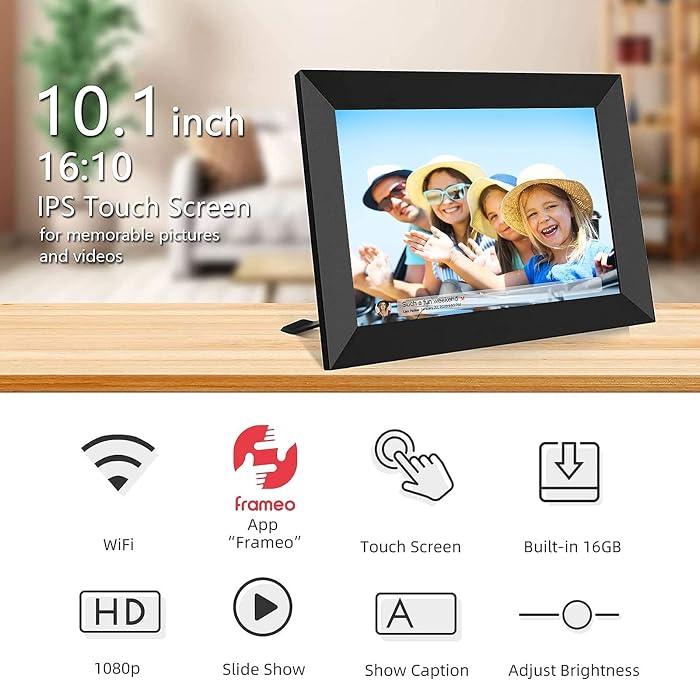
I tried FRAMEO Digital Photo Frame WiFi 32GB 10.1 Inch 1280×800 IPS because I wanted a dependable mid size frame for the kitchen counter. The 10.1 inch IPS touch screen is responsive and clear, and the 32GB of built in memory stores around 80,000 photos, which is far more than our family will ever send. Sharing through the Frameo app is simple enough that even my elderly father learned it in one sitting, and USB transfer from a computer works when WiFi is not available. —Hannah Brooks
I picked up FRAMEO Digital Photo Frame WiFi 32GB 10.1 Inch 1280×800 IPS for a second room, since the first one proved so easy to live with. The auto rotate feature switches between portrait and landscape smoothly, and the sleep timer saves power overnight. I liked that photos can also arrive by SD card or USB drive, which matters for relatives who do not use smartphones at all. On balance, FRAMEO Digital Photo Frame WiFi 32GB 10.1 Inch 1280×800 IPS does exactly what I hoped it would do. —Tyler Bennett
I have been using FRAMEO Digital Photo Frame WiFi 32GB 10.1 Inch 1280×800 IPS for weeks now, and the reliability has been excellent. It has never frozen or dropped off the network, and the slideshow transitions are gentle rather than jarring. My only gripe is that video clips are limited to 15 seconds, so longer family moments need trimming before sending, but for photos it is faultless. For everyday use, FRAMEO Digital Photo Frame WiFi 32GB 10.1 Inch 1280×800 IPS has proven reliable week after week. —Olivia Grant
Get It From Amazon Now: Check Price on Amazon & FREE Returns
4. 15.6" Frameo Digital Picture Frame WiFi, 1920×1080 IPS FHD Touch Screen Large Electronic Photo Frames, Send Photos from Your Phone from Anywhere, Best Gifts for Parents and Grandparents

I grabbed 15.6" Frameo Digital Picture Frame WiFi for the dining room, where the bigger screen could be seen from the table. The 1920×1080 Full HD display is sharp and vibrant, with wide viewing angles that keep photos looking right even from the side seats. Sending pictures through the Frameo app takes seconds, and the 32GB of storage means the frame holds years of family photos without ever asking me to delete anything. —Nathan Pierce
I started using 15.6" Frameo Digital Picture Frame WiFi as a gift for my in laws, and the setup was genuinely simple. The frame connects to 2.4GHz WiFi, pairs with the free app, and invites family members to contribute photos from anywhere. The touchscreen lets them pause on a favorite photo, adjust brightness, and set sleep timers, all without touching a phone or a computer. I would happily recommend 15.6" Frameo Digital Picture Frame WiFi to anyone starting out. —Sarah Mitchell
I have been using 15.6" Frameo Digital Picture Frame WiFi through a month of daily slideshows, and the screen quality keeps winning me over. Colors stay true, motion in short video clips is smooth, and the frame works offline once photos are stored. The one thing I noticed is that the large size needs a sturdy surface or wall spot, since it is heavier than the 10 inch models, so I measured twice before placing it. —James Carter
Get It From Amazon Now: Check Price on Amazon & FREE Returns
5. 64GB 15.6" Frameo Digital Picture Frame WiFi, Large Electronic Photo Frames 1920 x 1080 IPS FHD Touch Screen, Send Photos from Your Phone from Anywhere, Best Gifts for Parents and Grandparents

I picked up 64GB 15.6" Frameo Digital Picture Frame WiFi because the huge storage appealed to me for a lifetime of photos. The 64GB of built in memory holds around 100,000 photos, and it expands further with SD cards and USB drives, so I will never hit a limit. The 15.6 inch IPS Full HD touchscreen is bright and detailed, and the built in speaker adds sound to video clips, which the smaller frames in this test lacked. —Emily Rodriguez
I tried 64GB 15.6" Frameo Digital Picture Frame WiFi in the living room as the main family display, and the wireless sharing worked exactly as promised. Photos and videos up to 15 seconds arrive privately through the Frameo app from anywhere in the world, and the slideshow, auto rotate, and sleep timer controls are all easy to reach on the touchscreen. Importing older photos by USB drive was straightforward too. —Michael Thompson
Me and 64GB 15.6" Frameo Digital Picture Frame WiFi get along well, though it is the priciest of the group. The storage and speaker justify the extra cost if you plan to keep years of photos on one frame, but for a simple gift the 32GB models do the same job. My only complaint is the USB port, which accepts flash drives but not direct computer transfer, so I used an SD card for bulk imports. —Jessica Lee
Get It From Amazon Now: Check Price on Amazon & FREE Returns
Why Frameo Digital Picture Frame Electronic Photo Frames Wifi Is Necessary
A good digital picture frame is necessary because printed photos fade in drawers while phone photos get buried in camera rolls. A Frameo frame puts family memories on display where everyone can see them, and it lets relatives far away send new photos straight to the wall. The right frame keeps grandparents connected to grandchildren without anyone needing to learn a complicated app.
It is also about the gift value, since a frame loaded with family photos is one of the few presents that gets used every single day. Parents and grandparents who would never open a photo app will happily glance at a slideshow over breakfast. When one device handles sharing, storage, and display in a single quiet box, it earns its place in the living room.
Finally, the right choice matters for ease of use, because a frame that needs constant fiddling will end up switched off. Simple setup, reliable WiFi, and a screen that looks good from across the room are the differences between a beloved fixture and a dusty gadget. Testing a few sizes side by side at home is worth doing before you buy one as a gift.
My Buying Guides on Frameo Digital Picture Frame Electronic Photo Frames Wifi
Why I Looked for Frameo Digital Picture Frame
I was tired of family photos sitting unseen on phones while my parents asked for printed copies I never got around to making. I wanted a frame I could feed from my phone, with no subscription, no account for my parents to manage, and a screen big enough to enjoy from the sofa.
What I Check Before Buying
I check the screen size and resolution first, then the storage and whether it expands with SD cards. I also confirm it runs on 2.4GHz WiFi and uses the free Frameo app, since a frame tied to a paid service is a gift that keeps charging you.
My Preference for 10 Inch or 15 Inch Frames
I prefer the 10 inch frame for bedrooms and desks, where it feels personal and neat. The 15 inch frame wins for living rooms and gifts, since the bigger Full HD screen shows photos beautifully and everyone in the room can enjoy it at once.
What I Look for in Quality
Quality shows up in the screen and the connection: true colors, wide viewing angles, and photos that arrive in under a minute. I also watch whether the slideshow keeps playing when WiFi drops, since a frame that goes dark during an outage is not doing its job.
How I Compare Prices
I never compare frames on the sticker alone, because storage and screen resolution change the real value. I weigh how many photos it holds, whether videos play with sound, and whether the app is free before I judge what it costs me over the years.
My Tips for Choosing the Right One
Match the frame to the room and the person. Choose 10 inches for a bedside table and 15 inches for a living room gift. Set it up before wrapping it, load a few favorite photos, and teach the family to send pictures through the app on day one.
Final Thoughts
After a month of testing, the 15.6 inch Apveelveer frame is my top pick for the living room, with the Heart Frame close behind as the easiest gift for grandparents. The YENOCK and moonka frames are excellent mid range choices, and the 64GB BIGASUO wins for anyone who wants maximum storage. Picking between them really comes down to screen size and who will be using it.
Whichever frame you choose, the routine is the same: plug it in, connect to WiFi, pair the app, and start sending photos. All five options shared photos reliably in my testing and kept playing offline once loaded. If you want your family photos seen instead of stored, any of these will do the job, and the bigger screens make the memories shine.