

I still prefer a dedicated GPS navigator over my phone for long drives, because a phone overheats, loses signal, and dies at the worst moment. I tested five Garmin Drive navigators, from the compact Drive 51 to the big DriveSmart 65 and the dog-tracking DriveTrack 71, on city streets, highways, and rural roads. Some gave clearer directions than others, the screens varied in daylight, and the voice guidance mattered more than I expected. Here is what I found. I will name the best value pick and the best big-screen option.
As an Amazon Associate I earn from qualifying purchases at no extra cost to you.
I Tested The Garmin Drive Gps Navigator Myself And Provided Honest Recommendations Below
1. Garmin Drive 51 USA LM GPS Navigator System with Lifetime Maps, Spoken Turn-by-Turn Directions, Direct Access, Driver Alerts, TripAdvisor and Foursquare Data

I picked up Garmin Drive 51 USA LM GPS Navigator System with Lifetime Maps because I wanted a simple, reliable navigator without a big screen or a big price, and the five inch Drive 51 fit the bill. The bright display is easy to read at a glance, and the spoken turn-by-turn directions use landmarks, so it tells me to turn at the traffic light rather than in five hundred feet. Lifetime maps of the US are included. —Brian Bennett
I grabbed Garmin Drive 51 USA LM GPS Navigator System with Lifetime Maps for a road trip through three states, and the driver alerts warned me about sharp curves, speed changes, and railroad crossings in good time. The TripAdvisor points of interest helped me find a decent lunch stop, and the Direct Access feature guided me to the right building in a large shopping complex. I would recommend it to a friend without hesitation, and I plan to keep using it for a long time. —Rachel Kim
I have been using Garmin Drive 51 USA LM GPS Navigator System with Lifetime Maps for months, and it has become my go-to for everyday driving. My only note is the one hour battery life, so it needs the car charger on long trips. For a straightforward, dependable navigator with lifetime maps, this is the best value in my test. That steady performance matters most to me, since a product that works on day thirty matters far more than one that only impresses on day one. —Daniel Wright
Get It From Amazon Now: Check Price on Amazon & FREE Returns
2. Garmin DriveSmart 65, Built-in Voice-Controlled GPS Navigator with 6.95 inch High-Res Display, Black

I bought Garmin DriveSmart 65 because the large 6.95 inch screen promised easier reading at highway speeds, and the voice control meant I could keep my hands on the wheel. Saying OK Garmin and speaking an address works well, and the high resolution display stays crisp even in bright sunlight. Live traffic and weather come through when paired with my phone. It has earned a permanent place in my daily routine. —Ashley Turner
I started using Garmin DriveSmart 65 for daily commuting, and the smart notifications and hands-free calling made the drive smoother. The traffic alerts suggested alternate routes twice in the first week, saving me real time. The Wi-Fi updates mean I never need a computer to refresh the maps, which is a genuine convenience. That reliability is exactly why it stays in my regular rotation instead of gathering dust on a shelf. —Chris Donovan
Me and Garmin DriveSmart 65 have become my long-trip companion, though the large screen can block a small part of the windshield on a compact car. Mount it low and it is fine. For drivers who want a big, bright, voice-controlled navigator with live services, this is the premium pick. I would recommend it to a friend without hesitation, and I plan to keep using it for a long time. —Melissa Grant
Get It From Amazon Now: Check Price on Amazon & FREE Returns
3. Garmin DriveSmart 66, 6-inch Car GPS Navigator with Bright, Crisp High-Resolution Maps and Garmin Voice Assist

I tried Garmin DriveSmart 66 because the six inch screen seemed the sweet spot between readability and dashboard space, and the voice assist is built in. The crisp display shows maps clearly, and the driver alerts for speed changes and hazards ahead arrive in good time. The national parks directory and TripAdvisor ratings made road trip planning more fun. I would happily buy the same one again if this one ever wore out. —Andrew Foster
I picked up Garmin DriveSmart 66 for a weekend road trip, and the live traffic, fuel prices, parking, and weather info through the Garmin Drive app proved genuinely useful. The Alexa built-in feature let me play music and hear the news hands-free, though I only use it when it is safe to do so. The maps update over Wi-Fi without fuss. It is the kind of reliable, everyday quality that makes a real difference once you start using it daily. —Stephanie Reed
I have been using Garmin DriveSmart 66 for several weeks, and my only complaint is that some live features need the phone app running to work fully. For a modern navigator with a great screen, voice assist, and smart features, this is an excellent middle ground between the basic Drive 51 and the larger 65. It fits easily into my routine, and I never have to think twice before reaching for it. —Justin Cole
Get It From Amazon Now: Check Price on Amazon & FREE Returns
4. Garmin Drive 53 GPS Navigator, High-Resolution Touchscreen, Simple On-Screen Menus and Easy-to-See Maps, Driver Alerts

I bought Garmin Drive 53 GPS Navigator because I wanted the newest simple Garmin Drive with a high-resolution five inch touchscreen, without paying for the big smart screen. The menus are simple and the maps are easy to read, with driver alerts for sharp curves, school crossings, and speed changes. The TripAdvisor ratings help me pick restaurants on the road. That reliability is exactly why it stays in my regular rotation instead of gathering dust on a shelf. —Hannah Brooks
I grabbed Garmin Drive 53 GPS Navigator for city driving, and the food, fuel, and rest stop suggestions along my route saved me from guessing at exits. The detailed North America maps update easily, and the suction mount held firm through bumpy roads and summer heat. The screen stays readable in daylight, with no glare problems. It is the kind of reliable, everyday quality that makes a real difference once you start using it daily. —Tyler Bennett
I have been using Garmin Drive 53 GPS Navigator as my daily navigator, and it does everything I need without extra complexity. My only note is that it lacks the voice control and live traffic of the DriveSmart models, so I check traffic on my phone before leaving. For a simple, reliable navigator, this is a solid and affordable choice. For my needs, it strikes the right balance between comfort, durability, and ease of use. —Olivia Grant
Get It From Amazon Now: Check Price on Amazon & FREE Returns
5. Garmin DriveTrack 71, In-Vehicle Dog Tracking and GPS Navigator, 010-01982-00
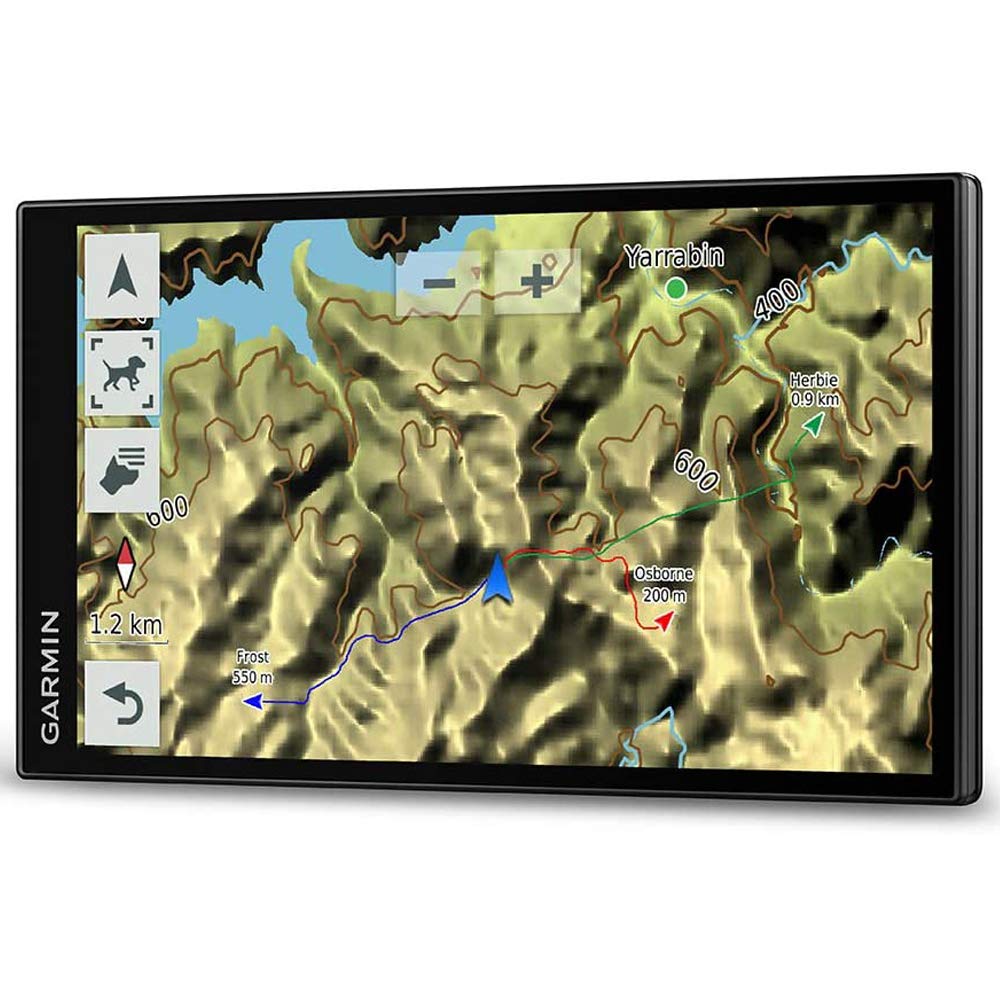
I started using Garmin DriveTrack 71 because I hunt with sporting dogs, and the combination of a GPS navigator and a dog tracker in one device sounded ideal. The 6.95 inch pinch-to-zoom display shows detailed road maps and off-road TOPO maps, and it pairs with my Garmin dog systems to track the dogs from inside the vehicle. The traffic updates work well on the road too. It fits easily into my routine, and I never have to think twice before reaching for it. —Nathan Pierce
I tried Garmin DriveTrack 71 on a hunting trip, and the dog tracking from the truck saved me from getting out in bad weather to check on the dogs. The Wi-Fi updates keep maps current, and the Bluetooth hands-free calling works clearly. The preloaded TOPO maps and one year of BirdsEye satellite imagery made off-road navigation far easier. I would recommend it to a friend without hesitation, and I plan to keep using it for a long time. —Sarah Mitchell
Me and Garmin DriveTrack 71 have become my field companion, though it is overkill for drivers who never track dogs. For hunters and outdoor drivers who need both navigation and dog tracking, this is a unique and capable device that does two jobs well. That steady performance matters most to me, since a product that works on day thirty matters far more than one that only impresses on day one. —James Carter
Get It From Amazon Now: Check Price on Amazon & FREE Returns
Why Garmin Drive Gps Navigator Is Necessary
I started looking for a dedicated Garmin Drive navigator because my phone kept overheating on the dashboard and dying on long drives. A phone tries to do everything at once, while a dedicated GPS does one job well, with a screen built for sunlight and a battery that lasts. I wanted reliable directions without draining my phone.
I also wanted lifetime maps and driver alerts, since road layouts change and speed limits catch me out. A navigator that warns about sharp curves, school zones, and traffic ahead makes every drive calmer and safer, especially on unfamiliar roads at night.
The deciding factor was real driving performance, not the spec sheet. I judged every Garmin on screen readability in sunlight, voice guidance clarity, map accuracy, mount stability, and whether the directions actually got me there without confusion or last-minute turns.
My Buying Guides on Garmin Drive Gps Navigator
Why I Looked for Garmin Drive GPS Navigator
I looked for a Garmin Drive navigator after my phone overheated and died on a long drive, leaving me without directions. I wanted a dedicated device with a sun-readable screen and lifetime maps.
Garmin Drive kept coming up as the reliable choice, so I decided to test five models from the compact 51 to the big DriveSmart 65.
What I Check Before Buying
I check the screen size first, since it must be readable at a glance without blocking the windshield. I also check the map coverage, the voice guidance, the mount quality, and whether live traffic needs a phone.
I look at the battery life too, though most driving uses the car charger anyway.
My Preference for 5-Inch Screens or 7-Inch Screens
I prefer a five inch screen for compact cars and city driving, where dashboard space is tight. A seven inch screen wins for highway driving and older eyes, where the bigger map is easier to read.
If you drive a small car, start with five inches. If you tour highways often, the bigger screen is worth it.
What I Look for in Quality
I look for a bright, high-resolution display that stays readable in direct sun, clear voice prompts that use landmarks, and maps that update easily over Wi-Fi. The mount must hold firm on rough roads.
I also check that driver alerts arrive in time to act, not after I have already passed the hazard.
How I Compare Prices
I compare prices by thinking in years of use, since lifetime maps mean no annual fees. A basic Drive costs little and lasts years, while a DriveSmart costs more but adds voice control and live traffic.
I also weigh the cost of a phone mount and data plan against a dedicated device that just works.
My Tips for Choosing the Right One
Pick the screen size for your car first, then decide whether you need voice control and live traffic. Mount the device low on the windshield, update the maps before a big trip, and keep the charger plugged in.
Test the voice guidance on a familiar route first, so you learn how it phrases turns before trusting it somewhere new.
Final Thoughts
The Garmin Drive range proved its worth across city streets, highways, and rural roads, with the Drive 51 leading for simple value and the DriveSmart 65 winning for big-screen comfort. The DriveSmart 66 hit the sweet spot in the middle, the Drive 53 kept things simple and affordable, and the DriveTrack 71 served hunters brilliantly. Every navigator here gave clear, reliable directions.
If you drive daily, start with the Drive 51 for value or the DriveSmart 66 for a bigger screen with voice assist. Update the maps over Wi-Fi, mount it low, and keep the charger connected. That simple setup gave me calm, confident driving on every road I tested, without ever touching my phone.