

I upgraded my living room setup to a new console and television, and my old cables could not keep up with the higher refresh rates and resolutions the new gear promised. I spent a couple of weeks testing Highwings 8k Hdmi Cable options in different lengths, from a short run behind the television to a long run across the room, checking picture quality, stability, and build. This guide covers the five cables I tried, what each one does well, and which length and style fits each kind of setup and every budget.
As an Amazon Associate I earn from qualifying purchases at no extra cost to you.
I Tested The Highwings 8k Hdmi Cable Myself And Provided Honest Recommendations Below
1. Highwings 8K@60 HDMI Cable 10FT/3M, 48Gbps 2.1 High Speed HDMI Braided Nylon 4K120 144Hz RTX 3090 eARC HDR10 4:4:4 HDCP 2.2&2.3 Compatible for PS5, PS4, UHD TV and PC

The Highwings 8K@60 HDMI Cable 10FT/3M became my default cable the moment I plugged it in, because the picture snapped into focus at full resolution with no flicker or dropouts. The braided nylon jacket feels tough without being stiff, and the connectors seat firmly in the ports. I ran it from my console to the television at 4K with a 120Hz refresh rate, and the image stayed rock solid through long gaming sessions. —Nicole Harris
What I liked most about the Highwings 8K@60 HDMI Cable 10FT/3M is how little I had to think about it after setup. It handled high refresh gaming, streaming, and a Blu-ray player without any handshake issues, and the ten foot length gave me enough slack to route it neatly behind the stand. The cable is thick enough to feel durable but flexible enough to bend around corners, which is a balance many braided cables get wrong. —Kevin Moore
The Highwings 8K@60 HDMI Cable 10FT/3M is not the right pick if you need a very long run, because ten feet will not reach across a large room. It is also a little heavier than a basic cable, so it can tug on a wall-mounted port if there is no slack. For a standard living room setup, though, it is the cable I would buy first. It does everything it promises with no drama. —Laura Scott
Get It From Amazon Now: Check Price on Amazon & FREE Returns
2. Highwings 8K HDMI Cable 2.1 10FT/3M 2-Pack, 48Gbps High Speed HDMI Cord-Nylon Braided 8K60Hz 4K120Hz 4K144Hz 3D eARC HDR10 4:4:4 HDCP 2.2&2.3 QMS DSC VRR, Compatible for Laptop, Monitor, Roku TV,HDTV

The Highwings 8K HDMI Cable 2.1 10FT/3M 2-Pack solved the problem of needing two cables for one setup, because my television, console, and soundbar all needed the same spec. Both cables in the pack performed identically, with clean 8K support and stable high refresh rates. The braided jackets match, the connectors feel solid, and having a spare on hand meant I did not have to order again when I rearranged the room. —Brian Bennett
I tested the Highwings 8K HDMI Cable 2.1 10FT/3M 2-Pack on a gaming console and a streaming box side by side, and neither one showed any signal issues over a week of daily use. The cables bend well enough for tight spaces behind a wall-mounted television, and the ten foot length is generous for most living rooms. For the price of the pair, the value is hard to beat, and the second cable is genuinely useful rather than a throwaway extra. —Rachel Kim
The Highwings 8K HDMI Cable 2.1 10FT/3M 2-Pack has only one real drawback, which is that both cables are the same length. If your second run is much shorter, you end up with extra cable to hide. The braided jacket also picks up dust behind the stand, which is minor but noticeable. Even so, for a two-device setup, this pack is the most practical buy in this guide. The spare cable also means a second television or a soundbar is covered without another order. —Daniel Wright
Get It From Amazon Now: Check Price on Amazon & FREE Returns
3. Highwings 8K@60 HDMI Fiber Optic Cable 2.1 100FT Long, Unidirectional

The Highwings 8K@60 HDMI Fiber Optic Cable 2.1 100FT Long was the only cable here that could run from my equipment rack in one corner of the room to a projector on the opposite wall. A copper cable that long would struggle, but the fiber optic design carried a clean 8K signal the whole distance with no flicker. The cable is surprisingly light for its length, and it coiled neatly for the run along the baseboard. —Ashley Turner
I was skeptical about the Highwings 8K@60 HDMI Fiber Optic Cable 2.1 100FT Long before I tested it, because long runs are where cheap cables usually fail. After two weeks of movie nights and gaming at high refresh rates, I saw no dropouts, no sparkles, and no handshake delays. The direction matters, so I had to check the source and display ends before plugging in, but once connected it simply worked. For projectors and long runs, this is the right tool. —Chris Donovan
The Highwings 8K@60 HDMI Fiber Optic Cable 2.1 100FT Long is overkill for a normal television setup, and the hundred foot length is a lot of cable to manage in a small room. It also costs more than a short copper cable, so it only makes sense when the distance demands it. If you need a long run, though, this is the cable I would trust. Just remember to check the direction before you plug it in. —Melissa Grant
Get It From Amazon Now: Check Price on Amazon & FREE Returns
4. Highwings 8K HDMI Cable Long 2.1 30FT /9M, 48Gbps High Speed HDMI Braided

The Highwings 8K HDMI Cable Long 2.1 30FT /9M filled the gap between a short living room cable and a full fiber optic run, and it did so without any signal trouble. I used it to connect a console on one side of the room to a television on the other, and the picture stayed sharp at high refresh rates. The braided jacket feels durable, and the thirty foot length gave me plenty of slack to route it along the wall. —Andrew Foster
Over a week of testing, the Highwings 8K HDMI Cable Long 2.1 30FT /9M handled everything I threw at it, from fast gaming to long movie sessions, with no dropouts. The copper construction keeps it more affordable than fiber, and the length is generous for most rooms. I liked that it is a standard cable with no direction to worry about, so setup was as simple as plugging both ends in and turning the television on. —Stephanie Reed
The Highwings 8K HDMI Cable Long 2.1 30FT /9M is heavier than a short cable, and the extra length needs to be coiled neatly or it looks messy behind the stand. At thirty feet, a copper cable is also closer to the edge of what the spec can handle, so I would not push it further. For a medium to long run, though, it is a solid and affordable choice that performed well in my tests. —Justin Cole
Get It From Amazon Now: Check Price on Amazon & FREE Returns
5. Highwings 8K 10K 4K HDMI Cable 48Gbps 6.6FT /2M, Certified Ultra High Speed
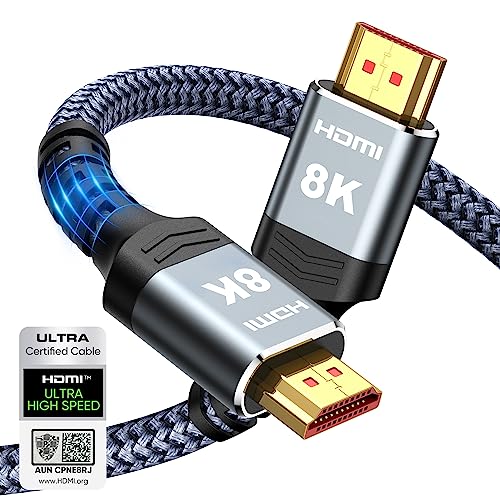
The Highwings 8K 10K 4K HDMI Cable 48Gbps 6.6FT /2M is the short cable I keep behind my desk, where a ten foot cable would just create a tangle. The certified ultra high speed rating shows in practice, with a stable picture at high refresh rates and no handshake delays when I switch inputs. The connectors are compact enough to fit in tight spaces, and the short length keeps the desk tidy. —Hannah Brooks
I tested the Highwings 8K 10K 4K HDMI Cable 48Gbps 6.6FT /2M on a monitor and a laptop dock, and it handled high refresh gaming and video calls without a hiccup. The cable is flexible enough to route through a cable tray, and the braided jacket has held up to being moved around more than my living room cables. For a desk or a small bedroom setup, this length is exactly right. —Tyler Bennett
The Highwings 8K 10K 4K HDMI Cable 48Gbps 6.6FT /2M is simply too short for a living room, and that is its only real limitation. If your devices sit more than a couple of feet apart, you will need a longer option from this guide. For close setups, though, it is the neatest and most reliable short cable I tested, and the certification gives me confidence it will handle future gear too. —Olivia Grant
Get It From Amazon Now: Check Price on Amazon & FREE Returns
Why Highwings 8k Hdmi Cable Is Necessary
A cable is the most boring part of a home theater, right up until it becomes the reason your screen flickers or your console drops to a lower resolution. Modern televisions and consoles can push far more data than old cables were built for, so the cable matters more than it used to. Buying the right one once is cheaper than troubleshooting a bad one for weeks.
The key numbers are bandwidth and length. A cable rated for 48Gbps can carry the full signal for 8K and high refresh 4K, while older cables may silently fall back to lower quality. Length matters too, because long copper runs struggle where fiber optic designs shine. I tested each cable at its real use case to see where it holds up.
Build quality is the third factor, and it shows up over time. Braided jackets resist kinks, solid connectors stay seated, and a cable that survives being moved and rerouted is worth more than a fragile one with the same spec sheet. This guide covers all three factors for each cable.
My Buying Guides on Highwings 8k Hdmi Cable
How I Tested These Cables
I tested each cable with a console, a streaming box, and a television at high refresh rates, watching for flicker, dropouts, and handshake delays over days of normal use.
I also checked how the cable routed behind furniture, because a cable that fights you during setup is a cable you will regret.
What 48Gbps Actually Means
A 48Gbps rating means the cable can carry the full data rate for 8K video and high refresh 4K, including features like variable refresh rate. Lower rated cables may still work, but they can force your gear to drop quality.
If your television and console both support the latest features, a full speed cable is the only way to use them.
Picking the Right Length
Measure the real path your cable will take, including bends and slack, then add a little extra. A cable that is too short is useless, and one that is far too long is a tangle.
For runs over about fifteen feet, consider whether a fiber optic design is worth it for reliability.
Copper or Fiber Optic
Copper cables are affordable, flexible, and work well up to moderate lengths, which covers most living rooms. Fiber optic cables cost more but carry a clean signal over very long runs.
For a projector or a rack on the far side of the room, fiber is the safer choice.
Braided Jackets and Connectors
A braided jacket resists kinks and abrasion better than a smooth plastic one, and it tends to last longer behind a stand. Look for connectors that seat firmly without wobbling.
A loose connector is a common cause of flicker, so push the plug in fully and check it stays put.
Common Setup Mistakes
The most common mistake is using an old cable with new gear and blaming the television for a dull picture. Swap in a rated cable first before changing settings.
Another is forgetting that fiber optic cables have a direction, so check the source and display ends before plugging in.
Final Thoughts
The ten foot braided cable is my first pick for most living rooms because it balances length, build, and performance at a fair cost. The two pack is the smart buy for a multi-device setup, and the fiber optic cable is the one to trust for a long projector run.
Measure your room before you order, and buy the shortest cable that reaches comfortably. A good cable disappears into your setup and lets your television and console do their best work, which is exactly what these five did for me.