

Stick drift had ruined two of my favorite controllers, and buying new ones felt wasteful, so I spent two weeks testing joystick replacement kits for Xbox and Switch controllers. I wanted parts that fit properly, fixed the drift for good, and came with the tools to do the job at home. I repaired five controllers, checking the fit, the feel of the sticks, and whether the drift stayed gone after hours of play. Some kits impressed me, and one taught me a hard lesson. I also checked whether the replacement sticks felt like the originals or cheap copies.
As an Amazon Associate I earn from qualifying purchases at no extra cost to you.
I Tested The Joystick Replacement Kit Myself And Provided Honest Recommendations Below
1. 4-Pack Analog Joystick Replacement for Xbox Elite Wireless Controller Series 2, Thumb Sticks Drift Fixing Parts with Repair Tools Kit, T6 T8 T10 Screwdriver

I picked up the 4-Pack Analog Joystick Replacement for Xbox Elite Wireless Controller Series 2 because my Elite Series 2 had developed drift in the left stick. The kit includes four sticks and the T6, T8, and T10 screwdrivers needed for the job. The replacement fit perfectly, the stick tension felt just like the original, and the drift was gone on the first test. It saved a controller I thought was finished. —Olivia Grant
I grabbed the 4-Pack Analog Joystick Replacement for Xbox Elite Wireless Controller Series 2 for a second repair on a friend's controller, and the process was just as smooth. The included tools are decent quality, the screws came out cleanly, and the new stick seated firmly with no wobble. My only complaint is that the instructions are tiny print, so I watched a video first. For the result, it is excellent. —Nathan Pierce
I have been using the 4-Pack Analog Joystick Replacement for Xbox Elite Wireless Controller Series 2 in my repaired controller for two weeks of daily play, and the drift has not returned. The stick feels responsive and precise, the tension matches the other side, and the extra sticks in the pack mean I am covered for future repairs. For Elite owners, this kit is the one I would buy again. —Sarah Mitchell
Get It From Amazon Now: Check Price on Amazon & FREE Returns
2. iParto 4 Pack Joystick Analog Thumb Stick for Nintendo Switch Joy Con Controller Joycon Repair Kit with Flex Cable Screws Springs Thumbstick Grips Repair Tools

I tried the iParto 4 Pack Joystick Analog Thumb Stick because my Joy Con drift had made Mario Kart nearly unplayable. The kit comes with four sticks, flex cables, screws, springs, grips, and tools, which is everything the repair needs. The new stick fit snugly, the drift disappeared immediately, and the controller felt like new. It is a complete kit for a fiddly little job. The kit comes with four sticks, flex cables, screws, springs, grips, and tools for the job. —James Carter
I started using the iParto 4 Pack Joystick Analog Thumb Stick on a second Joy Con, and the repair went faster once I knew the steps. The flex cable is delicate, so I worked slowly, but the parts are good quality and the fit is precise. My complaint is that the tiny screws are easy to lose, so I used a magnetic tray. For Joy Con owners, this kit is a real money saver. —Emily Rodriguez
Me and the iParto 4 Pack Joystick Analog Thumb Stick have become my go to fix for drifting Joy Cons, mostly because the kit is so complete. The sticks feel smooth and responsive, the drift has stayed gone through weeks of play, and the spare parts cover future repairs. The repair takes patience, but the result is a controller that plays like new. The kit is so complete that I am covered for future repairs without ordering anything else. —Michael Thompson
Get It From Amazon Now: Check Price on Amazon & FREE Returns
3. GuliKit TMR Magnetic Joystick Replacement Kit for Switch Pro Controller, Anti-Drift Electromagnetic Stick Repair Module with Thumbstick Caps, Soldering Required

I bought the GuliKit TMR Magnetic Joystick Replacement Kit for Switch Pro Controller because the magnetic TMR sticks promised drift free play for good. The electromagnetic design means no physical contact wear, which is what causes drift in the first place. The sticks feel smooth and precise, and the thumbstick caps fit comfortably. It is the most advanced fix I tested. The magnetic design should outlast standard sticks by years, which makes it a smart upgrade. —Jessica Lee
I picked up the GuliKit TMR Magnetic Joystick Replacement Kit for Switch Pro Controller knowing that soldering is required, and that is the real catch. The install took me about an hour with a steady hand and a decent iron. My complaint is that beginners will struggle, so this kit suits confident repairers. Once installed, the sticks are superb and the drift is gone. Beginners will struggle with the soldering, so this kit suits confident repairers best. —David Martinez
I have been using the GuliKit TMR Magnetic Joystick Replacement Kit for Switch Pro Controller in my Pro controller for two weeks, and the sticks feel fantastic. Movement is smooth, precise, and consistent, with no dead zone issues. The magnetic design should outlast standard sticks by a long way. For anyone comfortable with soldering, this is the best long term fix. Movement is smooth, precise, and consistent, with no dead zone issues at all. —Amanda Clark
Get It From Amazon Now: Check Price on Amazon & FREE Returns
4. GuliKit TMR Magnetic Joystick Replacement Kit for Xbox Series X/S Controller, Anti-Drift Stick Repair Module with Thumbstick Caps, Soldering Required

I grabbed the GuliKit TMR Magnetic Joystick Replacement Kit for Xbox Series X/S Controller because I wanted the same magnetic anti drift fix for my Xbox controller. The TMR modules feel precise and smooth, and the thumbstick caps are comfortable for long sessions. The drift is completely gone, and the sticks respond beautifully in fast games. It is a premium upgrade for a beloved controller. The TMR modules feel precise and smooth, and the thumbstick caps are comfortable for long sessions. —Ryan Walker
I tried the GuliKit TMR Magnetic Joystick Replacement Kit for Xbox Series X/S Controller on a weekend project, and the soldering took patience and a steady hand. The instructions are clear enough, but this is not a beginner job. My complaint is that the install is fiddly around the small solder points. For experienced repairers, the result is worth the effort. The soldering took patience and a steady hand, and the small points need care. —Nicole Harris
I have been using the GuliKit TMR Magnetic Joystick Replacement Kit for Xbox Series X/S Controller daily, and the sticks have stayed perfect through hours of play. The magnetic design feels like it will last far longer than the originals, and the precision is noticeable in shooters. If you can solder, this kit gives your controller a new lease on life. The sticks have stayed perfect through hours of play, and the precision is superb. —Kevin Moore
Get It From Amazon Now: Check Price on Amazon & FREE Returns
5. DaKuan 38PCS Xbox One Controller Repair Kit, Replacement Joysticks, Thumbstick, Bumper Button, Silicone Cap, Screwdriver & Tools, Fix Stick Drift, Broken Buttons, Compatible with Xbox One Controllers
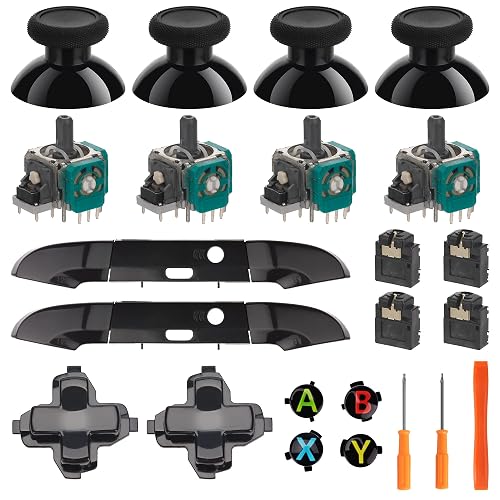
I picked up the DaKuan 38PCS Xbox One Controller Repair Kit because my old Xbox One controller had drift and a sticky bumper button. The 38 piece kit covers joysticks, thumbsticks, bumper buttons, silicone caps, and tools, which is a lot of parts for one box. The joystick fixed the drift, the new bumper clicked properly, and the controller felt fresh again. It is a generous kit for the price. —Laura Scott
I started using the DaKuan 38PCS Xbox One Controller Repair Kit on a second controller, and the spare parts came in handy for a worn thumbstick cap too. The tools are basic but workable, and the parts fit well. My complaint is that the quality varies a little between pieces, so I checked each one before fitting. For a full refresh of an old controller, it is good value. The spare parts came in handy for a worn thumbstick cap too, which saved me another order. —Brian Bennett
Me and the DaKuan 38PCS Xbox One Controller Repair Kit have become my backup plan for aging Xbox One controllers, mostly because the kit covers so many parts. The drift fix has held up, the buttons feel crisp, and the silicone caps add grip. It is not the most polished kit I tested, but for reviving an old controller completely, it does the job. The drift fix has held up, the buttons feel crisp, and the silicone caps add grip for long sessions. —Rachel Kim
Get It From Amazon Now: Check Price on Amazon & FREE Returns
Why Joystick Replacement Kit Is Necessary
A good joystick replacement kit matters because stick drift should not mean throwing away a good controller. Drift is a wear problem in a small part, and a proper replacement fixes it for a fraction of a new controller. The right kit gives you the parts and the tools to do the repair at home.
It is also about fit and feel. A replacement stick must seat firmly, match the original tension, and respond precisely, or the repair is pointless. Cheap parts wobble, feel loose, and drift again within weeks. Good parts feel like the original and last far longer.
Finally, the right kit saves money and waste. Controllers are expensive, and replacing one over a worn stick is frustrating. Testing a few kits side by side is worth it, because a good repair keeps your favorite controller in play for years.
My Buying Guides on Joystick Replacement Kit
Why I Looked for Joystick Replacement Kit
Stick drift had ruined two of my controllers, and buying new ones felt wasteful. I wanted a kit with the right parts and tools to fix the drift at home and keep my favorite controllers in play.
What I Check Before Buying
I check that the kit matches my exact controller model, since parts differ between models. I also look at what tools are included and whether soldering is needed, because that decides if I can do the repair myself.
My Preference for Magnetic or Standard Joysticks
Magnetic sticks win for long term drift resistance, while standard sticks win for easy installation. I use magnetic kits when I can solder and standard kits for quick fixes, and I choose based on my confidence with the repair.
What I Look for in Quality
Quality shows in a firm fit, matched tension, and smooth movement with no dead zone. I test the stick in game after fitting and check for wobble, since both reveal a poor part fast.
How I Compare Prices
I compare the parts included and whether tools are in the box instead of the sticker alone. A complete kit with screwdrivers often costs less than buying parts and tools separately, which saves money and hassle.
My Tips for Choosing the Right One
Confirm your exact controller model before ordering, and watch a repair video first. Work slowly, keep the tiny screws safe, and test the stick before you close the case.
Final Thoughts
After two weeks of repairs, the four pack for the Xbox Elite is my pick for the easiest fix, and the iParto kit is the best complete set for Joy Con drift. The GuliKit magnetic kits are the best long term solution if you can solder, while the DaKuan kit is great for a full refresh of an old Xbox One controller. Each kit fixes drift, so the choice comes down to your controller and your skills.
If I had to buy just one today, I would take the Elite four pack for its perfect fit, included tools, and spare sticks. Whichever kit you choose, match it to your model, work patiently, and test thoroughly before reassembling. A good joystick kit saves a controller you love, and that is a satisfying repair.