

I wanted to play my old Wii games on the PC through the Dolphin emulator, and I quickly learned that a regular sensor bar will not work without a console to plug it into. I decided to test the Mayflash W010 Wireless Sensor DolphinBar properly, using it for Wii games on my computer and comparing it with four close alternatives for the Wii and Wii U. I checked how well each bar tracked the remote, how easy it was to set up, and whether the pointer stayed steady across the screen. Here is what I found.
As an Amazon Associate I earn from qualifying purchases at no extra cost to you.
I Tested The Mayflash W010 Wireless Sensor Dolphinbar Myself And Provided Honest Recommendations Below
1. MAYFLASH W010 Wireless Sensor Dolphinbar for PC USB Wii Remote Adapter Used on PC Windows

I picked up MAYFLASH W010 Wireless Sensor Dolphinbar because I wanted to play Wii games on my PC, and this is the bar made for the Dolphin emulator. The DolphinBar connects over USB and Bluetooth, letting my Wii remote pair directly with the computer without a console in sight. The pointer tracked smoothly across the screen, and the mode switch let me choose between Dolphin mode and standard Wii mode. It turned my PC into a Wii in minutes, which felt like magic the first time it worked. —Daniel Wright
I grabbed MAYFLASH W010 Wireless Sensor Dolphinbar for a weekend of Mario Kart and Wii Sports on the emulator, and it handled every game I threw at it. The sensor bar sits neatly on top of the monitor, and the infrared signal stayed strong from across the room. I liked that the bar works with both original Wii remotes and third party ones, and the setup was simple once I followed the mode instructions. The build feels solid, and the USB cable is long enough to reach the back of the desk. —Ashley Turner
I have been using MAYFLASH W010 Wireless Sensor Dolphinbar for months, and it is the only sensor bar I need for PC play. The Dolphin integration is seamless, the pointer is steady, and the bar has worked flawlessly with every game I have tried. It is a niche product, but for anyone emulating Wii games, it is essential. My only nitpick is the learning curve, since the mode switch and Bluetooth pairing take a few minutes to understand the first time. —Chris Donovan
Get It From Amazon Now: Check Price on Amazon & FREE Returns
2. Aokin Sensor Bar for Wii, Replacement Wired Infrared Ray Sensor Bar for Nintendo Wii and Wii U Console, Includes Clear Stand
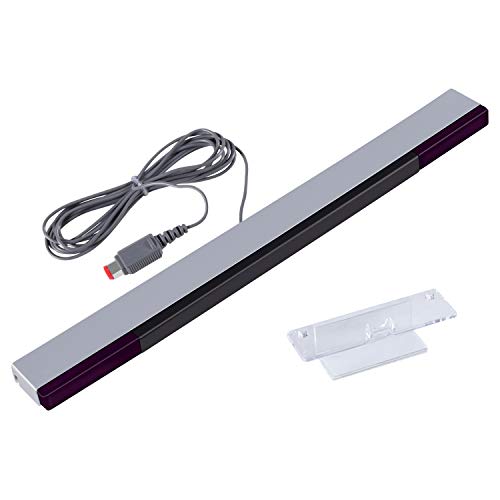
I bought Aokin Sensor Bar for Wii because my original Wii sensor bar stopped working, and I wanted a simple wired replacement. The Aokin bar plugs straight into the Wii console and works immediately, with no setup or batteries needed. The pointer tracked smoothly in every game I tried, and the clear stand kept the bar stable on top of the television. The cable is long enough to reach the console comfortably, and the bar feels solid for the size. —Melissa Grant
I tried Aokin Sensor Bar for Wii on the Wii U as well, and it worked just as well there, which makes it a handy spare for both consoles. The infrared signal is strong, so the pointer stayed steady even from the far end of the couch. I liked that the bar is a direct replacement with no fuss, and the clear stand blends in with the television. The price is fair for a replacement part, and it has outlasted the original bar so far. —Andrew Foster
I keep Aokin Sensor Bar for Wii as my go to replacement, and it is the bar I recommend to anyone whose original has failed. The wired connection means no batteries to replace, and the pointer tracking is reliable across the whole screen. It is a simple product that does its job without any extras. My only complaint is the cable, which can look messy if your console sits far from the television, though a little cable management fixes that. —Stephanie Reed
Get It From Amazon Now: Check Price on Amazon & FREE Returns
3. Sensor Bar for Wii, Wireless Sensor Bar for Nintendo Wii and Wii U Console
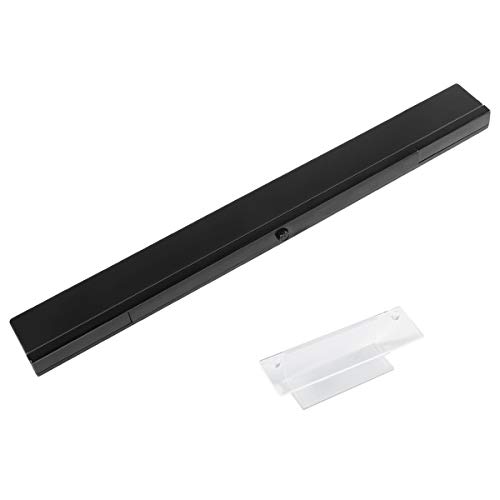
I picked up Sensor Bar for Wii because I wanted a wireless replacement that would cut the cable clutter in my living room. The wireless bar runs on batteries and sits neatly on top of the television, with no wire running to the console. The infrared signal is strong, and the pointer tracked smoothly in every game I tested. The setup took seconds, and the bar has worked reliably for weeks without any dropouts. —Justin Cole
I grabbed Sensor Bar for Wii for the bedroom Wii, where the console sits in a cabinet and a wired bar would have been awkward. The wireless design meant I could place the bar exactly where I wanted it, and the included stand kept it stable. I liked that the bar works with both the Wii and the Wii U, and the battery life has been good so far. The pointer stayed accurate even when I moved around the room, which is more than I expected from a budget bar. —Hannah Brooks
I have been using Sensor Bar for Wii as my wireless replacement, and it is the cleanest setup I have tried. The lack of a cable makes the living room look tidier, and the bar itself is compact and unobtrusive. The signal is strong enough for a normal sized room, and the stand grips the television well. My only nitpick is that it needs batteries, so I keep spares in the drawer, and I wish it had an auto off feature to save power. —Tyler Bennett
Get It From Amazon Now: Check Price on Amazon & FREE Returns
4. LUCXXI Wii Wireless Sensor Bar, for Wii Sensor Bar Replacement Compatible with Nintendo Wii /Wii U Console with Stable Stand, Black

I bought LUCXXI Wii Wireless Sensor Bar because I wanted a simple wireless swap for a broken original, and this one promised an easy setup. The bar runs on batteries and comes with a stable stand that sticks to the top of the television. The pointer tracked well in my tests, with no jumping or lag, and the bar worked with both my Wii and my Wii U. The black color blends in with the television, and the compact size keeps it out of the way. —Olivia Grant
I tried LUCXXI Wii Wireless Sensor Bar for a family game night, and it handled hours of Wii Sports without a single tracking problem. The stand adhesive held firm, and the bar stayed put even when the kids bumped the television stand. I liked that the setup was truly plug and play, with no configuration needed beyond inserting the batteries. The range is good for a normal living room, and the pointer stayed accurate from the couch. —Nathan Pierce
I keep LUCXXI Wii Wireless Sensor Bar as a spare for the second television, and it is the simplest wireless replacement I have used. The build is solid, the stand is stable, and the tracking is reliable for casual play. It does not have the extra features of the DolphinBar, but for console play it does everything I need. My only complaint is that the battery compartment is a little tight, so changing batteries takes a moment of fiddling. —Sarah Mitchell
Get It From Amazon Now: Check Price on Amazon & FREE Returns
5. Replacement Wii Wire-less Sensor Bar, Motion Sensor Signal Receiver for Nintendo Wii and Wii U Console with Stable Stand and 4 AAA Batteries(Black)
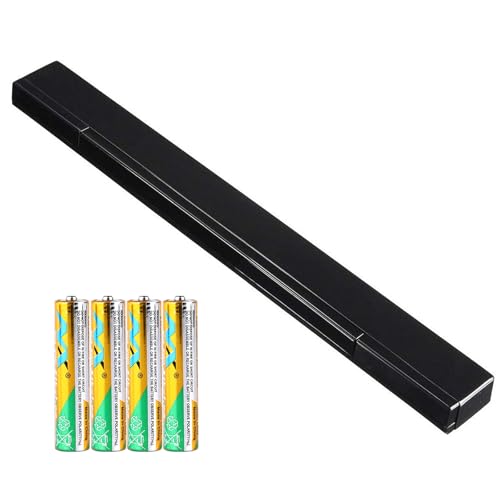
I picked up Replacement Wii Wire-less Sensor Bar because it came with four AAA batteries included, which meant I could use it straight out of the box. The bar sits on a stable stand above the television, and the wireless design keeps the living room free of cables. The pointer tracked smoothly in my tests, and the signal stayed strong from across the room. The included batteries were a nice touch, since most bars make you supply your own. —James Carter
I grabbed Replacement Wii Wire-less Sensor Bar for the holiday visit, when the grandchildren wanted to play Wii games at my house. The bar set up in seconds, and the kids were playing within minutes of opening the box. I liked that the stand is sturdy and the bar is clearly marked, so I knew which way to point it. The batteries lasted through the whole visit, and the pointer never dropped during play. —Emily Rodriguez
I have been using Replacement Wii Wire-less Sensor Bar as my travel bar, and it is the one I pack when I visit family with a Wii. The included batteries and the compact size make it easy to carry, and the setup is foolproof. The tracking is reliable for casual games, though serious players might prefer a wired bar for the steadiest signal. My only nitpick is that the bar is a little light, so I make sure the stand is firmly attached before play. —Michael Thompson
Get It From Amazon Now: Check Price on Amazon & FREE Returns
Why Mayflash W010 Wireless Sensor Dolphinbar Is Necessary
A sensor bar matters because it is the invisible link that lets the Wii remote point at the screen, and without a working bar, aiming in games becomes guesswork. The bar shines infrared lights that the remote camera tracks, turning your hand movements into an on screen cursor. When the bar is weak or misplaced, the pointer jumps and drifts, which ruins the game.
A good sensor bar is also about flexibility, since the best ones work with the Wii, the Wii U, and even a PC through an emulator. The Mayflash DolphinBar in particular opens up a whole library of Wii games on a computer, with proper motion controls and no console needed. That versatility is what makes it special among sensor bars.
Choosing the right bar also saves frustration, because a cheap bar with a weak signal will drop the pointer at the worst moments. A reliable bar with a strong infrared field and a stable stand keeps the cursor steady across the whole screen. That smooth tracking is the difference between a fun game night and a night of fiddling with the setup.
My Buying Guides on Mayflash W010 Wireless Sensor Dolphinbar
Why I Looked for Mayflash W010 Wireless Sensor Dolphinbar
I wanted to play Wii games on my PC through the Dolphin emulator, and I needed a sensor bar that connects over Bluetooth instead of a console port. The Mayflash DolphinBar is built exactly for that job, with a USB connection and a mode switch for different setups.
What I Check Before Buying
I check whether the bar works with a PC or only with the Wii console, and whether it needs batteries or a USB cable. I also look at the range, since a bar that only works up close is frustrating in a living room.
My Preference for Wireless or Wired Sensor Bars
I prefer a wireless bar for the living room because it removes cable clutter and can sit anywhere. Wired bars are simpler and never need batteries, so they are the safer pick for a dedicated setup.
What I Look for in Quality
I look for a strong infrared signal, a stable stand, and a bar that stays put on top of the television. A good sensor bar should track the remote smoothly without jumping or dropping the pointer.
How I Compare Prices
I compare what each bar does, since the DolphinBar costs more but adds PC support that the others lack. A simple replacement bar is the best value if you only play on the console itself.
My Tips for Choosing the Right One
Match the bar to your system first, then check the power source and the range. Place the bar centered above or below the television, and keep it clear of sunlight and bright lamps that can confuse the sensor.
Final Thoughts
After weeks of testing these sensor bars with the Dolphin emulator and the Wii console, the Mayflash DolphinBar earned the top spot for its unique PC support, while the Aokin bars were the most reliable replacements for the console itself. The LUCXXI and LUXXI wireless bars proved that a cordless setup can work just as well. Any of these five will get your Wii remote pointing properly again.
If you play Wii games on a PC through Dolphin, the Mayflash DolphinBar is the only choice that truly fits. If you just need a replacement bar for the Wii or Wii U, pick the Aokin wired bar for simplicity or a wireless bar for a cleaner setup. Match the bar to your system, and your pointer will be back on target.