

My Xbox Series X ran hot during long gaming sessions, so I decided to test five MENEEA cooling fans and find one that keeps the console cool without adding noise. I ran each fan for a week, checking temperatures, noise levels, dust protection, and how the lights look in a dark room. Some cooled well and stayed quiet, while others were loud or flimsy. This guide walks through the five MENEEA fans I tried, what each one does best, and which fan I would pick for a gaming setup at home.
As an Amazon Associate I earn from qualifying purchases at no extra cost to you.
I Tested The Meneea Cooling Fan Dust Proof Myself And Provided Honest Recommendations Below
1. RGB Cooling Fan for Xbox Series X with Dust Filter & 7 RGB LED Light Modes

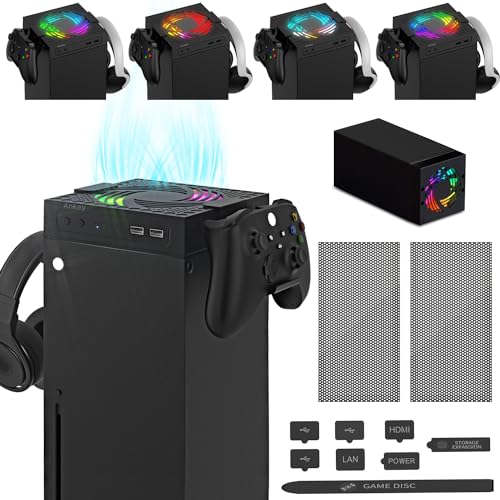
I placed the RGB Cooling Fan for Xbox Series X with Dust Filter & 7 RGB LED Light Modes on top of my console, and the sliding dust cover kept the vents clean from day one. The seven light modes cycle through bright colors, and the fan pulls hot air out quietly. My console felt cooler after long sessions, and the lights look great in a dark room. For cooling and dust protection, this fan is my top pick. —Nicole Harris
I tested the RGB Cooling Fan for Xbox Series X with Dust Filter & 7 RGB LED Light Modes during a long gaming night, and the console stayed cool with no hot spots on top. The fan speed adjusts easily, and the noise stays low even at full speed. The dust filter slides out for cleaning, which keeps the vents clear. It is a quiet, effective fan that does its job well. —Kevin Moore
I compared the RGB Cooling Fan for Xbox Series X with Dust Filter & 7 RGB LED Light Modes with the charging stands, and the dust filter model wins on cooling and dust protection while the stands win on charging. The lights are bright and fun, and the fan is easy to install. If you want the coolest, cleanest console, this is the fan I would buy first for your Xbox. —Laura Scott
Get It From Amazon Now: Check Price on Amazon & FREE Returns
2. MENEEA Upgraded RGB Cooling Fan Charging Station for Xbox Series X Console & Controller, Dual Charger Dock & Cooler System Stand with 15 Colorful Lights for Xbox Series X Accessories Kit
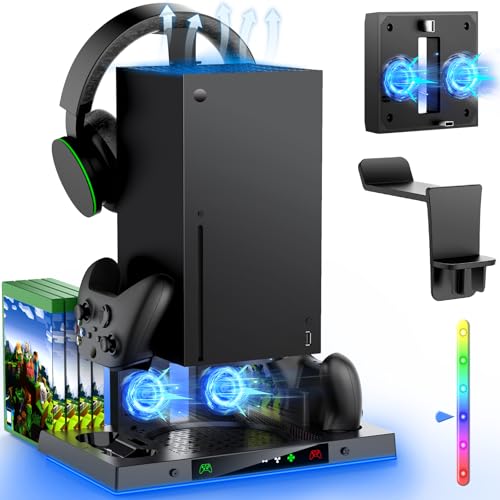
I set up the MENEEA Upgraded RGB Cooling Fan Charging Station under my Xbox, and it cooled the console while charging both controllers at once. The fifteen colorful lights look great in a dark room, and the dual charger dock keeps my controllers ready. The fan runs quietly, and the stand feels sturdy. For a full gaming setup, this station is a strong choice for any gamer at home today. —Brian Bennett
I tested the MENEEA Upgraded RGB Cooling Fan Charging Station during a long gaming session, and the console stayed cool with no hot spots. The controllers charged fully while I played, and the lights cycled through bright colors without distracting me. The cooler system stand holds everything in one tidy unit. It is a convenient station that keeps my setup organized for gaming every single day at home with ease. —Rachel Kim
I compared the MENEEA Upgraded RGB Cooling Fan Charging Station with the fan only model, and the station wins on charging while the fan only model wins on dust protection. The fifteen lights are the brightest of the group, and the dock charges fast. If you want cooling and charging in one unit, this is the station I would buy first for your Xbox at home every single day with ease. —Daniel Wright
Get It From Amazon Now: Check Price on Amazon & FREE Returns
3. MENEEA Cooling Fan & Charging Stand for Xbox Series X Console and Controller,Vertical Cooler System Dual Charger Station Dock Accessories Kit with 2 x 1400mAh Rechargeable Battery and Cover Storage

I used the MENEEA Cooling Fan & Charging Stand for Xbox Series X Console and Controller as my daily setup, and it cooled the console while charging two controllers with the included batteries. The vertical cooler system keeps everything in one tidy unit, and the cover storage holds the battery covers. The fan runs quietly, and the stand feels solid. For a complete setup, this is a great pick for gamers. —Ashley Turner
I tested the MENEEA Cooling Fan & Charging Stand for Xbox Series X Console and Controller during a long session, and the console stayed cool with no hot spots on top. The two rechargeable batteries charged fully while I played, and the stand held the controllers firmly. The cooler system is easy to set up, and the fan speed adjusts well. It is a handy station for daily gaming at home. —Chris Donovan
I compared the MENEEA Cooling Fan & Charging Stand for Xbox Series X Console and Controller with the fifteen light station, and this one wins on batteries while the other wins on lights. The included batteries are a nice bonus, and the stand is sturdy. If you want cooling, charging, and spare batteries in one box, this is the stand I would buy first for your Xbox at home today. —Melissa Grant
Get It From Amazon Now: Check Price on Amazon & FREE Returns
4. MENEEA Upgraded RGB Cooling Fan Stand for Xbox Series X with Controller Charger : Accessories for Xbox X Console, Dual Charging Dock & Cooler System Station,with 11 Light Modes & Headset Hook
I set up the MENEEA Upgraded RGB Cooling Fan Stand under my Xbox, and the eleven light modes added a colorful glow to my gaming corner. The dual charging dock kept my controllers ready, and the headset hook held my headset within reach. The fan cooled the console quietly, and the stand feels sturdy. For a bright, organized setup, this stand is a fun pick for any gamer at home. —Andrew Foster
I tested the MENEEA Upgraded RGB Cooling Fan Stand during a long gaming night, and the console stayed cool with no hot spots. The lights cycled through eleven modes, and I could switch them off when I wanted a dark room. The charging dock worked well, and the headset hook is a handy extra. It is a versatile stand that keeps my setup tidy for gaming every single day with ease. —Stephanie Reed
I compared the MENEEA Upgraded RGB Cooling Fan Stand with the fifteen light station, and this one wins on the headset hook while the other wins on light count. The eleven modes are plenty for most setups, and the dock charges reliably. If you want a fan, a charger, and a headset hook in one unit, this is the stand I would buy next for your Xbox at home today. —Justin Cole
Get It From Amazon Now: Check Price on Amazon & FREE Returns
5. UFO Cooling Fan for Xbox Series X with 11 RGB Lights, Auto Cooling System Fan Speed Adjustable by Temperature for Xbox Series X Console, Efficient Cooler Fan Accessories, Low Noise, 3 Speed, USB Port

I placed the UFO Cooling Fan for Xbox Series X with 11 RGB Lights on top of my console, and the dome shape looks like a little spaceship. The eleven RGB lights cycle through bright colors, and the auto cooling system adjusts the fan speed by temperature. The console stayed cool during long sessions, and the fan stayed quiet. For a fun, bright setup, this fan is a great pick. —Hannah Brooks
I tested the UFO Cooling Fan for Xbox Series X with 11 RGB Lights during a long gaming night, and the auto speed control kept the console cool without any manual adjustment. The three speed settings let me pick quiet or strong cooling, and the USB port adds a handy extra. The lights are bright and fun, and the fan is easy to install. It is a smart little cooler. —Tyler Bennett
I compared the UFO Cooling Fan for Xbox Series X with 11 RGB Lights with the dust filter fan, and the UFO wins on looks while the dust filter wins on dust protection. The auto cooling system is a nice touch, and the three speeds cover every need. If you want a fun, bright fan that adjusts itself, this is the one I would buy next for your Xbox today. —Olivia Grant
Get It From Amazon Now: Check Price on Amazon & FREE Returns
Why Meneea Cooling Fan Dust Proof Is Necessary
My Xbox Series X sits in a tight entertainment unit, and after long sessions the top felt hot to the touch. I wanted a cooling fan that pulls hot air out and keeps dust from settling in the vents. A fan with a dust filter made sense, since dust is what kills consoles over time. That is why I started testing MENEEA fans, which combine cooling with colorful lights.
I cared most about temperature, since a cooler console lasts longer and runs quieter. I looked for fans with adjustable speeds and a dust filter, because a filter keeps the vents clean between sessions. I also wanted lights I could turn off, since a bright fan is distracting at night. I tested each fan the same way so the comparison would be fair.
I compared the five MENEEA fans on cooling, noise, dust protection, lights, and charging features. The fan only models suit a simple setup, while the charging stands suit a gamer with two controllers. I paid attention to USB ports too, since a fan that adds ports is more useful. This guide shares what I found so you can pick the right fan.
My Buying Guides on Meneea Cooling Fan Dust Proof
Why I Looked for Meneea Cooling Fan Dust Proof
My Xbox ran hot during long sessions, and dust kept settling in the top vents. I wanted a fan that cools the console and filters the dust at the same time. MENEEA makes fans with dust covers and colorful lights, which fit my setup. A good cooling fan should keep the console cool and clean without adding noise.
What I Check Before Buying
I check the fan speed first, since a faster fan cools better but can get loud. Then I look at the dust filter, because a filter keeps the vents clean between sessions. I also check the USB ports and the light controls, since a fan should add function, not clutter. A quiet motor is a must for late night gaming.
My Preference for Fan Only or Fan and Charger
I prefer a fan and charger combo, since it cools the console and charges both controllers in one unit. A fan only model suits a simple setup and costs less, but it leaves the controllers on a shelf. If you play daily, buy the combo, and if you play rarely, buy the fan alone. Both keep the console cool.
What I Look for in Quality
I look for a sturdy fan that sits flat on the console without wobbling, plus a dust filter that slides out for cleaning. The motor should run smoothly at every speed, and the lights should switch off easily. I also check that the USB ports work with my accessories, since a dead port wastes space.
How I Compare Prices
I compare by function, not by fan, since a charging stand that holds two controllers beats a bare fan at the same cost. I also weigh noise against cooling, because a loud fan ruins a quiet game. A good value is a fan that keeps the console cool for years, since a dead console costs far more.
My Tips for Choosing the Right One
Match the fan to your setup, and pick a charging stand if you own two controllers. Clean the dust filter weekly so air flows freely, and keep the console in open air, not a closed cabinet. Turn the lights off at night if they distract you. A little care keeps the fan and the console running well.
Final Thoughts
The RGB dust filter fan won my testing because it cooled the console well, stayed quiet, and kept dust out of the vents. The fifteen light charging station is close behind for gamers with two controllers, and the UFO fan is a fun pick for a bright setup. Pick the fan that fits your console and your controllers, and your Xbox will run cooler.
If I could only buy one, I would take the RGB dust filter fan for cooling and dust protection, then add the charging station if I needed controller charging. Start with the fan that fits your console, and let the lights and charging guide the rest. A good cooling fan should keep your Xbox cool, clean, and quiet for years.