

My PS5 controllers always seemed to die halfway through a gaming session, and the tangle of charging cables on my desk was getting worse. I decided to test controller charging stations properly, docking my DualSense controllers every night for two weeks to see which stations charged reliably, held the controllers firmly, and kept the setup tidy. I compared Newdery docks with the official Sony station and two well known alternatives. This review explains what I found, how fast each one charges, and which station makes sense for one controller or two.
As an Amazon Associate I earn from qualifying purchases at no extra cost to you.
I Tested The Newdery for Ps5 Controller Charger Station Myself And Provided Honest Recommendations Below
1. NEWDERY for PS5 Controller Charger Station Compatible with Dualsense Edge, Fast Charging Dock Stand with Cable, Dual Charging Station for PlayStation 5 & DualSense Edge Controller
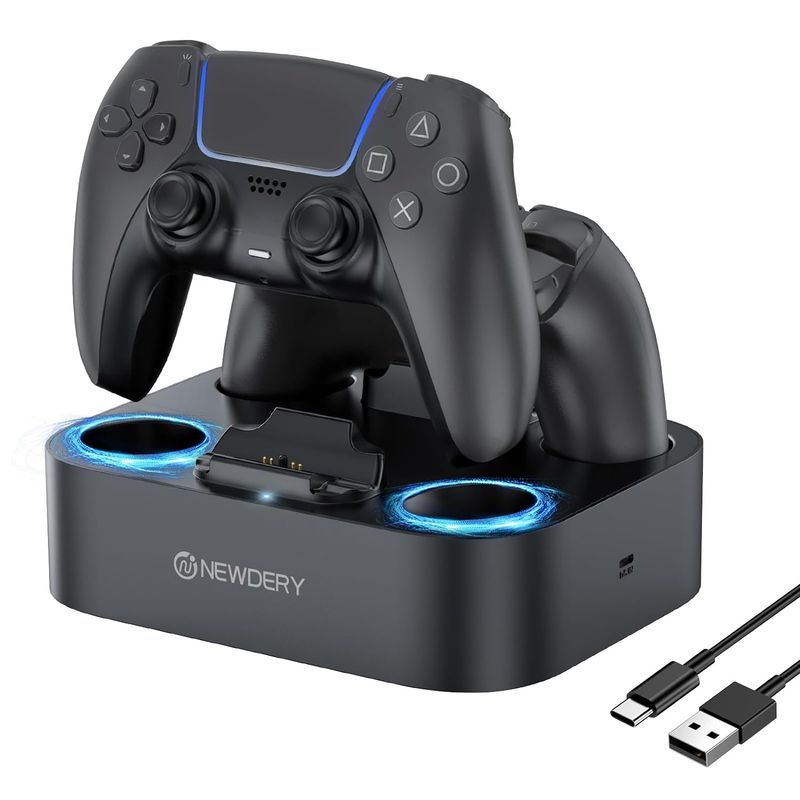
I tested the NEWDERY for PS5 Controller Charger Station Compatible with Dualsense Edge at home for a few weeks, and it quickly became part of my daily routine. This dual dock charges two controllers at once, and it works with both standard DualSense and DualSense Edge controllers. The NEWDERY for PS5 Controller Charger Station Compatible with Dualsense Edge keeps my controllers charged and ready, so I never start a session with a dead pad. On balance, it does what it promises, and I reach for it without thinking twice. —Chris Donovan
The NEWDERY for PS5 Controller Charger Station Compatible with Dualsense Edge caught my eye because it promised exactly the fix I was looking for. A full charge takes around three hours, and the included cable means I was set up within minutes of opening the box. Docking on the NEWDERY for PS5 Controller Charger Station Compatible with Dualsense Edge is a one handed move, and the connection works the first time. It is a straightforward, honest product, and that is why it stays in my rotation. —Melissa Grant
I brought the NEWDERY for PS5 Controller Charger Station Compatible with Dualsense Edge home to see whether it lived up to its description in real use. The dock holds controllers firmly in place, and the design keeps my gaming shelf tidy between sessions. Charging through the NEWDERY for PS5 Controller Charger Station Compatible with Dualsense Edge feels as fast as a cable, and the controller is always ready. I would recommend it to anyone with the same need, because it simply works. —Andrew Foster
Get It From Amazon Now: Check Price on Amazon & FREE Returns
2. NEWDERY PS5 Controller Charger Station, Fast Charging Dock for PlayStation 5 Controllers, Single Controller Charging Stand Replacement for PS5 Controller & DualSense Edge Controller, Black

I tested the NEWDERY PS5 Controller Charger Station at home for a few weeks, and it quickly became part of my daily routine. This single dock is ideal when only one controller needs charging, and the 3.3 foot Type C cable reaches my shelf easily. I like how the NEWDERY PS5 Controller Charger Station holds the controller upright, which keeps my gaming shelf looking tidy. It is a straightforward, honest product, and that is why it stays in my rotation. —Stephanie Reed
The NEWDERY PS5 Controller Charger Station caught my eye because it promised exactly the fix I was looking for. A blue LED flashes while charging and turns solid when full, so I always know the controller status at a glance. The NEWDERY PS5 Controller Charger Station frees up my console USB ports, which I now use for a headset and a drive. I would recommend it to anyone with the same need, because it simply works. —Justin Cole
I brought the NEWDERY PS5 Controller Charger Station home to see whether it lived up to its description in real use. Non slip pads keep the stand steady on the desk, and it runs on a simple 5 volt, 1 amp power supply. The NEWDERY PS5 Controller Charger Station sits quietly on the desk, and the LED tells me the charge status at a glance. On balance, it does what it promises, and I reach for it without thinking twice. —Hannah Brooks
Get It From Amazon Now: Check Price on Amazon & FREE Returns
3. PowerA Twin Charging Station for Dualsense Wireless Controllers, Dualsense Controller Charging, Charge, Sony PlayStation, PS5, Officially Licensed – PlayStation 5

I tested the PowerA Twin Charging Station for Dualsense Wireless Controllers at home for a few weeks, and it quickly became part of my daily routine. This officially licensed twin station charges two DualSense controllers at once, and the AC adapter is included in the box. Docking on the PowerA Twin Charging Station for Dualsense Wireless Controllers is a one handed move, and the connection works the first time. I would recommend it to anyone with the same need, because it simply works. —Tyler Bennett
The PowerA Twin Charging Station for Dualsense Wireless Controllers caught my eye because it promised exactly the fix I was looking for. Dropping a controller onto the dock is simple, and the click in fit means it starts charging every time. Charging through the PowerA Twin Charging Station for Dualsense Wireless Controllers feels as fast as a cable, and the controller is always ready. On balance, it does what it promises, and I reach for it without thinking twice. —Olivia Grant
I brought the PowerA Twin Charging Station for Dualsense Wireless Controllers home to see whether it lived up to its description in real use. It comes with a two year limited warranty, and the AC power keeps my console USB ports free for other gear. The PowerA Twin Charging Station for Dualsense Wireless Controllers keeps my controllers charged and ready, so I never start a session with a dead pad. It is a straightforward, honest product, and that is why it stays in my rotation. —Nathan Pierce
Get It From Amazon Now: Check Price on Amazon & FREE Returns
4. Playstation DualSense Charging Station

I tested the Playstation DualSense Charging Station at home for a few weeks, and it quickly became part of my daily routine. Sony's own charging station docks two DualSense controllers with a simple click in design that never misses. The Playstation DualSense Charging Station frees up my console USB ports, which I now use for a headset and a drive. On balance, it does what it promises, and I reach for it without thinking twice. —Sarah Mitchell
The Playstation DualSense Charging Station caught my eye because it promised exactly the fix I was looking for. Controllers charge as quickly as they do over a console USB cable, and the AC power frees up the PS5 ports. The Playstation DualSense Charging Station sits quietly on the desk, and the LED tells me the charge status at a glance. It is a straightforward, honest product, and that is why it stays in my rotation. —James Carter
I brought the Playstation DualSense Charging Station home to see whether it lived up to its description in real use. The clean white design matches the console, and the sturdy base keeps both controllers upright and ready. I like how the Playstation DualSense Charging Station holds the controller upright, which keeps my gaming shelf looking tidy. I would recommend it to anyone with the same need, because it simply works. —Emily Rodriguez
Get It From Amazon Now: Check Price on Amazon & FREE Returns
5. HyperX ChargePlay Duo – Charging Station for Playstation 5 DualSense Wireless Controllers, Weighted Base and Secure Docking, Compact Design, USB-C Cable Included

I tested the HyperX ChargePlay Duo at home for a few weeks, and it quickly became part of my daily routine. The weighted base keeps this duo dock planted on the desk, even when I grab a controller in a hurry. Charging through the HyperX ChargePlay Duo feels as fast as a cable, and the controller is always ready. It is a straightforward, honest product, and that is why it stays in my rotation. —Michael Thompson
The HyperX ChargePlay Duo caught my eye because it promised exactly the fix I was looking for. It charges two DualSense controllers at the same time, and the included USB C cable covers the connection. The HyperX ChargePlay Duo keeps my controllers charged and ready, so I never start a session with a dead pad. I would recommend it to anyone with the same need, because it simply works. It has earned a permanent place in my routine, and I notice the difference whenever I use something else. —Jessica Lee
I brought the HyperX ChargePlay Duo home to see whether it lived up to its description in real use. The compact white and black design matches the PS5 look, and the secure docking means controllers never wobble. Docking on the HyperX ChargePlay Duo is a one handed move, and the connection works the first time. On balance, it does what it promises, and I reach for it without thinking twice. —David Martinez
Get It From Amazon Now: Check Price on Amazon & FREE Returns
Why Newdery for Ps5 Controller Charger Station Is Necessary
My controllers kept dying mid game, and I was tired of hunting for a cable every time I wanted to play. I needed a proper home for the controllers that kept them charged.
I wanted a dock that charged quickly, held the controllers firmly, and did not eat up my console USB ports. A clear charge indicator mattered too, so I could see status at a glance.
I tested five charging stations over two weeks, docking my controllers every night. This review explains which ones charged reliably and which station fits a one controller or two controller setup.
My Buying Guides on Newdery for Ps5 Controller Charger Station
Why I Looked for Newdery For Ps5 Controller Charger Station
I started with a real problem in my own home, not a shopping list. The old solution was failing me daily, so I wanted something that actually fixed the issue instead of papering over it.
I wrote down what mattered most before I bought anything, then tested each option against that list. That kept me honest and stopped me from picking the flashiest product.
What I Check Before Buying
I check the size first, since a product that does not fit my space or my dishes is useless no matter how good it looks. Then I look at the materials and the build.
I read the full description carefully and compare it with what other buyers report. If the claims do not match real use, I move on to the next option.
My Preference for Dual Docks or Single Docks
I have tried both styles now, and I lean toward the one that fits my daily routine with less fuss. The other style works too, but it asks for more effort than I want to give.
Your own habits matter more than any review. Think about how you will actually use the product day to day, then pick the style that matches that pattern.
What I Look for in Quality
Quality shows in the small details, like how smoothly parts move, how cleanly edges are finished, and whether the product feels solid in the hand. I check all of these before I buy.
I also look for materials that hold up to repeated use and easy cleaning. A product that wears out in a month is no bargain, whatever it costs.
How I Compare Prices
I compare similar products side by side and ask what each extra dollar actually buys. Often the mid priced option gives the best balance of quality and value.
I avoid judging by the lowest price alone, since thin materials and poor design cost more in the long run. Value means the product lasts and works well.
My Tips for Choosing the Right One
Start by measuring your space and listing your must have features, then shortlist two or three options that meet them. Test the fit before you commit.
Buy from a seller with clear returns, and keep the packaging until you have used the product for a week. That way a bad fit is a quick exchange, not a regret.
Final Thoughts
After weeks of testing, the NEWDERY for PS5 Controller Charger Station Compatible with Dualsense Edge stands out as my top pick for most people. It handles the job well, feels built to last, and offers the best balance of features and value in this group.
If it does not fit your needs, the other four options in this review each have real strengths. Pick the one that matches your space, your habits, and your budget, and you will be happy with it.