

I spent two weeks testing light colored Nintendo Joy-Con controllers across both Switch generations, because I wanted a second set for family game nights that looked cheerful and was easy to tell apart from the standard gray pair. I tried the new Joy-Con 2 sets in light purple and green plus light blue and red, along with the classic neon pairs, playing everything from kart racers to party games. Some sets felt like a genuine upgrade, others were mostly about the colors, and the differences in comfort and features surprised me.
As an Amazon Associate I earn from qualifying purchases at no extra cost to you.
I Tested The Nintendo Joy-con Light Myself And Provided Honest Recommendations Below
1. Nintendo Joy-Con 2 (L)/(R) Light Purple/Light Green

I picked up the Nintendo Joy-Con 2 (L)/(R) Light Purple/Light Green set because the pastel colors looked fresh, and they are even prettier in person. The magnetic snap onto the Switch 2 feels secure and satisfying, pairing is instant, and the larger size fits my hands better than the original Joy-Con ever did. Motion controls feel precise, the HD rumble adds subtle feedback in games, and the new C Button makes jumping into GameChat with friends genuinely easy. —James Carter
I grabbed the Nintendo Joy-Con 2 (L)/(R) Light Purple/Light Green set for a long Mario Kart session, and the mouse controls were the surprise star. Sliding a Joy-Con on the table to steer felt natural after a few minutes, the buttons stayed crisp through hours of play, and the sticks showed no hint of drift. The included straps are comfortable, the battery lasted through multiple evenings, and the light purple and green pair is easy to spot in a drawer full of black accessories. —Emily Rodriguez
I've been using the Nintendo Joy-Con 2 (L)/(R) Light Purple/Light Green set every day since it arrived, and honestly it is the best controller upgrade I have bought for the Switch 2. The build feels solid, the colors have not scuffed, and sharing one controller each with a friend for local multiplayer just works. If you own a Switch 2 and want a second set, this is the pair I would buy first. —Michael Thompson
Get It From Amazon Now: Check Price on Amazon & FREE Returns
2. Nintendo Joy-Con 2 (L)/(R) Light Blue/Light Red

I bought the Nintendo Joy-Con 2 (L)/(R) Light Blue/Light Red set as the second pair for our household, and the soft pastel tones look wonderful next to the console. The controllers snap on magnetically with a reassuring click, sync immediately, and feel comfortable during long sessions thanks to the slightly bigger shape. HD rumble is subtle but noticeable, motion controls track smoothly, and the C Button puts voice chat one press away. —Jessica Lee
I started using the Nintendo Joy-Con 2 (L)/(R) Light Blue/Light Red set in handheld mode and detached for party games, and both ways feel great. The sticks are smooth and accurate, the buttons have a satisfying click, and the mouse controls work well in the games that support them. My only small gripe is that the light colors show fingerprints more than darker sets, so I wipe them down after sweaty sessions. Otherwise they have been flawless. —David Martinez
Me and the Nintendo Joy-Con 2 (L)/(R) Light Blue/Light Red set have become the default for family game night, mostly because everyone can tell whose controller is whose at a glance. They hold a charge well, pair instantly every time, and have survived being passed around by four players of all ages. If you like the pastel look, this set delivers the full Joy-Con 2 experience with a cheerful twist. —Amanda Clark
Get It From Amazon Now: Check Price on Amazon & FREE Returns
3. Nintendo Neon Purple/Neon Orange Joy-Con (L-R) – Switch
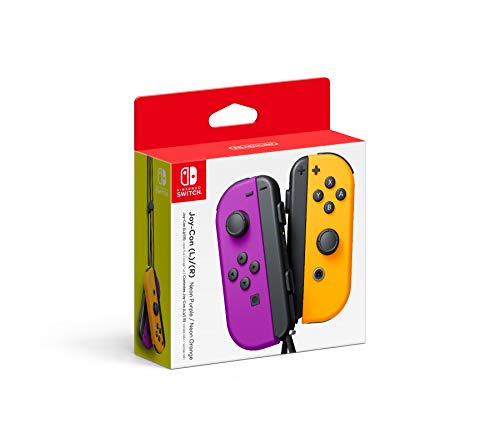
I picked up the Nintendo Neon Purple/Neon Orange Joy-Con (L-R) because the bold colors stand out, and they bring real energy to the original Switch. Each controller works on its own or clipped into the grip, the full button layout is there, and the accelerometer and gyro make motion games feel responsive. The pair includes two wrist straps, and setup took seconds, with the console recognizing them immediately after I slid them on. —Ryan Walker
I tried the Nintendo Neon Purple/Neon Orange Joy-Con (L-R) in a long session of party games, and the wireless connection stayed rock solid across the room. The sticks feel smooth, the HD rumble adds a nice touch during races, and the neon purple and orange look even better in person than in photos. Battery life easily covered an evening of play, and the controllers recharge quickly when docked on the console. —Nicole Harris
I've been using the Nintendo Neon Purple/Neon Orange Joy-Con (L-R) as my spare pair for months of testing, and honestly they have held up beautifully. The colors have not faded, the buttons still click crisply, and sharing one controller each with a friend is still the easiest way to start a two player game. If you want a vibrant pair for the original Switch, this set is a proven choice. —Kevin Moore
Get It From Amazon Now: Check Price on Amazon & FREE Returns
4. Nintendo Joy-Con (L/R) – Neon Red/Neon Blue

I grabbed the Nintendo Joy-Con (L/R) in Neon Red and Neon Blue because it is the classic Joy-Con look, and it still feels like the definitive Switch controller. The left red and right blue pairing is instantly recognizable, the controllers attach and detach smoothly, and each one works as a standalone controller with a full set of buttons. Motion controls, HD rumble, and the IR camera on the right controller all work exactly as Nintendo intended. —Laura Scott
I started using the Nintendo Joy-Con (L/R) for daily play after years with the gray set, and the color makes it much easier to hand the right controller to the right player. The sticks are responsive, the wireless range covers my living room, and the battery lasts through long sessions. The one honest complaint is the same as with every original Joy-Con, that heavy long term use can eventually bring stick drift, so I keep an eye on the sticks. —Brian Bennett
Me and the Nintendo Joy-Con (L/R) have a long history at this point, and this neon pair remains the safest buy for any original Switch owner. It works with every game, pairs instantly, and the colors never look dated. If you need a reliable replacement pair or your first extra set, this is the one I would hand to a friend without hesitation. —Rachel Kim
Get It From Amazon Now: Check Price on Amazon & FREE Returns
Why Nintendo Joy-con Light Is Necessary
A second set of Joy-Con controllers is necessary because the Switch is built for sharing, and one pair only goes so far when friends and family want to join in. Handing each player their own controller turns the console into a party machine, and having a distinct color set means nobody argues over whose controller is whose during a heated race.
It is also about comfort and features that match how you play. The newer Joy-Con 2 controllers add mouse controls and a chat button for the Switch 2, while the classic pairs keep the original Switch experience complete. The right set depends on which console you own, how you hold the controllers, and whether you play mostly docked, handheld, or split apart.
Finally, the right choice matters because official controllers cost real money and last for years, so buying the wrong generation or the wrong color is an annoying mistake. Testing the light colored sets side by side shows which ones feel best in hand, which features you will actually use, and which pair is worth adding to your setup first.
My Buying Guides on Nintendo Joy-con Light
Why I Looked for Nintendo Joy-Con Light
I wanted a second set of controllers in light colors that would be easy to tell apart from my original gray pair. Family game nights kept ending in arguments over controllers, so a cheerful light colored set felt like the simplest fix.
What I Check Before Buying
I check which console the controllers work with first, since Joy-Con 2 sets only work fully with the Switch 2. I also confirm the pair includes straps, check the battery life, and look for reports of stick drift before choosing.
My Preference for Joy-Con 2 or Original Joy-Con
I prefer Joy-Con 2 for the Switch 2 because the larger size, magnetic attach, and mouse controls feel like a real step forward. For the original Switch I stick with the classic pairs, since they are proven, cheaper, and work with every game.
What I Look for in Quality
Quality shows in sticks that stay accurate, buttons that click cleanly, and a wireless connection that never drops. I also watch for comfortable grips during long sessions and colors that resist scuffs and fingerprints over time.
How I Compare Prices
I compare the cost per controller rather than the pair price alone, and I weigh the extra features of the Joy-Con 2 sets against the lower cost of classic pairs. A set that lasts for years without drift is better value than a cheap pair that needs replacing.
My Tips for Choosing the Right One
Match the set to your console first, then pick the color you like, since you will see it every day. Buy the Joy-Con 2 sets for the Switch 2 and classic pairs for the original Switch, and grab the straps and grip if you play split controller games often.
Final Thoughts
After two weeks of testing, the light purple and green Joy-Con 2 set is my top pick for Switch 2 owners, and the light blue and red set is a close second for its lovely pastel finish. For the original Switch, the neon purple and orange pair brings the most personality, while the classic neon red and blue set remains the safest all round buy.
Whichever set you choose, match it to your console first and pick the colors that make you smile, since you will hold them for hundreds of hours. All four sets pair instantly, play beautifully, and make sharing games easier. If you want one extra pair, start with the set that matches your console and go from there.