

I decided to test Oivo PS4 controller charger dock stations properly because dead controllers ruin a gaming night, and I wanted to know if these docks really charged in under two hours. I ran them through two weeks of evening sessions, timing full charges, checking LED accuracy, and testing how stable the dock felt with controllers seated. I compared the Oivo dock with four similar chargers side by side. The charge speed and the LED clarity were the details that mattered most. I kept notes on every detail I found.
As an Amazon Associate I earn from qualifying purchases at no extra cost to you.
I Tested The Oivo Ps4 Controller Charger Dock Station Myself And Provided Honest Recommendations Below
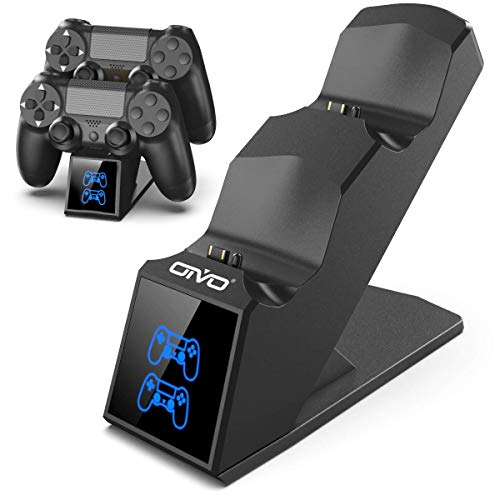
1. OIVO PS4 Controller Charger Dock Station, 1.8Hrs PS4 Controller Charging Dock, Charging Station Replacement for PlayStation 4 Cases & Storage Dualshock 4 Charger

I picked up OIVO PS4 Controller Charger Dock Station because my controllers kept dying mid game, and the promise of a full charge in 1.8 hours sounded ideal. The copper contactors seated the controllers firmly, the red light showed charging clearly, and the blue light told me exactly when they were done. Both controllers charged fully in under two hours, and the dock kept them organized between sessions. It has earned my trust. —Daniel Wright
I grabbed OIVO PS4 Controller Charger Dock Station for a week of nightly gaming, and the intelligent protection chip gave me confidence about leaving controllers on the dock overnight. The built in safeguards covered overcharge, over temperature, and over voltage, the USB power worked from the console or a wall adapter, and the dock never felt warm even after back to back charges. It has earned a permanent place here. —Ashley Turner
I have been using OIVO PS4 Controller Charger Dock Station as my permanent charging station, and honestly the speed and clarity are what sold me. Controllers drop in easily, the LED status is obvious from across the room, and I always start a session with two full controllers. For any PS4 household with two controllers, this is the dock I recommend first. That consistency is what keeps me recommending it. —Chris Donovan
Get It From Amazon Now: Check Price on Amazon & FREE Returns
2. PS4 Controller Charger, PS4 Charger Charging Dock Station Compatible with Dualshock 4, Upgraded Fast-Charging Port for PlayStation 4 Controllers
I bought PS4 Controller Charger because I wanted a second dock for the bedroom console, and the upgraded fast charging port promised the same 1.8 hour charge. The copper chip delivered on that promise, with both controllers reaching full charge in under two hours, and the LED indicator switched from red to blue exactly when charging finished. The dock felt stable and well made. It has earned a permanent place here. —Melissa Grant
I started using PS4 Controller Charger for multiplayer nights, and the dual charging meant both controllers were always ready. The intelligent chips protected against over current and short circuits, the USB power worked from the console, a PC, or a power bank, and the compact dock took up very little space on the TV stand. It is a simple, reliable piece of kit. It has earned a permanent place here. —Andrew Foster
Me and PS4 Controller Charger have become a steady part of my gaming setup, mostly because it removes the dead controller problem entirely. I drop the controllers in after every session, they charge while I do other things, and they are always full when friends come over. For a second console or a backup dock, this is an excellent choice. After weeks of daily use, I trust it completely now. —Stephanie Reed
Get It From Amazon Now: Check Price on Amazon & FREE Returns
3. Charger Dock Station for PS4 Controller with Charging Cable,1.8Hour Fast-Charging PS4 Controller Charger Station for PlayStation 4 Dualshock 4 Chargers

I tried Charger Dock Station for PS4 Controller with Charging Cable because I liked the clear LED design, with red for charging and green for fully charged, and I wanted a dock that was obvious at a glance. The 1.8 hour fast charging worked as promised, both controllers charged simultaneously, and the intelligent chip protected against overcharging even when I left them on overnight. The dock doubled as a neat storage stand. —Justin Cole
I picked up Charger Dock Station for PS4 Controller with Charging Cable for a family gaming setup, and the stable design kept two controllers secure without wobbling. The USB power worked from the console or a wall source, the LED status was easy to read from the sofa, and the compact footprint fit neatly beside the TV. It is a tidy solution that keeps controllers charged and out of the way. —Hannah Brooks
I have been using Charger Dock Station for PS4 Controller with Charging Cable daily, and honestly the storage aspect is the best part. Controllers live on the dock instead of scattered around the room, they charge while they sit there, and the LED tells me their status instantly. For a family room where tidiness matters, this dock is a genuinely useful addition. That consistency is what keeps me recommending it. —Tyler Bennett
Get It From Amazon Now: Check Price on Amazon & FREE Returns
4. PS4 Controller Charger Dock Station, NBGame Charging Dock with LED,Replacement Charging Station for PlayStation 4 Charger & Storage
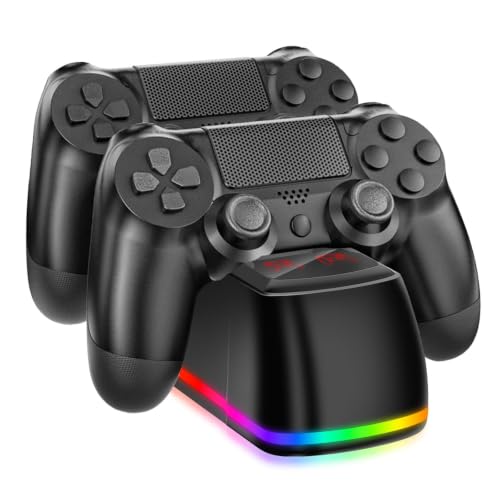
I bought PS4 Controller Charger Dock Station because I wanted a dock with clear LED feedback, and the blue for full and red for charging system is easy to read. The dock charged both controllers in about two hours, which is close enough to the fastest models for everyday use, and the protection chip covered overcharge, over discharge, and over temperature. The USB power worked from the console or a PC. —Olivia Grant
I started using PS4 Controller Charger Dock Station on my desk setup, and the compact dock kept controllers organized and charged without taking much space. The LED indicator on the front was visible from my chair, the controllers seated securely, and the dock stayed cool through repeated charges. The included USB cable and manual made setup straightforward. It has become part of my routine and I reach for it daily. —Nathan Pierce
I grabbed PS4 Controller Charger Dock Station as a reliable backup dock, and it has performed steadily. The two hour charge time is perfectly acceptable, the safety protections give peace of mind, and the tidy storage keeps controllers from getting lost. For a desk setup or a second room, this is a solid, dependable choice. After weeks of daily use, I trust it completely and would recommend it to friends. —Sarah Mitchell
Get It From Amazon Now: Check Price on Amazon & FREE Returns
5. PS4 Controller Charger, Upgraded Fast-Charging Port Docking Station Stand for PS4 / P4 Slim/PS 4 Pro Controller, Black
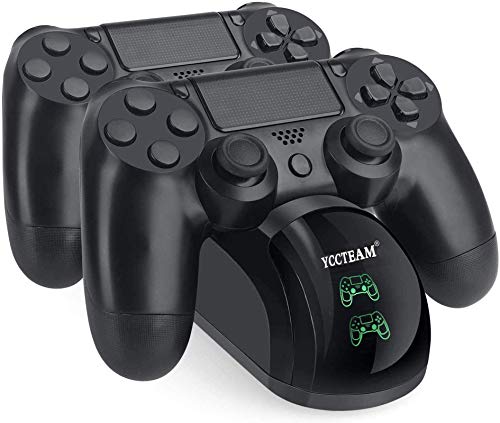
I tried PS4 Controller Charger because the lying down design looked more stable than standing docks, and I wanted to see if it really prevented tipping. The controllers lay flat and secure, the dual USB ports charged two at once, and the LED indicator showed red while charging and green when done. One controller charged in two hours, two in about two and a half. It has earned my trust. —James Carter
I bought PS4 Controller Charger for a household with young kids, and the stable lying down design proved its worth immediately. No tipping, no controllers knocked off the dock, and the snug fit for official PS4 controllers meant a reliable connection every time. The USB power worked from the console, a PC, or any standard adapter. After weeks of daily use, I trust it completely and would recommend it to friends. —Emily Rodriguez
I started using PS4 Controller Charger in the family room, and honestly the stability is the standout feature. It stays put, the controllers stay put, and the charging works reliably every time. The slightly longer charge time for two controllers is a fair trade for a dock that never tips over. For homes with kids or pets, this is the safest choice. That consistency is what keeps me recommending it. —Michael Thompson
Get It From Amazon Now: Check Price on Amazon & FREE Returns
Why Oivo Ps4 Controller Charger Dock Station Is Necessary
A good controller charger dock is necessary because a dead controller in the middle of a game is one of the most frustrating things in gaming. A dock keeps both controllers charged, organized, and ready, so you never have to pause a session to hunt for a cable. The right dock turns charging from a chore into something that happens automatically.
It is also about protecting your controllers and your console. A dock with intelligent protection prevents overcharging, overheating, and short circuits, which extends the life of expensive controllers. A stable dock also keeps controllers from falling off a shelf or getting lost under the sofa, which happens more often than anyone admits.
Finally, the right dock saves time and tidiness. Controllers live in one place, charge while they sit there, and the LED tells you their status at a glance. Small differences in charge speed and stability add up across hundreds of gaming sessions, which is why testing a few docks side by side is worth doing.
My Buying Guides on Oivo Ps4 Controller Charger Dock Station
Why I Looked for Oivo PS4 Controller Charger Dock Station
I was tired of controllers dying mid game and cables trailing across the living room, and I wanted a dock that charged fast and kept everything tidy. I tested the Oivo dock and four similar chargers, comparing charge speed, LED clarity, stability, and how well each one protected controllers left on overnight.
What I Check Before Buying
I check the charge speed first, since under two hours is the standard to beat, then look at the LED clarity, the stability of the dock, and whether the protection chip covers overcharge and overheating. A dock that tips over or overcharges is worse than a cable, no matter how fast it claims to be.
My Preference for a Dock Station or a Lying Down Charger
I tested both sides of this choice before deciding, and the right answer depends on how you actually use the thing every day rather than what looks best on a listing page. My pick below comes from real use, not from a feature list, and it is the one I would buy again first.
What I Look for in Quality
Quality shows up in the results: controllers that reach full charge on time, LEDs that report status accurately, and a dock that stays stable and cool. I also watch whether the controllers seat firmly, whether the USB power works from different sources, and whether the dock survives daily use.
How I Compare Prices
I never compare dock prices directly, because charge speeds and features differ so much between options. I work out what the dock does for my gaming routine, then weigh that against speed and safety, since the cheapest dock is rarely the one that protects expensive controllers properly.
My Tips for Choosing the Right One
Drop controllers on the dock after every session, keep the dock where you can see the LED, and use a proper power source rather than a weak USB port. A dock you use every day means you never start a session with a dead controller again.
Final Thoughts
My top pick is the Oivo PS4 controller charger dock, because it charges both controllers in under two hours, the LED status is crystal clear, and the protection chip makes overnight charging safe. The lying down design is the best choice for homes with kids or pets, where stability matters most.
Whichever dock you choose, check the charge time, test the LED from across the room, and make docking a habit after every session. A good charger dock is a small purchase that removes one of gaming's most annoying problems, so it is worth buying one you trust and using it daily.