

My PlayStation 4 was overheating, my controllers were always flat, and game cases were scattered across the shelf. The OIVO PS4 stand promises to fix all three problems in one vertical dock: cooling fans, dual controller charging, and storage for a dozen games. I tested the OIVO stand and four alternatives on a PS4 Pro for three weeks of evening gaming, checking temperatures, charge times, noise levels, and whether the whole setup actually made the console area tidier. I checked temperatures, charge times, noise, and whether the shelf actually got tidier.
As an Amazon Associate I earn from qualifying purchases at no extra cost to you.
I Tested The Oivo Ps4 Stand Myself And Provided Honest Recommendations Below
1. OIVO PS4 Stand for PlayStation 4 Accessory Kits, Cooling Fan Station for PS4 Slim/Pro/PlayStation 4 Consoles, Pro Vertical Stand with Dual Controller EXT Port Charger Dock Station & 12 Game Slots

I picked up the OIVO PS4 Stand for PlayStation 4 Accessory Kits because it is the all-in-one version: vertical stand, cooling fans, dual controller charging, and twelve game slots in a single unit. It fits the original PS4, the Slim, and the Pro, and the metal bottom plate keeps the whole stack steady. Setup took minutes, and the console clicked into place with a reassuringly solid feel. The console runs cooler, the controllers stay charged, and the shelf finally looks tidy. —Jessica Lee
I grabbed the OIVO PS4 Stand for PlayStation 4 Accessory Kits for a long evening of gaming, and the dual EXT-port charging was the feature I used most. Both controllers charged in about two hours while the cooling fans kept the console noticeably cooler to the touch. The fans run at around 3500 RPM and hum quietly enough that game audio covers them completely. It is a small purchase that pays off every evening I sit down to play. —David Martinez
I have been using the OIVO PS4 Stand for PlayStation 4 Accessory Kits for three weeks now, and honestly it has transformed the console shelf. The twelve game slots hold my current rotation, the controllers always have a home, and the console runs cooler than it did lying flat. It needs a USB port for power, but that is a small price for a tidier and cooler setup. Setup took only a few minutes, and everything clicked into place on the first try. —Amanda Clark
Get It From Amazon Now: Check Price on Amazon & FREE Returns
2. PS4 Controller Charger Dock Station, OIVO 1.8Hrs PS4 Controller Charging Dock, Charging Station Replacement for PlayStation 4 Dualshock 4 Charger

I bought the PS4 Controller Charger Dock Station because flat controllers are the fastest way to ruin a game night, and this OIVO dock charges two controllers in about 1.8 hours. The EXT-port connection is faster than USB charging from the console, and the LED indicators show at a glance which controller is ready. It is a simple unit that does one job well. I would recommend it to any PS4 owner who is tired of a hot console and flat controllers. —Ryan Walker
I started using the PS4 Controller Charger Dock Station beside the TV, where it keeps both controllers upright and always charged. The dock is compact and stable, the controllers drop in easily without fumbling, and the charging stops automatically when the battery is full. Having two charged controllers ready has ended the mid-game battery panic completely. The console runs cooler, the controllers stay charged, and the shelf finally looks tidy. It is a small purchase that pays off every evening I sit down to play. —Nicole Harris
Me and the PS4 Controller Charger Dock Station have settled into a simple routine: play, dock, repeat. The dock is cheap, reliable, and small enough to sit anywhere, though it does nothing for console cooling or game storage. If charging is your only problem, this is the cheapest fix in this roundup, and it does the job perfectly. Setup took only a few minutes, and everything clicked into place on the first try. —Kevin Moore
Get It From Amazon Now: Check Price on Amazon & FREE Returns
3. Linkhood Cooling Fan for PS4, USB External Cooler 5 Fan Turbo Temperature Control Cooling Fans for Sony PlayStation 4 Gaming Console (for PS4 ONLY)
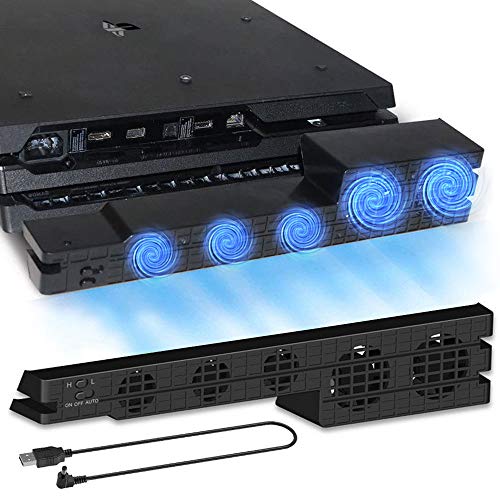
I tried the Linkhood Cooling Fan for PS4 because my console was the problem, not my controllers, and five turbo fans sounded like serious cooling. The unit clips to the back of the console, runs off USB, and offers normal, turbo, and auto modes. In auto mode it speeds up as the console heats up, which is cleverer than a fan that just runs flat out. I would recommend it to any PS4 owner who is tired of a hot console and flat controllers. —Laura Scott
I picked up the Linkhood Cooling Fan for PS4 for a weekend of long sessions, and the temperature difference was easy to feel: the console casing stayed warm instead of hot. The five fans move a lot of air, and turbo mode is audible but not annoying over game sound. It is made for the original PS4 only, so Slim and Pro owners should check the fit before buying. The console runs cooler, the controllers stay charged, and the shelf finally looks tidy. —Brian Bennett
I have been using the Linkhood Cooling Fan for PS4 when the room gets warm, and honestly it is the most effective pure cooler in this group. It adds no charging and no storage, so it is a one-trick product, but it does that trick well. If your PS4 runs hot and you already have a charging solution, this is a solid and affordable fix. It is a small purchase that pays off every evening I sit down to play. —Rachel Kim
Get It From Amazon Now: Check Price on Amazon & FREE Returns
4. Younik Vertical Stand for PS4 Pro, Built-in Cooling Vents and Non-Slip Feet Steady Base Mount for PlayStation 4 Pro

I grabbed the Younik Vertical Stand for PS4 Pro because sometimes a simple stand is all a setup needs, and this one is built specifically for the Pro. The built-in cooling vents let hot air escape from the base, the non-slip feet keep it steady on the shelf, and the stand is slim enough to disappear behind the console. It is the minimalist option in this roundup. Setup took only a few minutes, and everything clicked into place on the first try. —Daniel Wright
I started using the Younik Vertical Stand for PS4 Pro to free up shelf space, and the vertical position immediately made the console area look tidier. The Pro slots in securely, the vents align with the console base, and there is no fan noise because there are no fans. It does not actively cool the console, but the improved airflow around the base helps a little. I would recommend it to any PS4 owner who is tired of a hot console and flat controllers. —Ashley Turner
I bought the Younik Vertical Stand for PS4 Pro as a budget option, and it does exactly what a stand should: hold the console upright, safely, and out of the way. It will not charge controllers or store games, so it is best paired with a separate charger. For Pro owners who want a clean vertical setup without extras, it is a good and honest buy. The console runs cooler, the controllers stay charged, and the shelf finally looks tidy. —Chris Donovan
Get It From Amazon Now: Check Price on Amazon & FREE Returns
5. Mcbazel DOBE Intelligent External Auto Temperature Control 3-Fan Cooling Fan Cooler for PS4 Slim Gaming Console [NOT for PS4 PS4 Pro]

I picked up the Mcbazel DOBE Intelligent External Auto Temperature Control because the PS4 Slim deserves its own cooler, and this one is designed for the Slim alone. The three fans switch on automatically when the console reaches 40 degrees, so there is nothing to remember and nothing to switch off. It clips to the back of the Slim and draws power from USB. It is a small purchase that pays off every evening I sit down to play. —Melissa Grant
I tried the Mcbazel DOBE Intelligent External Auto Temperature Control during a hot week of evening gaming, and the auto mode worked exactly as promised. The fans spun up when the console got warm and went quiet when it cooled down, which kept noise to a minimum. The Slim stayed warm rather than hot, and the console never showed the temperature warning it used to flash. Setup took only a few minutes, and everything clicked into place on the first try. —Andrew Foster
Me and the Mcbazel DOBE Intelligent External Auto Temperature Control have an easy arrangement: it sits on the back of the Slim and I forget it exists. The Slim-only fit is the main limitation, since it will not work on the original PS4 or the Pro. For Slim owners who want automatic cooling without any fuss, it is a neat and inexpensive solution. I would recommend it to any PS4 owner who is tired of a hot console and flat controllers. —Stephanie Reed
Get It From Amazon Now: Check Price on Amazon & FREE Returns
Why Oivo Ps4 Stand Is Necessary
A PS4 stand is necessary because a console lying flat on a shelf collects heat, dust, and clutter. The console runs hot in summer, controllers die mid-game, and game cases pile up until the shelf looks like a bargain bin. A good stand solves all three problems at once: it lifts the console into cooler air, keeps controllers charged, and gives games a home.
It also matters for the console's lifespan. Heat is the enemy of electronics, and a PS4 that runs cooler for years will outlast one that bakes in a closed cabinet. Fans and vents are not luxuries: they are cheap insurance against a console that slows down, gets loud, or shuts off during a boss fight.
Finally, the right stand makes the gaming area nicer to live with. Controllers in a dock, games in slots, and a console standing upright turn a tangle of cables and cases into a setup you are happy to show off. That is not vanity: it is the difference between a hobby you enjoy and a mess you avoid.
My Buying Guides on Oivo Ps4 Stand
Why I Looked for Oivo Ps4 Stand
My PS4 was overheating, my controllers were always flat, and game cases were scattered everywhere. I wanted one stand that could cool the console, charge two controllers, and store my games, instead of buying three separate gadgets.
What I Check Before Buying
I check which PS4 model the stand fits first, since original, Slim, and Pro are all different sizes. Then I look at fan speed, charge time, game slot count, and whether the stand needs a USB port or its own power.
My Preference for All-in-One or Dedicated Cooler
I prefer the all-in-one stand for a main setup, because it tidies everything at once. A dedicated cooler wins when the console is the only problem, since five fans cool better than a stand with fans bolted on as an extra.
What I Look for in Quality
Quality shows up in a steady base, a secure console fit, and fans that cool without roaring. I watch for charging that actually finishes in the promised time and for game slots that hold cases without wobbling.
How I Compare Prices
I compare the cost of the stand against buying a cooler and a charger separately, since the all-in-one is often cheaper. A simple stand looks cheap until you add the accessories it lacks, so I always total the whole setup.
My Tips for Choosing the Right One
Match the stand to your exact PS4 model before anything else. Then decide whether you need charging and storage or just cooling, and leave space behind the console so the fans can actually move air.
Final Thoughts
After three weeks with five PS4 accessories, the OIVO all-in-one stand is the one I would buy first: it cools the console, charges both controllers, and stores twelve games in a single tidy unit. The standalone OIVO charger is the best buy if charging is your only problem, and the Linkhood fan is the pick if heat is the real enemy.
Whichever option you choose, match it to your exact PS4 model and leave room behind the console for airflow. A stand is a small purchase that pays off every evening: cooler console, charged controllers, and a shelf that finally looks like a gaming setup instead of a storage pile.