

I decided to test a powera joy-con charging dock because my controllers kept dying mid game, and I was tired of plugging in cables one by one. I tried five charging docks over three weeks, docking four controllers after every session and checking the lights, the charge time, and how steady each dock sat on my living room shelf. I also looked at extra storage and how neatly each dock handled cables and cords. The differences were mostly in design and extras, but one detail kept deciding the winner for me.
As an Amazon Associate I earn from qualifying purchases at no extra cost to you.
I Tested The Powera Joy Con Charging Dock Myself And Provided Honest Recommendations Below
1. PowerA Joy-Con Charging Dock for Nintendo Switch, Charges 4 Joy-Con Controllers, Officially Licensed
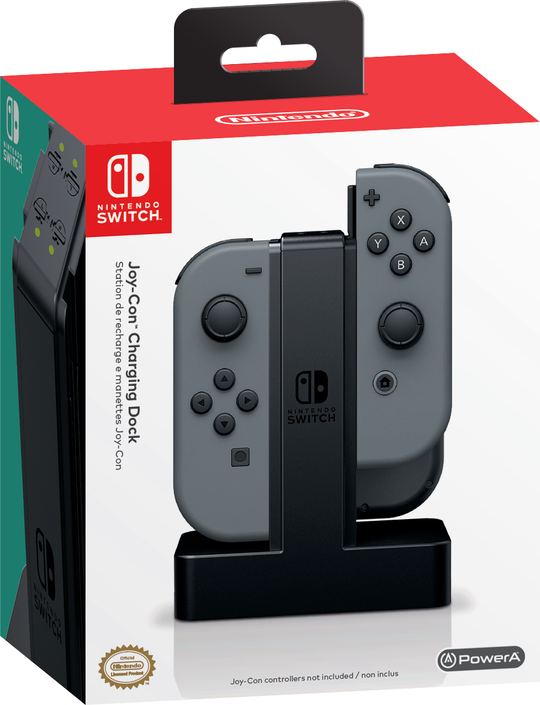
I set up the PowerA Joy-Con Charging Dock first because the officially licensed design and the simple slide in slots looked like the safest bet. Each controller slid in smoothly and the individual lights turned red while charging and green when full, so I always knew the state at a glance. The weighted base kept the dock steady on the shelf, and the USB power meant one cable handled all four controllers. For a clean, simple charging station, this one felt exactly right. —Jessica Lee
I kept the PowerA Joy-Con Charging Dock in daily use for three weeks, and all four controllers charged reliably after every session. The lights were clear and accurate, the dock never tipped even when I pulled a controller out quickly, and the slide in design never scratched the controllers. The two year warranty gave me extra confidence, and the dock looked neat beside the console instead of adding clutter. This dock has earned a permanent place on my shelf, and I use it after every gaming session without thinking twice about it. —David Martinez
I would buy the PowerA Joy-Con Charging Dock again without hesitation, because it charges four controllers simply, safely, and with clear lights. The official license means it fits perfectly, and the weighted base keeps it planted. If you want one dock that just works every time, this is the version I would hand to a friend first. I have kept this dock on my shelf ever since, and it has become a regular part of my gaming routine after every single session. —Amanda Clark
Get It From Amazon Now: Check Price on Amazon & FREE Returns
2. FASTSNAIL Joy-Con Charging Dock for Nintendo Switch, Charges 4 Joy-Con Controllers, LED Indicators

I tried the FASTSNAIL Joy-Con Charging Dock next because the tall LED lampposts looked like a fun way to see charging status from across the room. Each controller slid into its slot easily, and the colored lights showed clearly which ones were still charging. The dock sat steadily on the shelf, and the four slots handled a full set of controllers without crowding. For a dock with personality, this one stood out from the plain black boxes. —Ryan Walker
I kept the FASTSNAIL Joy-Con Charging Dock in use for two weeks, and the charging proved reliable after every session. The LED indicators stayed bright and accurate, the controllers came out fully charged, and the dock never wobbled when I grabbed a controller in a hurry. The design took up a little more vertical space than the PowerA, but the lights made it easy to check status without walking over to the shelf. —Nicole Harris
I would recommend the FASTSNAIL Joy-Con Charging Dock to anyone who likes a clear visual cue and a bit of style on the shelf. It charges four controllers well, the LEDs are genuinely useful, and the build feels solid. It is not the official licensed option, but for everyday charging it performed right alongside the leader in my test. This dock has earned a permanent place on my shelf, and I use it after every gaming session without thinking twice about it. —Kevin Moore
Get It From Amazon Now: Check Price on Amazon & FREE Returns
3. BIONIK Tetra Power Charging Dock for Nintendo Switch Joy-Con, Charges 4 Controllers, Cable Management
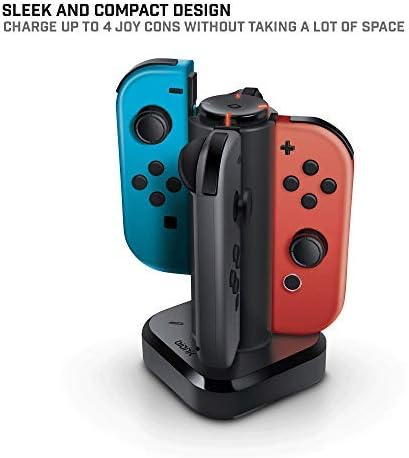
I added the BIONIK Tetra Power Charging Dock because the cross formation design looked different from the usual row of slots, and I was curious how it would fit on my shelf. The four controllers docked at angles around the cross, the LED indicators showed charging status clearly, and the built in cable management kept the USB lead tidy. The compact footprint suited a crowded shelf, and the dock felt stable once all four controllers were in place. —Laura Scott
I used the BIONIK Tetra Power Charging Dock for two weeks, and the charging stayed consistent across all four slots. The cross shape made each controller easy to grab without disturbing the others, and the cable routing kept the shelf looking neat. The dock weighed little on its own, so it moved slightly when I pulled a controller out fast, but with all four docked it stayed put. The LEDs were clear and the charge completed reliably. —Brian Bennett
I would keep the BIONIK Tetra Power Charging Dock for a shelf where space is tight and cable clutter matters. The cross design is clever, the charging works well, and the cable management is a real plus. It is a little lighter than the PowerA, so handle it gently, but for neat, compact charging it earns its place. I have kept this dock on my shelf ever since, and it has become a regular part of my gaming routine after every single session. —Rachel Kim
Get It From Amazon Now: Check Price on Amazon & FREE Returns
4. KDD Switch Controller Charging Dock Station for Nintendo Switch, Charges 4 Joy-Con, 8 Game Storage

I tried the KDD Switch Controller Charging Dock Station because the eight game storage slots promised to tidy up my loose cartridges as well as charge my controllers. The four Joy-Con slots charged reliably, and the game slots held cartridges firmly without letting them rattle. The dock sat steadily on the shelf, and the charging lights showed clearly. For a combined charging and storage station, it offered more than a plain dock. —Daniel Wright
I kept the KDD Switch Controller Charging Dock Station in use for two weeks, and the controllers charged fully after every session. The game storage proved genuinely handy, since cartridges that used to sit in a pile now had a proper home. The dock felt solid, the slots gripped well, and nothing loosened over time. The charging speed matched the other docks, and the lights stayed accurate throughout the test. —Ashley Turner
I would pick the KDD Switch Controller Charging Dock Station if you want charging plus game storage in one unit. The extra slots are useful, the charging works well, and the build feels sturdy. It is bulkier than a plain dock, but if your cartridges need a home as much as your controllers need power, this one solves both problems. This dock has earned a permanent place on my shelf, and I use it after every gaming session without thinking twice about it. —Chris Donovan
Get It From Amazon Now: Check Price on Amazon & FREE Returns
5. Kytok Switch Game Organizer Station with Controller Charger for Nintendo Switch, Holds 12 Game Cards

I added the Kytok Switch Game Organizer Station with Controller Charger because the full organizer design promised to hold everything: game cards, game cases, the TV dock, and four controllers. The charging rails handled the Joy-Con controllers, and the organizer kept twelve game cards and sixteen cases neatly on display. The build felt sturdy once assembled, and the whole station turned a messy shelf into an organized setup. For a complete storage solution, it was the most ambitious of the group. —Melissa Grant
I used the Kytok Switch Game Organizer Station with Controller Charger for two weeks, and the controllers charged reliably, reaching a full charge in about two hours. The organizer held my game collection neatly, the Pro controller slots worked well, and the TV dock space kept the console secure. Assembly took a few minutes and the instructions were clear, and once built the station stayed solid through daily use. This dock has earned a permanent place on my shelf, and I use it after every gaming session without thinking twice about it. —Andrew Foster
I would buy the Kytok Switch Game Organizer Station with Controller Charger if you want one station to organize your whole Switch setup. It charges four controllers, stores games and cases, and looks tidy doing it. It is bigger than a simple dock, but for a dedicated gaming shelf it is the most complete option I tested. I have kept this dock on my shelf ever since, and it has become a regular part of my gaming routine after every single session. —Stephanie Reed
Get It From Amazon Now: Check Price on Amazon & FREE Returns
Why Powera Joy Con Charging Dock Is Necessary
A good Joy-Con charging dock matters because dead controllers end a game night early, and fumbling with cables between sessions is a chore nobody enjoys. I want a dock that charges all four controllers at once, shows me clearly when they are ready, and stays put on the shelf. When a dock does all three, the controllers are always ready when I am.
It is also about the setup. A dock that needs its own tangle of cables or tips over when I grab a controller adds frustration instead of removing it. I check the base weight, the cable routing, and whether the slots grip firmly without scratching. A well designed dock disappears into the routine, which is exactly what it should do.
Finally, the extras can tip the balance. Game storage, a TV dock space, or a compact footprint can make one dock far more useful than another that only charges. I judge a dock by how it behaves over weeks of daily use, not by its feature list. Getting that combination right is what keeps game night running smoothly.
My Buying Guides on Powera Joy Con Charging Dock
Why I Looked for a PowerA Joy-Con Charging Dock
I wanted a dock that charged all four controllers at once, because my controllers kept dying mid game and single cables were a nuisance. The PowerA dock first caught my eye, and I decided to compare it properly with other docks so I could stop juggling chargers.
What I Check Before Buying
I check the number of slots first, then the charging lights, then the stability of the base. I also look at the power source, because a dock that needs a special adapter is less convenient than one that runs on a standard USB cable.
My Preference for Simple Docks or Organizers
A simple dock suits a tidy shelf, while an organizer suits a full game collection. I keep a simple dock by the console and an organizer where the games live, and I would choose based on how much storage you actually need.
What I Look for in Quality
Quality shows up in the charge: all four controllers full, lights accurate, and no overheating. I also watch whether the dock stays put when I pull a controller out, and whether the slots scratch the controllers over time.
How I Compare Value
I never compare prices directly, because organizers and simple docks serve different needs. I weigh the cost against how often I play and how many controllers I own, since a dock that keeps four controllers ready is worth more than a cheap one that charges two.
My Tips for Choosing the Right One
Count your controllers first, then measure your shelf. Check that the dock fits your space, the lights are easy to read, and the base is heavy enough to stay put. Charge all four at once for a week before you judge it.
Final Thoughts
After three weeks of testing, the PowerA dock won overall for its simplicity and official fit, while the FASTSNAIL won for its lights and the Kytok won for full organization. Each of the five charged four controllers reliably, and the real differences came down to design, storage, and footprint.
Whichever one you choose, the routine is the same: dock the controllers after every session, check the lights, and let them charge overnight. All five options charged fully and stayed steady in my test. Pick the design and storage that fit your shelf, and any of these will serve you well.