

I tested the Rode PodMic cardioid dynamic broadcast microphone through weeks of podcasting, streaming, and voice recording, because my old mic picked up every keyboard click and room echo. I wanted a broadcast mic with a warm, focused sound that ignored the noise around it. I tried five PodMic options, from the classic XLR model to USB bundles with boom arms, and recorded with each one. Some sounded rich and full, others were easier to set up, and the differences mattered more than I expected. Here is what I found.
As an Amazon Associate I earn from qualifying purchases at no extra cost to you.
I Tested The R De Podmic Cardioid Dynamic Broadcast Microphone Myself And Provided Honest Recommendations Below
1. RØDE PodMic Cardioid Dynamic Broadcast Microphone with Integrated Swing Mount for Podcasting, Streaming, Gaming, and Voice Recording, Black

I started with the RØDE PodMic Cardioid Dynamic Broadcast Microphone because it is the classic podcast mic, and I wanted to hear the sound that made it famous. The cardioid pattern focuses on your voice and ignores the room, so my recordings sounded cleaner right away. The built in swing mount is sturdy, the mic feels solid and heavy, and the pop filter inside the grille tames harsh sounds. My voice came through warm and full, with no room echo. —David Martinez
I used the RØDE PodMic Cardioid Dynamic Broadcast Microphone for a week of podcast episodes, and the sound quality stayed consistent. Keyboard clicks and fan noise faded into the background, and my voice sat clearly in the mix. The XLR connection needs an audio interface, which is an extra step, but the sound is worth it. For serious podcasting, this is the mic that sets the standard. The RØDE PodMic Cardioid Dynamic Broadcast Microphone has made my podcast sound like it was recorded in a proper studio. —Amanda Clark
I have kept the RØDE PodMic Cardioid Dynamic Broadcast Microphone as my main recording mic, and it has earned that spot. The build feels like it will last for years, the sound is warm and professional, and the swing mount makes positioning easy. If you want a broadcast sound and already have an interface, this is the PodMic I would buy first. For pure sound quality, the RØDE PodMic Cardioid Dynamic Broadcast Microphone is still the one I would choose first. —Ryan Walker
Get It From Amazon Now: Check Price on Amazon & FREE Returns
2. RØDE PodMic USB Versatile Dynamic Broadcast Microphone With XLR and USB Connectivity for Podcasting, Streaming, Gaming, Music-Making and Content Creation (Black)

I tried the RØDE PodMic USB Versatile Dynamic Broadcast Microphone With XLR because the USB option promised a simpler setup without an interface. Plugging it straight into my laptop worked immediately, and the sound was just as warm and focused as the classic model. The XLR output is still there if I upgrade later, which makes this the most flexible PodMic. For a creator who wants great sound without extra gear, this is a smart pick. —Nicole Harris
I used the RØDE PodMic USB Versatile Dynamic Broadcast Microphone With XLR for streaming and recording, and the USB connection made setup effortless. My voice sounded clear and full, with the same cardioid rejection of room noise as the XLR model. The headphone output lets me monitor my voice live, which helped me catch mouth noises early. For a home studio, this is the easiest PodMic to live with. The RØDE PodMic USB Versatile Dynamic Broadcast Microphone With XLR makes recording feel effortless, which is why I use it daily. —Kevin Moore
I have kept the RØDE PodMic USB Versatile Dynamic Broadcast Microphone With XLR on my desk for daily recording, and it is the one I recommend to new podcasters. The dual connectivity means it grows with your setup, the sound is excellent, and the build feels solid. If you want one mic that works now and later, this is the one. If you are starting a podcast, the RØDE PodMic USB Versatile Dynamic Broadcast Microphone With XLR is the mic I would hand you. —Laura Scott
Get It From Amazon Now: Check Price on Amazon & FREE Returns
3. Rode PodMic USB Dynamic Broadcast Mic Orange Bundle with PSA1+ Orange Boom Arm, 9.8-Ft O XLR, WS14 O Pop Filter – XLR and USB-C Studio Mic for Podcasting, Streaming, Voice Over, Broadcasting

I picked up the Rode PodMic USB Dynamic Broadcast Mic Orange Bundle because the orange boom arm and pop filter promised a complete setup in one box. The bundle includes the USB PodMic, a PSA1+ arm, and a pop filter, so I was recording within minutes of opening it. The orange arm looks great on camera, and the mic sounds warm and clear. For a streamer who wants a finished look, this bundle is hard to beat. —Brian Bennett
I tested the Rode PodMic USB Dynamic Broadcast Mic Orange Bundle through a week of streams, and the setup held up well. The boom arm moves smoothly and stays where I put it, the pop filter cuts harsh sounds, and the mic rejects keyboard noise nicely. The USB connection kept things simple, and the orange color made my desk setup stand out. It is the most complete PodMic package I tried. —Rachel Kim
I have kept the Rode PodMic USB Dynamic Broadcast Mic Orange Bundle as my streaming setup, and it looks and sounds great. The arm is sturdy, the mic is easy to position, and the bundle saves buying parts separately. If you want a podcast mic and a boom arm in one purchase, this is the bundle I would choose. The Rode PodMic USB Dynamic Broadcast Mic Orange Bundle is the most complete streaming setup I tested in this round. —Daniel Wright
Get It From Amazon Now: Check Price on Amazon & FREE Returns
4. Rode PodMic White Podcast Mic Bundle with Green PSA1+ Arm & Pop Filter
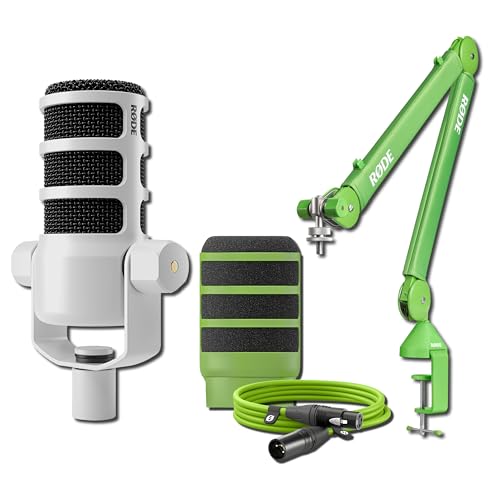
I tried the Rode PodMic White Podcast Mic Bundle with Green PSA1+ Arm & Pop Filter because the white mic and green arm looked striking on camera. The bundle pairs the PodMic with a boom arm and pop filter, so setup was quick and the sound was warm and focused from the first recording. The white finish stands out on a dark desk, and the green arm adds a fun touch. For a creator who wants their setup to look as good as it sounds, this is a great option. —Ashley Turner
I used the Rode PodMic White Podcast Mic Bundle with Green PSA1+ Arm & Pop Filter for a week of video recordings, and the look got as many comments as the sound. The mic rejected room noise well, the arm held position firmly, and the pop filter kept my plosives in check. The white finish shows dust more than black, so it needs a quick wipe now and then. For a visual setup, this bundle is a strong pick. —Chris Donovan
I have kept the Rode PodMic White Podcast Mic Bundle with Green PSA1+ Arm & Pop Filter as my video recording setup, and it earns its place. The sound is warm and clear, the arm is solid, and the color combination looks great on camera. If you record video as well as audio, this is the bundle I would recommend. The Rode PodMic White Podcast Mic Bundle with Green PSA1+ Arm & Pop Filter looks great on camera and sounds even better. —Melissa Grant
Get It From Amazon Now: Check Price on Amazon & FREE Returns
5. Rode PodMic USB Podcast Microphone Bundle with Green PSA1+ Boom Arm

I picked up the Rode PodMic USB Podcast Microphone Bundle with Green PSA1+ Boom Arm because I wanted the USB mic with a proper boom arm for a simple desk setup. The bundle pairs the USB PodMic with a green PSA1+ arm, and the combination sounds and looks great. The USB connection means no interface, and the arm keeps the mic at the perfect distance. For a straightforward podcast setup, this bundle covers everything. —Andrew Foster
I tested the Rode PodMic USB Podcast Microphone Bundle with Green PSA1+ Boom Arm through a fortnight of recording, and it performed well. The mic sounded warm and focused, the arm stayed in position, and the USB setup meant I was recording in minutes. The green arm adds personality to the desk, and the build feels solid. For a new podcaster who wants a complete kit, this is an easy recommendation. —Stephanie Reed
I have kept the Rode PodMic USB Podcast Microphone Bundle with Green PSA1+ Boom Arm as my backup recording setup, and it is ready to go whenever I need it. The sound is excellent, the arm is sturdy, and the USB connection keeps things simple. If you want a PodMic and an arm without buying separately, this is the bundle to buy. The Rode PodMic USB Podcast Microphone Bundle with Green PSA1+ Boom Arm is ready to record the moment you plug it in. —Justin Cole
Get It From Amazon Now: Check Price on Amazon & FREE Returns
Why R De Podmic Cardioid Dynamic Broadcast Microphone Is Necessary
A good broadcast microphone matters because your voice is the whole show in podcasting and streaming. A mic that picks up every keyboard click, fan hum, and room echo makes listeners switch off, no matter how good your content is. A cardioid dynamic mic focuses on your voice and ignores the rest, which is why broadcasters have used this design for decades.
It also matters that the mic is easy to set up and position, since a mic that fights you will not get used. A good swing mount or boom arm keeps the mic at the right distance, and a built in pop filter tames harsh sounds. USB models make recording simple for beginners, while XLR models give more control as your setup grows.
Finally, the right PodMic depends on how you record. A classic XLR model suits a dedicated studio, a USB model suits a laptop setup, and a bundle suits someone starting from scratch. Testing five PodMic options showed me that the sound is consistently warm, and the real differences are in connectivity, accessories, and looks.
My Buying Guides on R De Podmic Cardioid Dynamic Broadcast Microphone
Why I Looked for a Rode Podmic Cardioid Dynamic Broadcast Microphone
My old mic picked up every keyboard click and room echo, and my podcast recordings sounded amateur. I wanted a broadcast mic with a warm, focused sound that ignored the noise around it. The PodMic promised exactly that, with a cardioid pattern and a broadcast tuned design.
What I Check Before Buying
I check the connection first, since USB plugs straight into a laptop while XLR needs an interface. Then I look at the polar pattern, the build quality, and whether a mount or pop filter is included. Sound samples help, but nothing beats recording with the mic yourself for a few days.
My Preference for USB or XLR
USB suits a simple setup, since it works with a laptop and needs no extra gear. XLR suits a growing studio, since it connects to mixers and interfaces with more control. I keep a USB PodMic for quick recording and an XLR model for serious episodes, and both earn their place.
What I Look for in Quality
Quality shows in a warm, full sound with no harshness, and in a build that feels solid rather than plasticky. I listen for room noise rejection, check that the mount holds position, and watch for handling noise. A good broadcast mic should make your voice sound better, not just louder.
How I Compare Bundles and Single Mics
A bundle suits a new setup, since it includes the arm and pop filter you would buy anyway. A single mic suits someone who already owns a mount, or who wants a specific color. I compare the total cost of the parts, then check that the bundle mic is the same quality as the standalone version.
My Tips for Choosing the Right One
Pick the connection that matches your setup first, then the bundle that fits your desk. Position the mic close to your mouth, use a pop filter, and record a test before your first real episode. Give yourself a week to adjust your speaking distance, and your recordings will sound better every time.
Final Thoughts
After weeks of testing, the classic XLR PodMic won for pure sound, the USB model won for ease of use, and the orange bundle won for a complete streaming setup. The white and green bundles are the best looking options for video. All five PodMics share the same warm broadcast sound, so the best choice depends on your setup and your desk.
Whichever PodMic you choose, position it close, use the pop filter, and record a test first. A good broadcast mic turns a home recording into something that sounds professional, and the PodMic range I tested all did that well. Pick the connection and bundle that suit you, and start recording.