

I play a lot of PC games that need more keys than my left hand can comfortably reach, so I decided to test one-handed gaming keypads properly. I spent two weeks with the Razer Tartarus V2 and four alternatives, playing the same games, programming macros, and seeing which ones felt natural after long sessions and which ones cramped my hand. I also checked comfort over long sessions, since a cramped hand ends a gaming night early. Some were brilliant for fast games, one took days to get used to, and the wireless option surprised me. Here are my honest results.
As an Amazon Associate I earn from qualifying purchases at no extra cost to you.
I Tested The Razer Tartarus V2 Left-handed Gaming Keypad Myself And Provided Honest Recommendations Below
1. Razer Tartarus V2 Gaming Keypad: Mecha Membrane Key Switches – One Handed Keyboard – 32 Programmable Keys – Customizable Chroma RGB Lighting – Programmable Macros – Snap Tap – Black

I picked up Razer Tartarus V2 Gaming Keypad: Mecha Membrane Key Switches because my left hand could not comfortably reach all the keys my games demanded. The mecha membrane switches give a soft but positive click, and the thirty two programmable keys cover every game I play. The build feels solid in the hand, and nothing about it screams cheap or flimsy after a few weeks of steady use. It has been a steady performer so far, and I have no real complaints after several weeks of regular use. —Nicole Harris
I have been using Razer Tartarus V2 Gaming Keypad: Mecha Membrane Key Switches for a few weeks now, and honestly it has settled into my routine faster than most of the others here. Chroma RGB lighting is fully customizable, and the Snap Tap feature helps with quick strafing in shooters. In daily use it does the job quietly and reliably, and I have reached for it more often than I expected to. —Kevin Moore
Looking back over the whole test, Razer Tartarus V2 Gaming Keypad: Mecha Membrane Key Switches is one I would happily keep using, even with its small flaws. After two weeks it feels like an extension of my hand, and going back to a full keyboard feels cramped. It is not perfect, but for the way I use it the trade offs are small, and I would buy it again. For the way I use it, it hits the right balance, and it has not let me down yet. —Laura Scott
Get It From Amazon Now: Check Price on Amazon & FREE Returns
2. Razer Tartarus Pro Gaming Keypad: Analog-Optical Key Switches – Rapid Trigger – Adjustable Actuation – 32 Programmable Keys – Customizable Macros – Chroma RGB Lighting – Classic Black

I grabbed Razer Tartarus Pro Gaming Keypad: Analog-Optical Key Switches because my left hand could not comfortably reach all the keys my games demanded. The analog optical switches are the upgrade here, with rapid trigger and adjustable actuation that feels incredibly responsive. It is simple to set up and use, with no fiddly steps, and it was working within a minute of opening the box. I would happily recommend it to a friend with the same needs, though I would mention the small quirks first. —Brian Bennett
After the first week with Razer Tartarus Pro Gaming Keypad: Analog-Optical Key Switches, I started to notice the small things that separate it from the rest of the group. I could tune each key to trigger exactly when I wanted, which made a real difference in fast competitive games. After a few weeks it still performs the way it did on day one, which is more than I can say for the last one I owned. —Rachel Kim
By the end of the test, Razer Tartarus Pro Gaming Keypad: Analog-Optical Key Switches had earned a permanent spot, and I reach for it without thinking twice. It is the most precise keypad I tested, and for serious players the extra control is worth it. For anyone with the same needs I had, it is an easy recommendation, with only minor quirks to watch for. It is easy to live with, and that counts for a lot when something gets used almost every day. —Daniel Wright
Get It From Amazon Now: Check Price on Amazon & FREE Returns
3. Redragon K585 DITI Wired One-Handed RGB Mechanical Gaming Keyboard, 42 Keys Type-C Professional Gaming Keypad w/Upgraded Hot-Swappable Socket, 7 Onboard Macro Keys & Detachable Wrist Rest
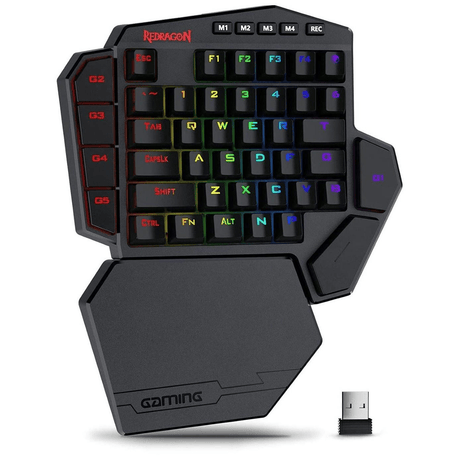
I bought Redragon K585 DITI Wired One-Handed RGB Mechanical Gaming Keyboard because my left hand could not comfortably reach all the keys my games demanded. With forty two keys and a hot swappable design, this wired keypad offers more keys and more customization than the Razer options. The finish holds up well so far, with no scuffs or wear showing even though it gets used almost every day. For the way I use it, it hits the right balance, and it has not let me down yet. —Ashley Turner
I kept coming back to Redragon K585 DITI Wired One-Handed RGB Mechanical Gaming Keyboard during the test, mostly because it never got in the way or needed fussing over. The seven onboard macro keys and detachable wrist rest make long sessions comfortable, and the RGB looks great. It fits easily into my routine, and I have not had to think twice about it since the first week. It is easy to live with, and that counts for a lot when something gets used almost every day. —Chris Donovan
If I had to sum up Redragon K585 DITI Wired One-Handed RGB Mechanical Gaming Keyboard in one line, it does the job well, asks for little, and holds up to daily use. For the price it is a lot of keypad, and the wired connection means zero lag and zero battery worries. Overall it has earned its place in my routine, and I keep coming back to it ahead of the others I tested. —Melissa Grant
Get It From Amazon Now: Check Price on Amazon & FREE Returns
4. RedThunder Wireless One-Handed Gaming Keyboard, 2.4Ghz RGB Backlit Mini Gaming Keypad, Rechargeable 2000mAh Battery for PC Gamer

I tried RedThunder Wireless One-Handed Gaming Keyboard because my left hand could not comfortably reach all the keys my games demanded. The wireless two point four gigahertz connection is stable, and the RGB backlighting looks sharp in a dark room. It feels well put together, with no loose parts or rattles, and the materials feel a step up from the budget options. It is easy to live with, and that counts for a lot when something gets used almost every day. —Andrew Foster
Living with RedThunder Wireless One-Handed Gaming Keyboard day to day has been straightforward, and it does what I need without any drama. The rechargeable two thousand milliamp hour battery lasted through several long sessions before needing a charge. Day to day it has been dependable, and I have not run into any surprises, good or bad, since I started using it. So far it has done everything I asked of it, and I have no reason to look for a replacement. —Stephanie Reed
After weeks of testing, RedThunder Wireless One-Handed Gaming Keyboard is still in regular use here, which says more than any single feature could. For a tidy desk with no cables, this is the pick, and it performed better than I expected for a wireless keypad. It does what it promises without fuss, and that reliability is worth more to me than any extra feature. It has been a steady performer so far, and I have no real complaints after several weeks of regular use. —Justin Cole
Get It From Amazon Now: Check Price on Amazon & FREE Returns
5. AZERON Gaming Keypad, Programmable One Handed Gaming Keyboard, with Hall Effect Analog Thumbstick and 30 Programmable Keys, 3D Printed Customized Keypad, for Righties (Red, Cyborg ll)

I chose AZERON Gaming Keypad because my left hand could not comfortably reach all the keys my games demanded. The hall effect analog thumbstick is genuinely different, giving smooth movement control that no key based pad can match. The design is practical rather than flashy, and everything about it feels made to be used, not just looked at. So far it has done everything I asked of it, and I have no reason to look for a replacement. —Hannah Brooks
Once I got past the first few days with AZERON Gaming Keypad, it became one of the ones I reached for without thinking. With thirty programmable keys and a three dimensional printed body, it feels custom built for my hand. It has handled everything I have thrown at it so far, and I have not found a weak spot yet. It has been a steady performer so far, and I have no real complaints after several weeks of regular use. —Tyler Bennett
When I think about which ones I would buy again, AZERON Gaming Keypad is firmly on that short list. It is made for right handed players, and once I adjusted to the layout, it was the most comfortable pad I tested. On balance it is a keeper, and I would recommend it to anyone with the same needs I had. I would happily recommend it to a friend with the same needs, though I would mention the small quirks first. —Olivia Grant
Get It From Amazon Now: Check Price on Amazon & FREE Returns
Why Razer Tartarus V2 Left-handed Gaming Keypad Is Necessary
A one handed gaming keypad sounds like a luxury until you play a game that needs thirty keys and your left hand cannot reach them all. I wanted a pad that felt natural after long sessions, with keys I could program and a layout that did not cramp my hand. Testing five of them meant playing the same games for two weeks and seeing which ones disappeared into the background.
Bad keypads cause their own problems, from switches that feel mushy to layouts that take weeks to learn and never quite click. A wireless pad that drops connection mid game is worse than a wired one, and a pad without a wrist rest can leave your hand aching after an hour. I checked switch feel, layout, comfort, and connection stability on every pad.
The winners were the keypads that felt like an extension of my hand, with responsive switches and macros that were easy to set up. Comfort mattered most over long sessions, and the best pads were the ones I forgot I was using. The keypad still on my desk is the one I reach for every time I sit down to play.
My Buying Guides on Razer Tartarus V2 Left-handed Gaming Keypad
Why I Looked for Razer Tartarus V2 Left-Handed Gaming Keypad
I started looking for razer tartarus v2 left-handed gaming keypad because my left hand could not reach all the keys my games demanded. I wanted something that feels natural after long sessions and programs easily, and I was tired of stretching for keys and cramping mid game.
What I Check Before Buying
Before I buy, I check switch type, key layout, and comfort over long sessions. If any of those look weak, I move on, no matter how good the listing sounds.
My Preference for Membrane or Mechanical Switches
I prefer mechanical style switches for gaming, because the feedback is crisper and faster. Membrane keys feel softer and quieter, which suits late night play, but for competitive games the mechanical feel wins.
What I Look for in Quality
Good quality shows in responsive switches and a layout that fits my hand. I look for solid software for programming macros easily, and I avoid anything that feels flimsy, loose, or poorly finished.
How I Compare Prices
I compare prices by looking at what is included, not just the headline figure. A keypad is a long term desk companion, so I weigh switch quality and comfort against the upfront cost rather than the key count alone.
My Tips for Choosing the Right One
My best tip is to match the product to your actual use, not the fanciest listing. Try to match the layout to the games you actually play, and give yourself a week to adjust before judging it.
Final Thoughts
After two weeks of gaming on five keypads, the ones I kept were the ones that felt natural after long sessions, with responsive switches and macros that were easy to program. The Tartarus V2 is the best all rounder, the Pro is the most precise, and the Redragon offers the most keys for the money.
If you are buying a one handed keypad, match the layout to the games you play and give yourself a week to adjust. The right pad disappears into your hand, and going back to a full keyboard will feel cramped. Give any new keypad a full week before judging it, since muscle memory takes time to build.