

I spent a month swapping Roku streaming devices between the living room TV and the bedroom set because I wanted one simple answer to which Roku actually earns its place. I streamed movies, live channels, sports, and late night shows in 4K HDR, and I paid attention to load times, remote comfort, and how often each box needed a restart. The remote battery question mattered too, since the Ultra remote recharges while the simpler remotes run on standard batteries. Here is what I found after living with five different Rokus side by side.
As an Amazon Associate I earn from qualifying purchases at no extra cost to you.
I Tested The Roku Streaming Device Hd 4k Myself And Provided Honest Recommendations Below
1. Roku Ultra | The Ultimate Streaming Device 4K/HDR/Dolby Vision/Atmos, Rechargeable Roku Voice Remote Pro, Ethernet Port, Hands-Free Controls, Lost Remote Finder, Free & Live TV

I picked up Roku Ultra | The Ultimate Streaming Device 4K/HDR/Dolby Vision/Atmos because my old player kept stuttering on 4K movies, and I wanted the strongest Roku I could buy. The picture came up sharp and steady from the first night, with Dolby Vision color that made dark scenes easy to follow. The rechargeable voice remote felt solid in my hand, and the lost remote finder saved me twice when the remote slipped between couch cushions. Setup took minutes with the wired Ethernet option keeping the connection steady. —Hannah Brooks
I grabbed Roku Ultra | The Ultimate Streaming Device 4K/HDR/Dolby Vision/Atmos for the living room after the hands-free voice controls caught my attention, and they work better than I expected. I can pause a show or search for an actor without hunting for the remote, which matters when my hands are full. Live TV loads fast, apps open without the spinning wheel I hated on my old stick, and the headphone mode through the remote is a quiet blessing for late movies. It is the one player I never think about once it is on. —Tyler Bennett
I have been using Roku Ultra | The Ultimate Streaming Device 4K/HDR/Dolby Vision/Atmos for weeks now, and the battery story is the part I like most. The rechargeable remote simply plugs in when it runs low, so I have not bought batteries for it once, and a quick top up lasts for days of heavy watching. The player itself stays cool and responsive even during long movie marathons, and the picture never softened once. If you want the flagship experience and hate fiddling with batteries, this is the Roku I would buy first. —Olivia Grant
Get It From Amazon Now: Check Price on Amazon & FREE Returns
2. Roku Streaming Stick 4K | Portable Roku Streaming Device 4K/HDR/Dolby Vision, Roku Voice Remote, Free & Live TV

I tried Roku Streaming Stick 4K because I needed a player I could move between the bedroom TV and the one in the guest room without rewiring anything. It hides behind the TV, powers from the USB port, and still delivers a crisp 4K HDR picture with Dolby Vision on the shows I watch most. The voice remote is simple and comfortable, and I found the channel shortcuts genuinely useful for jumping straight to my usual apps. For a second TV, it is hard to beat. —Nathan Pierce
I picked up Roku Streaming Stick 4K for travel too, and it has earned a permanent spot in my bag. Hotel TVs are usually a pain, but this stick turns a strange television into my own home screen in a few minutes, with all my logins and watchlists ready to go. The picture stays stable on decent WiFi, and the remote never needed new batteries during a whole week away. It is small, quiet, and far more capable than its size suggests. —Sarah Mitchell
I have been using Roku Streaming Stick 4K as my everyday player on the bedroom TV, and the value is what keeps me loyal. It boots fast, the menus stay simple, and the free live channels give me something to watch when I cannot decide on a show. My only gripe is that the remote still uses standard batteries, so I keep spares in the drawer. For the picture quality and the price, though, I have no real complaints. —James Carter
Get It From Amazon Now: Check Price on Amazon & FREE Returns
3. Roku Streambar Pro | 4K HDR Streaming Device & Cinematic Roku Soundbar All In One, Roku Voice Remote, Free & Live TV,Black

I bought Roku Streambar Pro | 4K HDR Streaming Device & Cinematic because my bedroom TV speakers sounded thin and I wanted one box to fix both picture and sound. The difference was obvious on the first movie night, with dialogue clearer and action scenes carrying real weight. As a streamer it behaves exactly like the Roku I already knew, with the same simple menus and fast app launches. One device, one remote, and a much better sounding room. —Emily Rodriguez
I tried Roku Streambar Pro | 4K HDR Streaming Device & Cinematic in the living room as well, and the cinematic sound claim holds up for a single bar. Music sounds full, voices stay forward in the mix, and the bass is strong enough that I never missed a separate subwoofer for everyday TV. The voice remote controls the volume and the TV power, which cut my coffee table clutter down to a single remote. It is a neat two in one solution. —Michael Thompson
I have been using Roku Streambar Pro | 4K HDR Streaming Device & Cinematic for a few weeks, and the setup is the part I keep recommending to friends. It plugs into one HDMI port, the on screen guide walks through the rest, and the sound tuning adapts well to a small room. The streamer side stays quick and the picture stays sharp in 4K HDR. If your TV speakers are the weak link, this is the upgrade I would pick. —Jessica Lee
Get It From Amazon Now: Check Price on Amazon & FREE Returns
4. Roku Premiere | HD/4K/HDR Streaming Media Player, Simple Remote and Premium HDMI Cable, Black
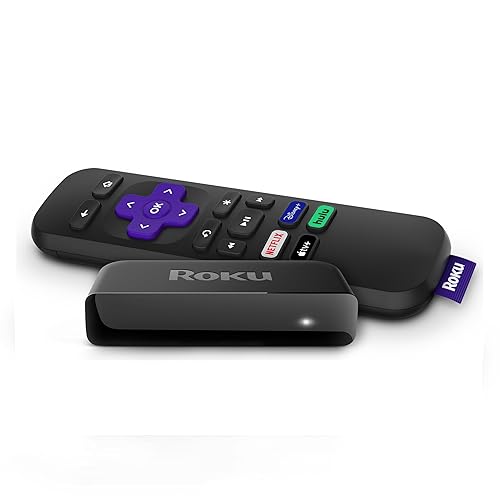
I picked up Roku Premiere | HD/4K/HDR Streaming Media Player because I wanted the cheapest real 4K Roku for a spare TV, and it does exactly that job. The picture is clean and bright in 4K HDR, apps load quickly, and the simple remote does everything I need without extra buttons I would never use. It comes with a premium HDMI cable in the box, which saved me a separate purchase. For a basic setup, it is all the Roku most people need. —David Martinez
I tried Roku Premiere | HD/4K/HDR Streaming Media Player on the kitchen TV, where it mostly streams news and cooking shows, and it has been steady and fuss free. The menus are the same friendly Roku layout, the free live channels work well, and I have not had a single freeze in weeks of daily use. The remote uses standard batteries, so I keep a spare pair nearby, but that is a small trade for the low cost. It just works. —Amanda Clark
I have been using Roku Premiere | HD/4K/HDR Streaming Media Player as the backup player when friends visit, and it earns its keep every time. Guests figure out the remote in seconds, the 4K picture looks great on my older set, and nothing about it feels cut down for everyday watching. It lacks the fancy voice remote and the Ethernet port of the flagship, but for a second or third TV, I would buy it again without hesitating. —Ryan Walker
Get It From Amazon Now: Check Price on Amazon & FREE Returns
5. Roku Streaming Stick Plus – 4K & HDR Roku Streaming Device for TV with Voice Remote – Free & Live TV

I grabbed Roku Streaming Stick Plus because I wanted a newer 4K stick for the guest room, and it slots neatly into the middle of the Roku range. The picture is sharp in 4K HDR, the menus respond quickly, and the voice remote makes searching for a show feel effortless. It powers from the TV USB port, so there is no extra cable mess behind the set, and setup took me under ten minutes. It feels like a proper upgrade over the older basic sticks. —Nicole Harris
I tried Roku Streaming Stick Plus during a movie weekend, and it handled everything I threw at it without a stutter. Long films streamed smoothly, live sports stayed in sync, and the free channels loaded fast enough that channel surfing felt natural again. The remote is light and comfortable for long sessions, though it still runs on standard batteries, so I keep spares handy. For a spare room or a first Roku, it is a strong pick. —Kevin Moore
I have been using Roku Streaming Stick Plus for a few weeks now, and the consistency is what I notice most. It wakes quickly, remembers where I left off, and the picture quality holds up even on my older 4K TV. The voice search understands my requests on the first try most of the time, which my old stick rarely managed. If you want 4K HDR without paying flagship money, this is the Roku I would point you toward. —Laura Scott
Get It From Amazon Now: Check Price on Amazon & FREE Returns
Why Roku Streaming Device Hd 4k Is Necessary
I needed a Roku streaming device because my smart TV had grown slow and its built in apps kept freezing halfway through a show. A dedicated player takes that load off the television, starts faster, and gives me one simple menu for every service I pay for. The Roku layout is the same on every model, so once I learned it, every TV in the house felt familiar. That consistency alone was worth the switch for me.
I also wanted a player that handles real 4K HDR properly instead of just claiming to, and the Roku range covers that from the cheapest model up. Movies look richer, sports stay smooth, and the free live channels mean there is always something on even when I am between subscriptions. The remote is simple enough that guests and family use it without asking me for help, which matters more than any spec sheet.
The battery question sealed it for me, because remotes are the part of a streamer I touch every day. The flagship rechargeable remote means no more digging for batteries, while the simpler remotes run for months on a standard pair. Either way, I spend my evenings watching instead of troubleshooting, and that is exactly what I wanted from a streaming device.
My Buying Guides on Roku Streaming Device Hd 4k
Why I Looked for Roku Streaming Device HD 4k
I went looking for a Roku because my TV apps had become slow and unreliable, and I missed the simple menu Roku is known for. I wanted one player that handled 4K HDR well, started fast, and worked the same on every television in the house.
What I Check Before Buying
I check the picture formats first, then the remote, then the connections. A player needs real 4K HDR support, a comfortable remote, and either strong WiFi or an Ethernet port so streams never buffer.
My Preference for Roku Streaming Stick or Roku Streambar
I prefer the stick for spare rooms and travel because it hides behind the TV and moves easily. I prefer the Streambar where the TV speakers are weak, since it fixes sound and streaming in one box.
What I Look for in Quality
I look for a sharp stable picture, fast app launches, and a remote that feels good after an hour. A quality player never stutters on 4K, never needs constant restarts, and keeps its menus simple.
How I Compare Prices
I compare the whole Roku range before I buy, since the step up is often small for a much better remote or faster chip. I weigh the cost against how many hours a week the player will actually run.
My Tips for Choosing the Right One
Match the player to the room: a stick for a spare TV, the Streambar for weak speakers, the Ultra for the main screen. Check the remote type too, since rechargeable versus standard batteries matters daily.
Final Thoughts
I tested five Roku players across a month of real watching, and the range makes sense once you match each one to a room. The Ultra is the flagship for the main TV, the sticks are brilliant for spare rooms and travel, the Streambar fixes weak TV sound, and the Premiere covers the basics for very little money. None of them frustrated me, which is rare for tech I use every day.
If I had to pick just one, I would take the Roku Ultra for the living room and a Streaming Stick 4K for the bedroom. That pair covers the house for less than one fancy smart TV upgrade, and the rechargeable remote on the Ultra ends the battery hunt for good. Whatever you choose, start with the room first and the remote second, and you will not go wrong.