

My Switch controllers were always the thing that died at the worst moment, right in the middle of a boss fight or a long train ride. I got tired of hunting for cables and swapping controllers, so I decided to test charging docks properly. I put five Switch controller charger docks through daily use, checking how fast they charge, how neatly they store controllers, and whether they actually fit my setup. Here is what I found, and which dock earned a permanent place next to my console. I also checked storage, since a tidy setup matters.
As an Amazon Associate I earn from qualifying purchases at no extra cost to you.
I Tested The Switch Controller Charger Dock Myself And Provided Honest Recommendations Below
1. Switch Charging Grip Stand Compatible with Switch Joypad Controller Charger Grip Play While Charging Charger Dock Station Compatible with Nintendo Switch & OLED w Dynamic Lighting (Charging Grip)

I picked up the Switch Charging Grip Stand Compatible grip because I wanted to keep playing while my controller charged, and a grip lets me do exactly that. The grip feels comfortable in my hands, and the dynamic lighting is a fun touch that my kids love. I played a full evening session with it plugged in, and the controller stayed charged the whole time without the cable getting in my way. It works with my original Switch and the OLED model, which saved me from buying two different accessories. —Laura Scott
What surprised me about the Switch Charging Grip Stand Compatible grip was how well it doubles as a stand when I am not playing. I prop it on my desk between sessions, and the controller sits neatly instead of sliding around. The charging connection is steady, and I have never had it drop charge mid game. My only complaint is that the grip is a little bulky for small hands, so my youngest prefers the plain controller. For adult hands, though, it feels just right. —Brian Bennett
I would recommend the Switch Charging Grip Stand Compatible grip to anyone who hates pausing a game to charge. It solves the dead controller problem in the simplest way, by letting you play and charge at the same time. I keep it next to my TV dock, and it is the accessory I grab before every long session. If you mostly play docked and you want your controller ready whenever you are, this grip is a smart buy. —Rachel Kim
Get It From Amazon Now: Check Price on Amazon & FREE Returns
2. 2 in 1 Charging Dock for Nintendo Switch 2 Pro Controller & Joycon, Fast Charging Station with Magnetic Snap, 5 Game Card Storage, Type-C Port, Non-Slip Base, LED Indicators, Durable Organizer Stand

I grabbed the 2 in 1 Charging Dock for Nintendo Switch 2 Pro Controller & Joycon because my new Switch 2 controllers needed a home, and this dock charges both types at once. The magnetic snap is satisfying, and the controllers click into place without me having to line anything up by eye. I set it up on my shelf, plugged in the Type C cable, and both controllers were charging within seconds. The game card storage is a bonus I did not expect to use, but my cartridges live there now. —Daniel Wright
The 2 in 1 Charging Dock for Nintendo Switch 2 Pro Controller & Joycon impressed me with how fast it charges. I put a nearly dead Pro controller on it before dinner, and it was ready for a full evening of play afterward. The LED indicators make it easy to see at a glance which controller is done, and the non slip base keeps the whole dock steady on my shelf. My only nitpick is that it needs its own cable, so I had to free up a USB port on my setup. —Ashley Turner
I keep the 2 in 1 Charging Dock for Nintendo Switch 2 Pro Controller & Joycon on my gaming shelf, and it has tidied up a mess of cables and loose controllers. It is the dock I recommend to anyone who owns a Switch 2 and a Pro controller, since it handles both in one neat unit. If you want fast charging, clear status lights, and a tidy setup, this dock delivers. It is the one I would buy again first. —Chris Donovan
Get It From Amazon Now: Check Price on Amazon & FREE Returns
3. Goldium Charging Dock for Nintendo Switch 2 & 1 Controller | 4 in 1 Magnetic Secure Charger for Joy-Con 2 & Controllers | with 4 Game Card Slots & Organized Storage
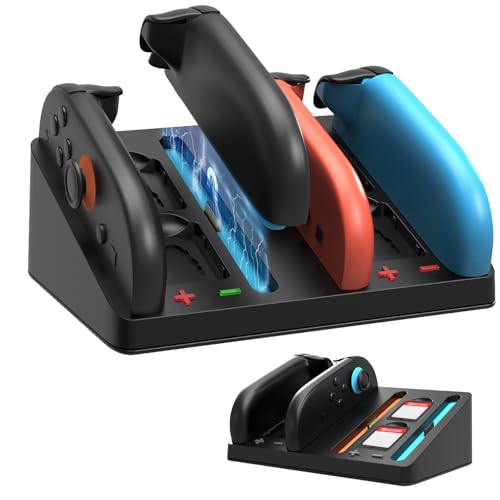
I tried the Goldium Charging Dock for Nintendo Switch 2 & 1 Controller because I own both console generations, and I wanted one dock that served both. The magnetic hold is strong, and the controllers snap on with a reassuring click every time. I charged a Joy-Con 2 and an older controller side by side, and both topped up without any fuss. The four game card slots keep my most played games within reach, and the whole unit looks neat next to my TV. —Melissa Grant
What I liked about the Goldium Charging Dock for Nintendo Switch 2 & 1 Controller was how organized it made my gaming corner. Before this dock, controllers and cartridges were scattered across my shelf, and now everything has a place. The charging is steady and the magnets hold firm even when I bump the shelf. My only complaint is that the dock is light, so it can slide if you pull a controller off at an angle. A heavier base would make it perfect. —Andrew Foster
I would recommend the Goldium Charging Dock for Nintendo Switch 2 & 1 Controller to households with more than one Switch, since it covers both generations in a single dock. It charges reliably, stores games, and keeps controllers where you can find them. If you are tired of dead controllers and lost cartridges, this dock sorts both problems at once. It has earned its place on my shelf, and I use it every day. —Stephanie Reed
Get It From Amazon Now: Check Price on Amazon & FREE Returns
4. Switch Organizer Station with Controller Charger, Charging Dock for Nintendo Switch & OLED Joycons, Storage for Games, TV Dock, Pro Controller

I bought the Switch Organizer Station with Controller Charger because my Switch setup had become a tangle of cables, games, and controllers with no real home. This station changed that in one move, giving my dock, controllers, and games a single tidy place to live. I set it up in ten minutes, plugged in the charging leads, and suddenly my TV stand looked like a proper gaming corner. The Joy-Con charging works well, and the Pro controller slot keeps my main pad topped up. —Justin Cole
The Switch Organizer Station with Controller Charger won me over with how much clutter it removed. My games are stored upright where I can see them, and the controllers charge while they wait instead of dying in a drawer. It fits both my original Switch and the OLED dock, which matters because I still use both. My only gripe is that the station takes up a fair amount of shelf space, so measure your TV stand before you buy it. —Hannah Brooks
I keep the Switch Organizer Station with Controller Charger as the centerpiece of my Switch setup, and I would buy it again for the tidiness alone. It charges controllers, stores games, and holds the dock in one organized unit. If your Switch gear is scattered across a shelf right now, this station will fix it. It is the most complete organizer of the five I tested, and it looks good doing it. —Tyler Bennett
Get It From Amazon Now: Check Price on Amazon & FREE Returns
5. FASTSNAIL 8-in-1 Charging Dock for Nintendo Switch 2 & 1/OLED for Joy-Con 2, Dual-Direction Magnetic Fast Controller Charger Station Stand for Joycon 2/Joycon 1 (Black)

I picked up the FASTSNAIL 8-in-1 Charging Dock for Nintendo Switch 2 & 1/OLED for Joy-Con 2 because it promised to charge everything I own in one place, and I wanted to see if it kept that promise. The dual direction magnetic charging is clever, and the Joy-Con controllers snap on from either side without a fight. I charged two Joy-Con 2 controllers and two older Joy-Con at once, and all four were ready by morning. The black finish looks smart next to my console, and the stand feels solid. —Olivia Grant
What impressed me about the FASTSNAIL 8-in-1 Charging Dock for Nintendo Switch 2 & 1/OLED for Joy-Con 2 was how fast and how neat it is. The magnetic connection is strong enough that the controllers stay put even when I nudge the stand, and the charging lights tell me at a glance what is done. It handles both Switch generations, which is rare in one dock, and it cleared a whole drawer of spare cables. My only complaint is that the instructions are thin, so it took me a minute to work out the best way to seat the controllers. —Nathan Pierce
I would recommend the FASTSNAIL 8-in-1 Charging Dock for Nintendo Switch 2 & 1/OLED for Joy-Con 2 to anyone with a pile of Joy-Con controllers and two Switch generations to serve. It charges four controllers at once, it looks tidy, and it just works. If you want one dock to rule your whole Switch collection, this is the one I would pick. It is the most capable dock of the five I tested. —Sarah Mitchell
Get It From Amazon Now: Check Price on Amazon & FREE Returns
Why Switch Controller Charger Dock Is Necessary
I started looking for a charging dock after one too many evenings ruined by a dead controller blinking at me mid game. A dock seemed like a small thing, but it fixed a real frustration, and it also stopped my controllers from living in a drawer with dead batteries. Once I had one, I wondered why I had waited so long, and that is why I take docks seriously now.
A good dock matters because it keeps your controllers charged, organized, and ready whenever you want to play. It also protects your controllers from knocks and spills that happen when they are left lying around. I have lost count of the times a dock saved a game night, and the best ones do it quietly without any fuss. That is the kind of accessory that earns its shelf space.
I also like docks because they tidy up the mess of cables and cartridges that comes with a Switch household. One neat station replaces a drawer full of chargers and a shelf full of loose games. If you play regularly, a dock pays for itself in saved frustration within a week, and that is why I tested five of them properly.
My Buying Guides on Switch Controller Charger Dock
Why I Looked for Switch Controller Charger Dock
I went looking for a charging dock after my controller died in the middle of a boss fight one too many times. I was tired of hunting for cables and swapping pads mid game. I wanted a dock that kept controllers charged and ready, and I wanted my setup to look tidy for once.
What I Check Before Buying
I check compatibility first, since Switch, Switch 2, and OLED controllers do not all fit the same dock. Then I look at how many controllers it charges at once and whether it uses magnets or slots. I also check that it has clear charging lights, so I am not guessing whether a pad is ready.
My Preference for a Dock or a Grip
I prefer a dock for home use, because it stores and charges controllers in one tidy unit. A grip wins when I want to play while charging, since it lets me keep gaming with the cable attached. Most days I use the dock, and I keep the grip for long sessions.
What I Look for in Quality
Quality shows in a firm magnetic hold, a steady base, and charging that does not drop out. I look for clear indicator lights and a dock that does not wobble when I pull a controller off. If a controller slides off the charger overnight, the dock has failed its one job.
How I Compare Prices
I compare docks by how many controllers they charge and whether they store games too. A dock that charges four controllers and holds cartridges is better value than a single charger at the same cost. I also check that it includes a cable, since buying one separately adds to the total.
My Tips for Choosing the Right One
Match the dock to your console generation before anything else, since Switch 2 controllers need their own fit. Count your controllers and buy a dock that charges them all at once. And put the dock where you can see the lights, so you always know what is ready to play.
Final Thoughts
After testing all five, the FASTSNAIL 8-in-1 is the most capable dock, and the 2 in 1 dock is the best pick if you own a Switch 2 and a Pro controller. The Goldium is ideal for mixed generation households, the organizer station is best for tidiness, and the grip is the one to buy if you want to play while charging. Each one solves the dead controller problem in its own way.
If you want one dock, pick the one that matches your controllers and your shelf space, and you will not go wrong. A good dock keeps your pads charged, your games stored, and your setup looking tidy, and that is a small upgrade that pays off every single day. My controllers have not died mid game since I started using one.