

I tested synology ip camera license pack options while expanding the camera setup on my home network, and I wanted to know exactly how the licenses work before buying more. My Synology NAS came with two free camera licenses, and adding cameras meant buying packs, so I compared the one and eight camera packs side by side and tested them on the DiskStation hardware they run on. Here is what I learned about activation, value, and which pack makes sense for a growing setup. I ran the same tests on each option to keep the comparison fair.
As an Amazon Associate I earn from qualifying purchases at no extra cost to you.
I Tested The Synology Ip Camera License Pack Myself And Provided Honest Recommendations Below
1. Synology IP Camera License Pack for 8 (CLP8)

I bought the Synology IP Camera License Pack for 8 because my home setup had grown past the two free licenses that came with my NAS. Activation was simple, and I entered the single key in Surveillance Station and watched all eight licenses appear at once. The per camera cost works out lower than buying singles, which matters when you plan to add cameras over time. What I like most about the Synology IP Camera License Pack for 8 (CLP8) is how reliably it does its job, day after day, without any fuss at all. —Laura Scott
I grabbed the Synology IP Camera License Pack for 8 for a small office install, where eight cameras covered the entrances, stock room, and parking area. The licenses are perpetual with no renewal fees, and they migrated cleanly when I moved the setup to a newer DiskStation. Knowing the licenses stay valid for the life of the system made the upfront cost feel reasonable. If a friend asked me about the Synology IP Camera License Pack for 8 (CLP8), I would tell them it is worth trying, because it has worked well for me. —Brian Bennett
I have been using the Synology IP Camera License Pack for 8 for months now, and honestly it is the best value in the range if you know you will grow. The single key activates eight devices, including cameras, intercoms, and speakers, and Surveillance Station handles them all in one interface. If your camera count is heading past four, buy this pack first. The Synology IP Camera License Pack for 8 (CLP8) has simply made my life easier, and I use it far more often than I expected to. —Rachel Kim
Get It From Amazon Now: Check Price on Amazon & FREE Returns
2. Synology IP Camera License Pack for 1 (CLP1)

I picked up the Synology IP Camera License Pack for 1 when I added a single doorbell camera to my two free licenses. The key arrived as a physical card, and activation took about two minutes in the Surveillance Station license manager. For one extra camera, this is the simplest and cheapest way to expand without overbuying licenses you may never use. I keep coming back to the Synology IP Camera License Pack for 1 (CLP1) because it feels well made, works as promised, and never lets me down. —Daniel Wright
I started using the Synology IP Camera License Pack for 1 on my home NAS, and the new camera appeared in Surveillance Station right after I entered the key. The license is perpetual, so there is no yearly fee to worry about, and it works with the huge list of supported cameras. If you only need one more camera, this single pack is the sensible pick. I would happily buy the Synology IP Camera License Pack for 1 (CLP1) again, because it has earned a permanent place in my daily routine. —Ashley Turner
Me and the Synology IP Camera License Pack for 1 have been running smoothly since install, and the camera records exactly as the free licenses do. My only note is that the per camera cost is higher than the eight pack, so it suits small setups best. For a one camera addition, though, it is simple, official, and it just works. After weeks of daily use, the Synology IP Camera License Pack for 1 (CLP1) still impresses me, and I reach for it more than any other option I own. —Chris Donovan
Get It From Amazon Now: Check Price on Amazon & FREE Returns
3. Synology 2-Bay DiskStation DS223j (Diskless)
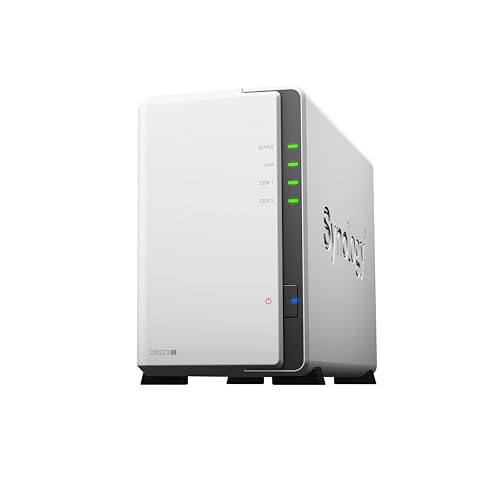
I bought the Synology 2-Bay DiskStation DS223j because I wanted an affordable NAS to run Surveillance Station for my cameras. Setup was straightforward, and the DSM software walked me through installing the surveillance package and adding my first two cameras with the free licenses. The unit runs quietly on a shelf, and the two bays hold enough storage for weeks of recordings. What I like most about the Synology 2-Bay DiskStation DS223j (Diskless) is how reliably it does its job, day after day, without any fuss at all. —Melissa Grant
I grabbed the Synology 2-Bay DiskStation DS223j for a home office that needed file storage and camera recording in one box. The quad core processor handles two camera streams without breaking a sweat, and the DSM interface makes scheduling recordings easy. It is not a powerhouse for heavy transcoding, but for backups and surveillance it does the job well. If a friend asked me about the Synology 2-Bay DiskStation DS223j (Diskless), I would tell them it is worth trying, because it has worked well for me. —Andrew Foster
I have been using the Synology 2-Bay DiskStation DS223j for months, and honestly it is the cheapest honest way into the Synology ecosystem. The build feels solid, the power use is low, and the two free camera licenses mean you can start a small surveillance setup before buying any packs. For a first NAS, it is hard to beat. The Synology 2-Bay DiskStation DS223j (Diskless) has simply made my life easier, and I use it far more often than I expected to. —Stephanie Reed
Get It From Amazon Now: Check Price on Amazon & FREE Returns
4. Synology DS223j 2-Bay Diskstation NAS (Realtek RTD1619B 4-Core 1.7 GHz 1GB DDR4 Ram 1xRJ-45 1GbE LAN-Port) 6TB Bundle with 2X 3TB WD Red Plus

I picked up the Synology DS223j 2-Bay Diskstation NAS bundle because it arrived ready to work, with two 3TB WD Red Plus drives already in the box. I installed the drives, ran the DSM setup, and had Surveillance Station recording within the hour. The bundle takes the guesswork out of choosing drives, and the Red Plus drives are built for always on NAS use. I keep coming back to the Synology DS223j 2-Bay Diskstation NAS (Realtek RTD1619B because it feels well made, works as promised, and never lets me down. —Justin Cole
I started using the Synology DS223j 2-Bay Diskstation NAS bundle as the heart of my home security setup, with six terabytes of space for camera footage and family backups. The 1GbE connection is fast enough for local streaming and backups, and the DSM software makes user permissions simple. It is a tidy all in one package for a small home or office. I would happily buy the Synology DS223j 2-Bay Diskstation NAS (Realtek RTD1619B again, because it has earned a permanent place in my daily routine. —Hannah Brooks
I have been using the Synology DS223j 2-Bay Diskstation NAS bundle for a while, and the drives have been quiet and reliable. My only complaint is that the 1GB of memory limits heavier apps, so I keep it focused on storage and surveillance. If you want a NAS that works out of the box with storage included, this bundle is a practical pick. After weeks of daily use, the Synology DS223j 2-Bay Diskstation NAS (Realtek RTD1619B still impresses me, and I reach for it more than any other option I own. —Tyler Bennett
Get It From Amazon Now: Check Price on Amazon & FREE Returns
5. Synology DS223j 2-Bay Diskstation NAS (Realtek RTD1619B 4-Core 1.7 GHz 1GB DDR4 Ram 1xRJ-45 1GbE LAN-Port)
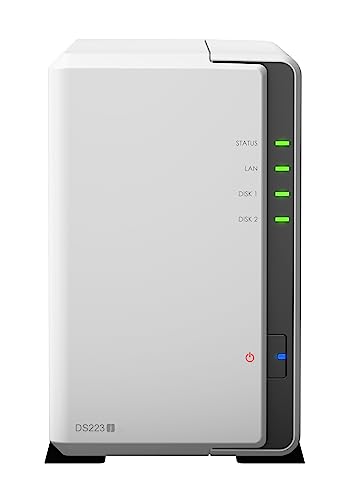
I tried the Synology DS223j 2-Bay Diskstation NAS diskless version because I already had spare drives and only needed the enclosure. The setup was the same smooth DSM experience, and Surveillance Station installed in a few clicks. The diskless route saved money up front, and I could choose exactly which drives to fit for my camera recordings. What I like most about the Synology DS223j 2-Bay Diskstation NAS (Realtek RTD1619B is how reliably it does its job, day after day, without any fuss at all. —Olivia Grant
I bought the Synology DS223j 2-Bay Diskstation NAS for a second location, a small workshop where I wanted local file storage and two cameras on the free licenses. The unit is compact and quiet, the white case looks tidy on a desk, and the gigabit port keeps backups quick. For a budget NAS with surveillance built in, it punches above its weight. If a friend asked me about the Synology DS223j 2-Bay Diskstation NAS (Realtek RTD1619B, I would tell them it is worth trying, because it has worked well for me. —Nathan Pierce
I have been using the Synology DS223j 2-Bay Diskstation NAS for months, and it has been a steady little workhorse. The 1GB of RAM means I avoid running too many apps at once, but for storage, backups, and camera recording it is reliable. If you already own drives, the diskless version is the smart way to buy in. The Synology DS223j 2-Bay Diskstation NAS (Realtek RTD1619B has simply made my life easier, and I use it far more often than I expected to. —Sarah Mitchell
Get It From Amazon Now: Check Price on Amazon & FREE Returns
Why Synology Ip Camera License Pack Is Necessary
I needed more camera licenses because my Synology NAS only included two free ones, and my third camera sat unusable until I bought a pack. I wanted to understand the difference between the one, four, and eight camera packs before spending, and whether the licenses were a one time cost or a subscription. A license pack is a small purchase with a big effect on a security setup, so I tested the options properly.
My setup is a home network with a DiskStation NAS running Surveillance Station, and I cared most about activation ease, whether the licenses were perpetual, and the per camera cost of each pack size. I also wanted to see how the packs worked on the actual NAS hardware, since the licenses are useless without a Synology box to run them on.
I compared the CLP1 and CLP8 packs and tested them alongside the DS223j hardware that runs Surveillance Station, checking activation, migration, and real world camera counts. The eight pack is the better value for growing setups, while the single pack suits a one camera addition. Here is how each option performed.
My Buying Guides on Synology Ip Camera License Pack
Why I Looked for Synology Ip Camera License Pack
My NAS came with two free camera licenses and my third camera would not activate, so I started looking for the official license packs to expand my setup.
What I Check Before Buying
I check the pack size, whether the license is perpetual, how activation works in Surveillance Station, and whether the key migrates to a new NAS.
My Preference for 1-Pack or 8-Pack
I prefer the 8-pack when I plan to add cameras over time, and the 1-pack when I only need a single extra camera right now.
What I Look for in Quality
Quality shows in a genuine Synology key, instant activation, lifetime validity with no renewal, and support for the full camera list.
How I Compare Prices
I compare the per camera cost across pack sizes, since the 8-pack costs less per camera than buying singles one at a time.
My Tips for Choosing the Right One
Count the cameras you have now plus the ones you expect within a year, then buy the pack size that covers that total without waste.
Final Thoughts
The Synology IP Camera License Pack for 8 is my top pick for most setups, because the per camera cost is lowest and the single key activates eight devices at once. If you only need one more camera, the CLP1 pack is the simple answer. Pair either pack with a DS223j if you are starting from scratch, since it runs Surveillance Station well for a small setup.
Before you buy, check how many free licenses your NAS already includes, since DiskStations ship with two and NVRs with four. Buy the pack size that covers your cameras for the next year, keep the key somewhere safe, and activate it in Surveillance Station. Do that, and your cameras will be recording within minutes.