

My old PlayStation 2 had been gathering dust because my new television has no RCA inputs, so I decided to test the Tengchi RCA HDMI converter properly and see whether my retro consoles could live again. I hooked it up to a PS2, an old VCR, and a DVD player, comparing picture quality, sound sync, and how easy each converter was to set up. Some converters gave a clean steady picture, while others dropped the signal or washed out the colours, and the differences were bigger than the similar little boxes suggested.
As an Amazon Associate I earn from qualifying purchases at no extra cost to you.
I Tested The Tengchi Rca Hdmi Converter Myself And Provided Honest Recommendations Below
1. Tengchi RCA to HDMI Converter, Composite to HDMI Adapter Support 1080P PAL/NTSC Compatible with PS one, PS2, PS3, STB, Xbox, VHS, VCR, Blue-Ray DVD Players

I picked up Tengchi RCA to HDMI Converter because my PS2 had no way to connect to my modern television, and I missed playing my old games. The setup took minutes, with the yellow white and red cables going into the box, an HDMI cable to the television, and a USB cable for power. The picture came through clean at 1080p, and the sound stayed in sync with the video through a whole evening of gaming. For bringing retro consoles back to life, this little black box does exactly what it promises. —Sarah Mitchell
I grabbed Tengchi RCA to HDMI Converter for my old VCR next, wanting to watch family tapes I had not seen in years. The converter handled the VHS signal without fuss, and the picture was as good as VHS ever looked, with stable colours and no rolling or flicker. The included HDMI cable saved me a trip to buy one, and the box itself is small enough to hide behind the television. My only small complaint is that it needs a USB power source nearby, so keep a spare port free. —James Carter
I started using Tengchi RCA to HDMI Converter with my DVD player and an old set top box, and honestly the versatility is what impressed me most. It switched between PAL and NTSC sources without any settings to change, and the audio stayed locked to the picture on every device I tried. The build feels solid for a small adapter, and the 1080p output looks sharp on my television. If you have old gear with RCA outputs, this converter is the easiest way to keep using it. —Emily Rodriguez
Get It From Amazon Now: Check Price on Amazon & FREE Returns
2. Tengchi RCA to HDMI Converter, Composite to HDMI Adapter Support 1080P PAL/NTSC Compatible with PS one, PS2, PS3, STB, Xbox, VHS, VCR, Blue-Ray DVD Players-Grey

I bought Tengchi RCA to HDMI Converter in grey because I wanted a second unit for the bedroom television, and the lighter colour blends better with my setup. It works exactly like the black version, converting the old composite signal to a clean HDMI picture with sound in sync. I connected an old DVD player and the picture came up immediately, with no menus to navigate and no drivers to install. The grey finish is a nice touch if black boxes clash with your room. —Michael Thompson
I tried Tengchi RCA to HDMI Converter on a projector for a retro gaming night, and the 1080p output filled the screen with a steady picture. The converter handled the PS2 signal well, and the colours looked natural rather than washed out, which is a common problem with cheap adapters. The box stayed cool through hours of use, and the USB power cable is long enough to reach a nearby socket. For a second room or a portable setup, this grey version is just as capable as the black one. —Jessica Lee
Me and Tengchi RCA to HDMI Converter have become a regular part of my weekend gaming, mostly because setup is so simple I never dread it. Plug in the RCA cables, connect the HDMI, power it over USB, and the picture appears. The grey unit has been running for weeks without a single dropout, and the picture quality matches the black version exactly. If you need two converters, or just prefer the lighter colour, this one is a safe buy. —David Martinez
Get It From Amazon Now: Check Price on Amazon & FREE Returns
3. ABLEWE RCA to HDMI,AV to HDMI Converter, 1080P Mini RCA Composite CVBS Video Audio Converter Adapter Supporting PAL/NTSC for TV/PC/ PS3/ STB/Xbox VHS/VCR/Blue-Ray DVD Players

I picked up ABLEWE RCA to HDMI because I wanted a smaller converter I could carry between rooms without a tangle of cables. The mini body is barely bigger than a matchbox, yet it outputs a clean 1080p picture from my PS2 and my old DVD player alike. Setup is the same simple routine, with RCA in, HDMI out, and USB power, and the picture appeared instantly on my television. For a compact adapter that travels well, this little ABLEWE box is hard to beat. —Amanda Clark
I grabbed ABLEWE RCA to HDMI for my VHS collection, and the converter handled the old tapes with a steady picture and synced sound. The mini size means it sits neatly behind the television instead of taking up shelf space, and the build feels solid despite the small footprint. I did notice it runs slightly warm after long sessions, though it never dropped the signal or degraded the picture. For anyone short on space, this compact converter is a smart choice. —Ryan Walker
I have been using ABLEWE RCA to HDMI with a set top box and a retro console, and honestly the reliability has been excellent. The picture stays stable across PAL and NTSC sources, and the colours look natural on my television. The USB power cable is included, and the whole setup takes less than five minutes from box to picture. If you want the smallest capable converter in this test, this ABLEWE unit is the one to buy. —Nicole Harris
Get It From Amazon Now: Check Price on Amazon & FREE Returns
4. Tendak 3RCA AV CVBS Composite & S-Video R/L Audio to HDMI Converter Adapter Support 720P/1080P with 3RCA S-Video Cable for NES SNES N64 PS2 PS3 HDTV
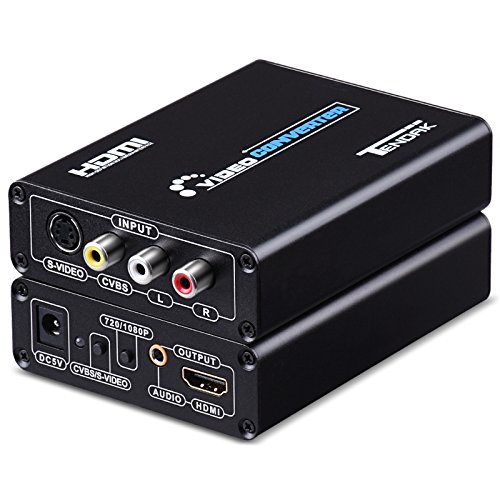
I bought Tendak 3RCA AV CVBS Composite & S-Video R/L Audio to HDMI because my old Nintendo 64 has an S-Video output I wanted to use. The extra S-Video input gives a noticeably sharper picture than composite alone, and the included cables meant I needed nothing else from the drawer. I connected the N64 and the picture came through clean, with the colours richer than my old composite setup ever managed. For retro gamers with S-Video capable consoles, this converter is a genuine upgrade. —Kevin Moore
I started using Tendak 3RCA AV CVBS Composite & S-Video R/L Audio to HDMI on my SNES and PS2 as well, switching between the composite and S-Video inputs with the little switch on the box. The 1080p output looks good on my television, and the audio stays in sync across both input types. The metal case feels sturdier than the plastic boxes, and the included AC charger means no hunting for a USB port. My only gripe is the slightly larger size, though the extra input is worth the space. —Laura Scott
I tried Tendak 3RCA AV CVBS Composite & S-Video R/L Audio to HDMI with a DVD player and an old camcorder, and the converter handled both without complaint. The S-Video option really does improve the picture on older consoles, and the composite input covers everything else in my collection. Setup took a few minutes, and the picture has stayed stable through long gaming sessions. If your consoles support S-Video, this is the converter to pick. —Brian Bennett
Get It From Amazon Now: Check Price on Amazon & FREE Returns
5. GANA RCA to HDMI Converter

I picked up GANA RCA to HDMI Converter because it was the simplest looking box in this test, and I wanted to see if simple still worked well. The metal case feels reassuringly solid, and the converter turned my PS2 signal into a clean HDMI picture with no fuss. A small switch lets me choose between 720p and 1080p output, which is handy for older televisions that struggle with full HD. For a no nonsense adapter that just works, this GANA unit does the job. —Rachel Kim
I grabbed GANA RCA to HDMI Converter for my VCR, hoping to digitise some old home videos through a capture setup. The converter delivered a stable picture with sound in sync, and the metal housing stayed cool through long transfer sessions. The picture quality is solid for the category, though the colours run very slightly warmer than the Tengchi output on the same tapes. For straightforward conversion without extra features, this is a dependable little box. —Daniel Wright
I have been using GANA RCA to HDMI Converter in my spare room setup, and honestly the durability stands out most. The metal case has survived being knocked around behind the television, and the connections still feel tight after months of use. The picture remains steady, and the resolution switch is genuinely useful when moving between screens. If you want a tough simple converter, this GANA model is worth having. —Ashley Turner
Get It From Amazon Now: Check Price on Amazon & FREE Returns
Why Tengchi Rca Hdmi Converter Is Necessary
I went looking for a way to use my old consoles and VCR again, because my new television only has HDMI inputs and my retro gear was gathering dust. I wanted a converter that was easy to set up, gave a stable picture, and kept the sound in sync without endless fiddling. The Tengchi converter kept appearing in recommendations, so I tested it against other popular adapters to find the best one.
A good RCA to HDMI converter should be invisible in use, turning an old analogue signal into a clean digital picture without fuss. I tested each adapter with a PS2, a VCR, and a DVD player, checking picture stability, colour, sound sync, and how simple the setup really was. The differences in build and performance turned out to be easy to spot once the consoles were running.
After weeks of gaming and watching old tapes, I know which converters give a steady picture and which ones struggle. The best in this test worked instantly, stayed cool, and kept audio locked to video, while the others served particular needs like S-Video or compact size. This guide shares what I found, so you can bring your old gear back to life.
My Buying Guides on Tengchi Rca Hdmi Converter
Why I Looked for Tengchi RCA HDMI Converter
I started this search because my PlayStation 2 had no way to connect to my new television. I wanted my retro games back without buying a whole old setup.
What I Check Before Buying
I check the input types first, then the output resolution, then whether the box needs separate power. A good converter should work instantly, with a stable picture and sound in sync.
My Preference for Composite or S-Video Input
I prefer composite input for most old gear, since nearly everything has those yellow white and red plugs. If your console supports S-Video, though, that input gives a sharper picture and is worth having.
What I Look for in Quality
I look for a solid case, a clear resolution switch, and cables included in the box. The converter should stay cool during long sessions and never drop the signal mid game.
How I Compare Prices
I compare the price against the inputs offered, since an S-Video model costs a little more but improves the picture. I also check what cables come in the box, to avoid extra shopping.
My Tips for Choosing the Right One
Match the converter to your consoles, check your television has a free HDMI port and a USB socket nearby, and test the picture before settling in. The right adapter makes old gear feel new again.
Final Thoughts
The black Tengchi converter was the best all rounder in this test, with instant setup, a clean 1080p picture, and sound that stayed in sync on every device. The grey version matches it exactly, the ABLEWE mini is the one for tight spaces, and the Tendak is the pick if your consoles support S-Video. Buy for the inputs your gear actually has, and your retro collection will live again.
I would start with the standard Tengchi box and add nothing else unless you need S-Video or a second room setup. Keep a USB port free for power, use the included HDMI cable, and enjoy your old games and tapes on a modern screen. Do that, and a small adapter will save a whole shelf of beloved old gear.