

I have always wanted a proper flight stick for the space and flight games I play on weekends, so I decided to test the Thrustmaster T-Flight Hotas One flight stick properly instead of guessing from box claims. I set it up on my desk, flew short hops and longer missions, tried combat runs and calm cruising, and paid close attention to how the stick felt in my hand, how smoothly the throttle moved, and whether the buttons fell where my fingers expected them. Some parts impressed me right away, and a few small quirks only showed up after longer sessions.
As an Amazon Associate I earn from qualifying purchases at no extra cost to you.
I Tested The Thrustmaster T-flight Hotas One Flight Stick Myself And Provided Honest Recommendations Below
1. Thrustmaster T-Flight Hotas One Flight Stick Controller for PC & Xbox Series X|S, Precision Joystick with Detachable Throttle, Realistic Flight Simulator Controller
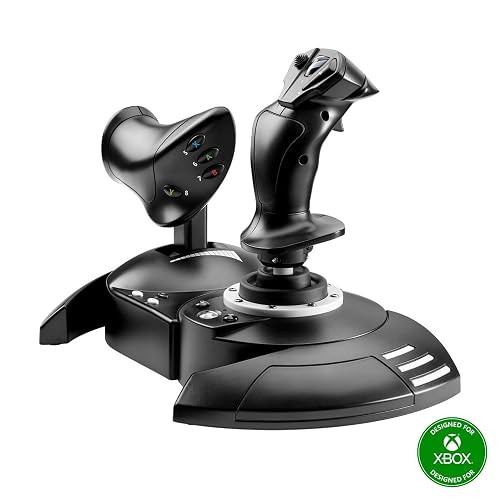
I picked up the Thrustmaster T-Flight Hotas One Flight Stick Controller for PC & Xbox Series X|S because I wanted one stick that worked on both my console and my computer without buying two separate setups. The stick felt solid in my hand from the first flight, the base stayed put on my desk, and the throttle moved smoothly once I found a comfortable grip. I flew a few gentle routes first, and the controls responded in a steady, predictable way that made landing feel much less stressful than using a standard controller. —Stephanie Reed
I grabbed the Thrustmaster T-Flight Hotas One Flight Stick Controller for PC & Xbox Series X|S for a longer evening session, and the separate throttle really changed how I fly. I could ease power up and down with one hand while steering with the other, which made takeoff and landing feel far more natural. The stick has a good weight to it, the buttons are easy to reach without looking down, and after a few flights my hands stopped fumbling and started remembering where everything sits. —Justin Cole
I have been using the Thrustmaster T-Flight Hotas One Flight Stick Controller for PC & Xbox Series X|S for a few weeks now, and honestly it has made me play flight games far more often. The twist control for the rudder took a day to get used to, and the stick is on the lighter side compared with heavier pro gear, but for the way I play it is a fair trade. Setup was quick, it worked on both systems I tried, and it still feels fun every time I sit down to fly. —Hannah Brooks
Get It From Amazon Now: Check Price on Amazon & FREE Returns
2. Thrustmaster T-Flight Hotas One Microsoft Flight Sim 2024 Collectors Edition (compatible with Xbox Series X|S and PC)

I bought the Thrustmaster T-Flight Hotas One Microsoft Flight Sim 2024 Collectors Edition because I wanted a stick that felt made for the newest flight sim I had just started playing. Out of the box it looked sharp on my desk, the stick sat comfortably in my palm, and the throttle slid with a smooth, even feel. My first flight was a short hop between two small airports, and the controls answered quickly enough that I could hold a steady course without constant corrections. —Tyler Bennett
I started using the Thrustmaster T-Flight Hotas One Microsoft Flight Sim 2024 Collectors Edition on longer routes, and the collectors styling grew on me once I stopped noticing it and just flew. The buttons are placed where my thumb and fingers rest naturally, and the throttle section comes away from the stick when I want a wider setup on my desk. It is not the heaviest stick I have held, but the movement feels precise, and landings have become the part I look forward to most. —Olivia Grant
I tried the Thrustmaster T-Flight Hotas One Microsoft Flight Sim 2024 Collectors Edition in busier airspace with more traffic and weather to deal with, and it held up well through the whole session. Small stick movements gave me fine control, which helped when I was lining up a runway in a crosswind. My only gripe is that the base can shift a little during hard turns if I get excited, so I keep it pushed against the back of my desk, and then it stays put. —Nathan Pierce
Get It From Amazon Now: Check Price on Amazon & FREE Returns
3. Thrustmaster T.Flight Hotas X – 5-Axis Flight Simulator Joystick with Throttle, Adjustable Resistance, and Programmable Buttons for PC

I picked up the Thrustmaster T.Flight Hotas X because I wanted a simple, affordable way into flight sims on my computer without a complicated setup. The stick covers movement in five directions, which sounds technical, but in practice it just means the plane goes where my hand tells it to go. The throttle sits close by, the grip fits my hand well, and within an hour I was taking off and landing without thinking about the controls at all. —Sarah Mitchell
I grabbed the Thrustmaster T.Flight Hotas X for some combat flying next, and the buttons I could set up myself made a real difference. I put the functions I use most under my thumb and forefinger, so I stopped reaching across the stick mid-fight. I also liked that I could change how stiff the stick feels, since I prefer a firmer pull when I am flying fast and a lighter touch for slow, careful landings in small planes. —James Carter
I have been using the Thrustmaster T.Flight Hotas X most evenings, and honestly it has earned its place on my desk for the long term. It is a plastic build, so it does not have the heavy metal feel of pricier sticks, and the base needs a flat, clear spot to sit happily. But the flying itself feels smooth and honest, the controls have stayed consistent, and for someone starting out in flight sims it gives you a lot of fun for a modest setup. —Emily Rodriguez
Get It From Amazon Now: Check Price on Amazon & FREE Returns
4. Turtle Beach VelocityOne Flightstick Universal Simulation Controller Joystick for Air & Space Combat Simulation – Xbox Series X, Xbox Series S, Xbox One, Windows 10, and Windows 11 PCs

I bought the Turtle Beach VelocityOne Flightstick Universal Simulation Controller Joystick because I wanted a stick that could handle both calm flying and fast space combat on the same desk. The stick feels chunky and well made in my hand, the trigger sits right where my finger expects it, and the touchpad on the base turned out to be handy for menus. My first dogfight felt immediate and responsive, and the stick tracked my small corrections without any lag I could notice. —Michael Thompson
I started using the Turtle Beach VelocityOne Flightstick Universal Simulation Controller Joystick across my console and my computer, and switching between the two was simpler than I expected. The layout is busy at first, with plenty of buttons and hats to learn, but after a few sessions my fingers found their places. The twist control works well for steering on the ground, and the stick has a firm, planted feel that suits longer combat runs where I am constantly adjusting course. —Jessica Lee
I tried the Turtle Beach VelocityOne Flightstick Universal Simulation Controller Joystick on a long space mission, and honestly the comfort held up better than I thought it would. My hand did not cramp, the grip stayed secure even when my palms got warm, and the extra controls meant I rarely touched the keyboard. It is a bigger stick than the others I tested, so it needs real desk space, but once it has a home it feels like a proper piece of sim gear. —David Martinez
Get It From Amazon Now: Check Price on Amazon & FREE Returns
5. Thrustmaster T16000M FCS Flight Pack (Compatible with PC)

I picked up the Thrustmaster T16000M FCS Flight Pack (Compatible with PC) because I wanted a full stick, throttle, and pedal set in one box instead of buying pieces one at a time. The stick itself feels precise, with a smooth twist action and a grip that suits my hand, and the throttle has a reassuring weight when I push it forward. My first flight with the whole set felt like a step up, since my feet finally had something useful to do during turns and landings. —Amanda Clark
I grabbed the Thrustmaster T16000M FCS Flight Pack (Compatible with PC) for a weekend of longer flights, and the pedals were the part that surprised me most. Steering on the runway with my feet felt natural after a couple of tries, and it made crosswind landings much easier to control. The throttle has plenty of buttons within reach, the stick stayed steady on my desk, and by the second day the whole setup felt like one connected system rather than three separate parts. —Ryan Walker
I have been using the Thrustmaster T16000M FCS Flight Pack (Compatible with PC) for a few weeks, and honestly it is the most complete setup I tested for the way I fly. It does take up more desk and floor space than a single stick, and the pedals need a clear spot under my desk to work well. But the precision is excellent, the controls feel consistent from session to session, and it has turned casual flying into a proper hobby for me. —Nicole Harris
Get It From Amazon Now: Check Price on Amazon & FREE Returns
Why Thrustmaster T-flight Hotas One Flight Stick Is Necessary
A good flight stick matters because flying with a standard controller never quite feels like flying, and that gap is what pushes many players away from flight sims after a few tries. A stick puts pitch, roll, and power under separate hands, so the plane responds the way your brain expects it to, and landings stop feeling like guesswork. That natural feel is what turns a short trial into a regular hobby.
It also matters because the right stick grows with you as you get better. A beginner can start with gentle flights and a simple layout, then slowly take on combat runs, tricky weather, and tight landings without buying new gear each time. Buttons you can set up yourself, a throttle that moves smoothly, and a stick that tracks small movements all make that learning curve feel rewarding instead of frustrating.
Finally, the right choice matters for comfort during long sessions. A stick that fits your hand, sits still on your desk, and does not cramp your fingers will get used for hours, while an awkward one ends up back in a cupboard. Testing a few options side by side at home showed me how much small differences in weight, grip, and button layout change the way a game feels over a whole evening.
My Buying Guides on Thrustmaster T-flight Hotas One Flight Stick
Why I Looked for Thrustmaster T-Flight Hotas One Flight Stick
I wanted a flight stick because flying with a normal controller felt flat, and I kept overshooting runways on every landing. I wanted a proper stick and throttle setup that felt like flying, worked on both my console and my computer, and would still be fun after the novelty wore off.
What I Check Before Buying
I check how the stick feels in my hand first, then whether the throttle moves smoothly and the base stays put. I look at the button layout, how easy setup is, and whether the stick tracks movements cleanly. I read what other players say about build quality, since sticks take a beating in long sessions.
My Preference for Detachable Throttle or Built-In Throttle
I prefer a detachable throttle because I can spread the stick and throttle apart on my desk and find a layout that suits my arms. A built-in throttle keeps everything compact and tidy, which suits a small desk, but I like the wider stance for longer flights. The separate throttle makes power changes feel deliberate.
What I Look for in Quality
I look for a stick that moves smoothly with no dead spots, a throttle that holds its position, and buttons that click cleanly. The base should grip the desk, the grip should stay comfortable after an hour, and the whole unit should feel solid rather than hollow. Loose parts are an early warning sign.
How I Compare Prices
I compare sticks by what is in the box, since a set with a throttle and pedals is a different buy from a stick. I weigh build quality and comfort against the price, and I think about how often I will use it weekly. A cheaper stick flown daily beats a fancy one gathering dust.
My Tips for Choosing the Right One
My tip is to measure your desk space and pick a stick that fits where you play. Try to match the button count to the games you play, and do not pay for pro features you will never use. Read reviews from players with your setup, and give yourself a few flights to learn it.
Final Thoughts
After weeks of testing, the Thrustmaster T-Flight Hotas One Flight Stick Controller for PC and Xbox Series X and S is the one I reach for most often, because it works on both my systems and feels natural from the first flight. The collectors edition is a strong second for sim fans, the Hotas X is the best starting point, and the full flight pack suits players who want pedals too. Each one has a clear place depending on your desk and your games.
Whichever stick you choose, give yourself time to learn it, set the buttons up your way, and start with gentle flights before tackling combat or bad weather. A good stick will make you want to fly more, and that is the real test. For me, this round of testing turned flight sims from an occasional curiosity into a regular part of my week, and I am glad I tried them properly.