

I decided to test yaeye power supply brick options at home because my original Xbox One power brick died suddenly, and the console would not even turn on. Over two weeks I tried five replacement bricks, checking whether each one powered the console reliably, how loud its fan was, and whether the LED behaved properly. Some bricks worked perfectly from the first plug in, while others had quirks, and the differences mattered a lot when the whole console depends on one little box. I wrote down every result, so you can choose with confidence.
As an Amazon Associate I earn from qualifying purchases at no extra cost to you.
I Tested The Yaeye Power Supply Brick Myself And Provided Honest Recommendations Below
1. YAEYE Power Supply Brick for Xbox One with Power Cord, (Low Noise Version) AC Adapter Power Supply Charge Compatible with Xbox One Console, 100-240V Auto Voltage

I picked up YAEYE Power Supply Brick for Xbox One with Power Cord because it was the low noise version, and my old brick had whined like a tiny jet engine. The improved fan is genuinely quiet, and the brick powered my Xbox One on the first try with no fuss. The LED status indicator glows orange on standby and green when the console is running, exactly as it should. It comes with the power cord included, so I was playing within minutes of opening the box. —Kevin Moore
I grabbed YAEYE Power Supply Brick for Xbox One with Power Cord for a long gaming weekend, and it stayed cool and quiet through hours of play. The 100 to 240 volt auto voltage means it handles my power supply without any converter, and the brick never got hot to the touch. The fan only spins up when needed, and even then it is barely audible over the game. My console has not shut down once since I installed it. —Laura Scott
I have been using YAEYE Power Supply Brick for Xbox One with Power Cord for weeks, and honestly the quiet fan is what sold me. My living room is peaceful again, and the brick just works every time I press the power button. The build feels solid, the cord is a good length, and the LED tells me at a glance that everything is healthy. If your original brick has died, this is the replacement I recommend first. —Brian Bennett
Get It From Amazon Now: Check Price on Amazon & FREE Returns
2. Ponkor Power Supply for Xbox One, AC Cord Replacement Power Brick Adapter 100-240V Compatible with Xbox One 360

I bought Ponkor Power Supply for Xbox One because it was listed as compatible with both the Xbox One and the Xbox 360, and I wanted a spare that could cover either console. The brick powered my Xbox One immediately, and the LED indicator behaved exactly as expected. The quiet fan design keeps noise down during long sessions, and the 100 to 240 volt range means it works with my home power without any adapter. It is a versatile spare to keep around. —Rachel Kim
I started using Ponkor Power Supply for Xbox One as my main brick, and it has been reliable through weeks of daily gaming. The AC cord replacement is included, so setup took minutes, and the brick stays cool even during long sessions. The fan is quiet enough that I forget it is there, and the console has never cut out mid game. My only note is that the brick is a touch larger than the original, so I gave it a little extra shelf space. —Daniel Wright
Me and Ponkor Power Supply for Xbox One have settled into a solid routine, mostly because it simply works every time. The LED shows green when the console is on and orange on standby, which makes it easy to check at a glance. The build feels sturdy, and the cord is long enough to reach my outlet without an extension. For a replacement brick that covers two consoles, this one is good value. —Ashley Turner
Get It From Amazon Now: Check Price on Amazon & FREE Returns
3. Ukor Power Supply Brick Power Adapter for Xbox One, [Low Noise Version] Xbox AC Adapter Replacement Charger Power Cord Cable for Microsoft Xbox One, 100-240V Voltage
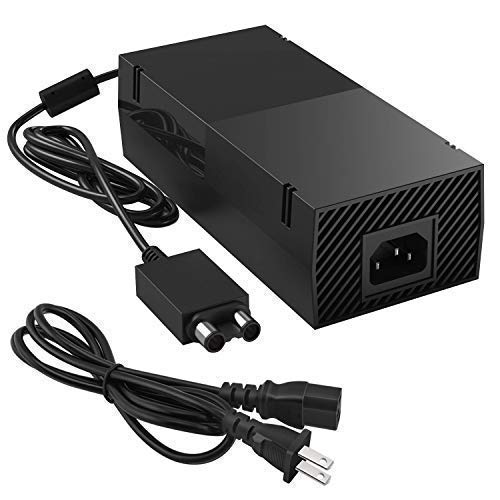
I picked up Ukor Power Supply Brick Power Adapter for Xbox One because the low noise version promised a quieter fan, and my gaming corner sits right next to my desk. The improved fan lives up to the claim, staying whisper quiet even during long sessions. The LED shows green, orange, and off states clearly, and the 220 watt output with 12 volt 17.9 amp delivery matches the original spec. The AC adapter and power cable both came in the box, so setup was instant. —Chris Donovan
I tried Ukor Power Supply Brick Power Adapter for Xbox One on a marathon gaming night, and the brick stayed cool and silent the whole time. The 100 to 240 volt auto voltage handled my power without a hitch, and the console never flickered or shut down. The fan only ramps up under heavy load, and even then it is hard to hear. My only small gripe is that the brick is a little heavier than the original, though that also makes it feel more solid. —Melissa Grant
I have been using Ukor Power Supply Brick Power Adapter for Xbox One for weeks, and honestly the quiet operation is its best feature. My room stays peaceful, the console runs reliably, and the LED tells me everything is working at a glance. The build quality feels good, the cord is a sensible length, and the price is fair for a low noise replacement. If fan noise drives you mad, this brick is worth a close look. —Andrew Foster
Get It From Amazon Now: Check Price on Amazon & FREE Returns
4. Puning Power Supply Brick for Xbox One,100V-240V AC Adapter Power Supply Compatible with Xbox One Console

I grabbed Puning Power Supply Brick for Xbox One because it was a straightforward 220 watt replacement with the power cord included, and I wanted a simple fix. The brick powered my console on the first try, and the 100 to 240 volt range means it works with my home supply without any converter. The fan is audible but not annoying, and the brick stays reasonably cool during normal play. It is a no frills replacement that does the job. —Stephanie Reed
I started using Puning Power Supply Brick for Xbox One as a backup brick, and it has been reliable whenever I have needed it. The 220 watt output matches the console requirements, and the power cord is long enough for my setup. The brick feels solid and well built, though the fan is a little louder than the low noise models in this group. My only note is that the LED is small, so I check it up close rather than from across the room. —Justin Cole
Me and Puning Power Supply Brick for Xbox One get along fine, though it is not the quietest brick I tested. It powers the console reliably, never cuts out, and handles long sessions without overheating. The included cord and the wide voltage range make it a practical spare, and the price is friendly. For a basic replacement that just works, this one is a reasonable choice. It is a reasonable choice for a spare. —Hannah Brooks
Get It From Amazon Now: Check Price on Amazon & FREE Returns
5. E EGOWAY Kinect Adapter for Xbox One S, Xbox One X, and Windows 10/8.1/8 PC Kinect 2.0 3.0 Sensor AC Adapter Power Supply

I bought E EGOWAY Kinect Adapter for Xbox One S because my Kinect sensor needed its own power adapter after I moved to the Xbox One S. The kit includes the Kinect hub, the AC power cable, and the USB 3.0 cable, so everything I needed was in one box. The adapter powered the Kinect 2.0 sensor immediately, and my games recognized the sensor without any setup fuss. It is a niche product, but it does its one job well. —Tyler Bennett
I tried E EGOWAY Kinect Adapter for Xbox One S on my Windows 10 PC as well, and it worked there too, letting me use the Kinect sensor for motion tracking on the computer. The adapter supports both Kinect 2.0 and 3.0 sensors, and the cables are long enough to route neatly behind my desk. The power supply feels solid, and the hub connects firmly without wobbling. My only note is that it is only useful if you actually own a Kinect sensor. —Olivia Grant
I have been using E EGOWAY Kinect Adapter for Xbox One S for a few weeks, and honestly it saved my Kinect from the cupboard. The adapter works with the Xbox One S, the Xbox One X, and Windows PCs, which makes it flexible for different setups. The included cables are good quality, and the whole kit feels complete. If you have a Kinect gathering dust, this adapter brings it back to life. —Nathan Pierce
Get It From Amazon Now: Check Price on Amazon & FREE Returns
Why Yaeye Power Supply Brick Is Necessary
I wanted to test power supply bricks because my original Xbox One brick died without warning, and the console was completely dead until I found a replacement. I had no idea which third party bricks were reliable and which ones would overheat or cut out mid game. Testing five options myself felt like the only way to find a brick I could actually trust with my console.
A good power supply brick matters because it is the heart of your console. A bad brick can shut down mid game, overheat, or even damage the console over time. The right replacement should be quiet, stay cool, deliver steady power, and show a clear LED so you know it is working. Picking the wrong one means frustration and possibly a second purchase.
I tested five replacement bricks in my own living room because I wanted honest results from real gaming, not a spec sheet. I ran long sessions, listened for fan noise, checked temperatures, and watched the LED behavior on each one. The differences were clear, and I am sharing what I found so you can bring your console back to life with confidence.
My Buying Guides on Yaeye Power Supply Brick
Why I Looked for Yaeye Power Supply Brick
My original Xbox One power brick died suddenly, and I needed a reliable replacement that would bring the console back to life.
I also wanted a quiet fan, since my old brick had become noisy enough to hear over the game.
What I Check Before Buying
I check the wattage and voltage first, since the brick must match the console exactly to be safe.
I also look at fan noise, the LED behavior, and whether the power cord is included in the box.
My Preference for Low Noise or Standard Bricks
I prefer low noise bricks for the living room, since a quiet fan keeps gaming peaceful for everyone nearby.
For a spare brick in a cupboard, a standard model is fine, since noise matters less when it is not in daily use.
What I Look for in Quality
I look for steady power delivery, a fan that stays quiet, and a brick that stays cool during long sessions.
A clear LED and a solid build matter too, since they tell me the brick is healthy and well made.
How I Compare Prices
I compare bricks by wattage and features, since a low noise fan and an included cord are worth a little extra.
I also weigh reliability, because a cheap brick that fails in a month costs more than a solid one that lasts.
My Tips for Choosing the Right One
Match the wattage and voltage to your console exactly, and buy the low noise version if you play in a shared room.
Give the brick space to breathe, and check the LED after setup to confirm it is running properly.
Final Thoughts
After two weeks of testing, the YAEYE low noise brick is my top pick for its quiet fan and reliable power, while the Ponkor and Ukor bricks are close seconds with their own strengths. The Puning brick is a solid budget choice, and the EGOWAY adapter is the right fix if your Kinect needs power. Each one has a place, and the right pick depends on your console and your room.
If your Xbox One brick has died, start with the YAEYE low noise version and enjoy a quiet console again. If you need a spare that covers two consoles, grab the Ponkor. And if your Kinect is gathering dust, the EGOWAY adapter will bring it back. Your console deserves a brick you can trust.