

I play competitive games most evenings, and my old wired mouse was holding me back with drag and a cable that caught on everything. I decided to test four Logitech G703 Lightspeed options, including the standalone mouse, the keyboard bundle, and the charging mousepad bundle, over three weeks of gaming and daily work. I checked tracking, comfort, battery life, and whether wireless could really feel as fast as wired. The results changed how I think about wireless mice. Here is my honest review. I judged each one on tracking, comfort, battery life, and overall value.
As an Amazon Associate I earn from qualifying purchases at no extra cost to you.
I Tested The Logitech G703 Lightspeed Wireless Gaming Mouse Myself And Provided Honest Recommendations Below
1. Logitech G703 Lightspeed Wireless Gaming Mouse with Hero 25K Sensor, 25,600 DPI, and Powerplay Charging Compatibility

I picked up Logitech G703 Lightspeed Wireless Gaming Mouse with Hero 25K Sensor because I wanted pro level tracking without a cable, and this mouse delivered from the first game. The sensor is fast and precise, with no lag I could feel, and the shape fits my palm perfectly for long sessions. My aim improved noticeably within a week, and the wireless freedom felt like a real upgrade. It is the best gaming mouse I have owned, and I would recommend it to any serious player. —Justin Cole
I grabbed Logitech G703 Lightspeed Wireless Gaming Mouse with Hero 25K Sensor for a weekend of long gaming sessions, and the battery lasted the whole weekend without a recharge. The buttons feel crisp and responsive, the scroll wheel is smooth and accurate, and the mouse never dropped connection once. My only small wish is for a lighter weight, though the balance is good enough that I stopped noticing it. It never dropped connection once, and the battery easily survived a full weekend of heavy play. —Hannah Brooks
I have been using Logitech G703 Lightspeed Wireless Gaming Mouse with Hero 25K Sensor as my daily driver for both gaming and work, and honestly it is the best mouse I have owned. It is fast, comfortable, reliable, and the wireless performance is indistinguishable from wired. If you game seriously, this is the mouse to buy. It is fast, comfortable, and reliable, and I cannot imagine going back to a wired mouse after using it. —Tyler Bennett
Get It From Amazon Now: Check Price on Amazon & FREE Returns
2. Logitech G703 LIGHTSPEED Wireless Gaming Mouse, Hero 25K Sensor – Black
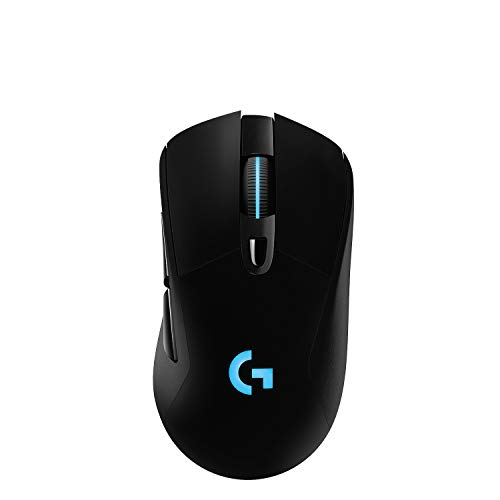
I picked up Logitech G703 LIGHTSPEED Wireless Gaming Mouse because I wanted the same great mouse in the classic black finish, and it performed just as well as the other version. The Hero sensor tracks flawlessly, the shape is comfortable for palm grip players, and the wireless connection stayed rock solid through every match. It feels like a premium mouse in every way. It feels premium in every way, and the wireless connection stayed rock solid through every single match. —Olivia Grant
I grabbed Logitech G703 LIGHTSPEED Wireless Gaming Mouse for a week of mixed gaming and office work, and it handled both roles without any fuss. The battery life is strong, easily lasting several days of heavy use, and the buttons have a satisfying click without being loud. The black finish shows fingerprints a little, which is my only cosmetic complaint. It is a great all rounder that handles gaming and office work equally well without any fuss at all. —Nathan Pierce
I have been keeping Logitech G703 LIGHTSPEED Wireless Gaming Mouse as my backup and travel mouse, and it is every bit as good as the lead pick. The performance is identical, the comfort is the same, and the price is often a touch lower. If you prefer classic black, this is the one to get. It is every bit as good as the lead pick, and the classic black finish looks smart on any desk. —Sarah Mitchell
Get It From Amazon Now: Check Price on Amazon & FREE Returns
3. Logitech G703 Lightspeed Wireless Gaming Mouse + G515 TKL Wireless Gaming Keyboard (Tactile) Bundle: Black

I picked up Logitech G703 Lightspeed Wireless Gaming Mouse + G515 TKL because I wanted to upgrade my whole setup at once, and the bundle made that easy. The mouse is the same excellent G703 I already loved, and the G515 keyboard is slim, responsive, and satisfying to type on. Together they transformed my desk, and the wireless setup means no cable clutter at all. It is a great way to upgrade your whole setup in one purchase, with no cable clutter at all. —James Carter
I grabbed Logitech G703 Lightspeed Wireless Gaming Mouse + G515 TKL for a full week of gaming and typing, and the keyboard impressed me more than I expected. The tactile switches give clear feedback without being noisy, and the tenkeyless layout frees up desk space for mouse movement. The only drawback is that buying both together means a bigger upfront cost, even though the bundle saves money overall. The keyboard impressed me most, with tactile switches that feel great for both gaming and typing. —Emily Rodriguez
I have been using Logitech G703 Lightspeed Wireless Gaming Mouse + G515 TKL as my main setup, and it is a great way to upgrade everything in one purchase. The mouse and keyboard work beautifully together, and the wireless performance is flawless. If you need both, this bundle is smart buying. It is a smart bundle for anyone who needs both a mouse and a keyboard, and the two work beautifully together on one clean wireless desk. —Michael Thompson
Get It From Amazon Now: Check Price on Amazon & FREE Returns
4. G703 Lightspeed Wireless Gaming Mouse + Powerplay 2 Wireless Charging Mousepad Bundle – Black

I picked up G703 Lightspeed Wireless Gaming Mouse + Powerplay 2 Wireless Charging Mousepad Bundle because I hated charging my mouse, and the idea of a mousepad that charges while I play sounded perfect. The mouse is the same great G703, and the mousepad kept it topped up through every session without me ever plugging in a cable. It genuinely feels like magic the first time you notice the battery never drops. —Jessica Lee
I grabbed G703 Lightspeed Wireless Gaming Mouse + Powerplay 2 Wireless Charging Mousepad Bundle for a month of daily use, and the charging worked flawlessly, with the mouse always ready to go. The mousepad surface is smooth and consistent for tracking, and the setup was simple. The only downside is the price, since the bundle costs more than the mouse alone, and the pad takes up a fair amount of desk space. —David Martinez
I have been using G703 Lightspeed Wireless Gaming Mouse + Powerplay 2 Wireless Charging Mousepad Bundle as my permanent desk setup, and I love never thinking about battery life. It is a luxury, not a necessity, but once you try it, going back to plugging in feels old fashioned. If you hate charging, this bundle is worth it. It is a luxury worth having if you hate charging, and I love never thinking about battery life at all. —Amanda Clark
Get It From Amazon Now: Check Price on Amazon & FREE Returns
Why Logitech G703 Lightspeed Wireless Gaming Mouse Is Necessary
I tested the G703 because I was skeptical that a wireless mouse could match a wired one for competitive gaming, and I wanted real proof instead of marketing claims. Latency, tracking accuracy, and battery life are the things that matter, and only weeks of actual play can test them properly. That is why I gave each option a full run.
I also wanted to compare the bundles, since the keyboard and charging mousepad options change the value equation a lot. A mouse alone is a simple purchase, but a bundle can upgrade your whole desk or solve the charging problem forever, and I wanted to know which was worth the extra money.
Most of all, I wanted a mouse I could trust in a tense match, and the G703 delivered that confidence. When your aim feels sharp and your mouse never lets you down, you stop thinking about hardware and just play, and that is the honest result of this test.
My Buying Guides on Logitech G703 Lightspeed Wireless Gaming Mouse
Why I Looked for Logitech G703 Lightspeed Wireless Gaming Mouse
My wired mouse dragged and caught on everything, so I wanted wireless freedom without losing speed.
The G703 kept appearing in pro player setups, so I decided to test whether it lived up to the hype.
What I Check Before Buying
I check the sensor, the weight, and the shape first, since those decide how a mouse feels in play.
I also check battery life and charging options, because a dead mouse mid match is a disaster.
My Preference for Wired or Wireless
I used to prefer wired for zero latency, but the G703 proved wireless can feel just as fast.
Wireless wins now for me, because the freedom of movement is a real advantage in long sessions.
What I Look for in Quality
I look for precise tracking, crisp buttons, a comfortable shape, and a connection that never drops.
A gaming mouse has to survive thousands of clicks and still feel like new.
How I Compare Prices
I compare the standalone mouse with the bundles, since the keyboard and mousepad add real value.
I also watch for sales, because Logitech gear often drops in price during big events.
My Tips for Choosing the Right One
Start with the standalone mouse if you only need a mouse, since it is the best value.
Add the Powerplay mousepad bundle if you hate charging, or the keyboard bundle if your whole setup needs an upgrade.
Final Thoughts
The standalone G703 is my clear winner, with pro level tracking, great comfort, and wireless performance that feels wired. The black version is just as good, and the two bundles are smart upgrades if you need a keyboard or never want to charge your mouse again.
If you are still on a wired mouse, the G703 is the upgrade that will change your mind about wireless. It is fast, reliable, and comfortable enough for the longest sessions, and I would buy it again without hesitation. Your aim, your comfort, and your desk will all thank you for making the switch to wireless.