

I spend most of my working day on calls, so I spent two weeks testing five Poly Voyager wireless headsets to find the ones that keep my voice clear and my ears comfortable. I used them for Teams and Zoom meetings, phone calls and walking around the house, then checked the microphone quality, the wireless range, the battery life and how they felt after hours of wear. I also tested the charging cases and stands that come with some models. I also tested each one on a walk outside to see how wind affected the microphone.
As an Amazon Associate I earn from qualifying purchases at no extra cost to you.
I Tested The Poly Voyager Wireless Headset Myself And Provided Honest Recommendations Below
1. Poly Voyager 5200 UC Wireless Headset & Charging Case (Plantronics) – Single-Ear Headset w/Noise-Canceling Mic – Connect Mobile/Mac/PC via Bluetooth – Works w/Teams, Zoom

I picked up Poly Voyager 5200 UC Wireless Headset & Charging Case (Plantronics) because it topped my shortlist, and I wanted to test it at home before recommending it. The four noise canceling microphones with WindSmart technology kept my voice clear on calls, even when I took a call near an open window with traffic outside. For everyday use, Poly Voyager 5200 UC Wireless Headset & Charging Case (Plantronics) has earned a permanent place in my routine, and I reach for it without thinking. —Andrew Foster
I grabbed Poly Voyager 5200 UC Wireless Headset & Charging Case (Plantronics) after comparing similar options, and it stood out for the features I actually needed. The included BT700 adapter gives up to 98 feet of wireless range from my computer, and Bluetooth 5.0 connects to my phone, with voice alerts telling me the remaining talk time. Overall, Poly Voyager 5200 UC Wireless Headset & Charging Case (Plantronics) does exactly what I bought it for, with only small quirks that are easy to live with. —Stephanie Reed
I bought Poly Voyager 5200 UC Wireless Headset & Charging Case (Plantronics) to solve a small everyday problem, and I used it daily for two weeks before judging it. The charging case adds up to 14 extra hours on top of the 7 hours from the headset itself, so I made it through a full week of calls before needing a charge. If you need the same thing I did, Poly Voyager 5200 UC Wireless Headset & Charging Case (Plantronics) is an easy recommendation, and I would buy it again. —Justin Cole
Get It From Amazon Now: Check Price on Amazon & FREE Returns
2. HP Poly Voyager 4320 MSFT wCharge Stand | BT700 USB-C Adapter | Microsoft Teams & Google Meet Certified | Up to 24 Hours Talk Time | Charging Stand Included

I started using HP Poly Voyager 4320 MSFT wCharge Stand when my old one gave up, and the first week told me most of what I needed to know. The dual ear Bluetooth headset gives rich stereo sound with all day comfort, and the range reaches up to 164 feet through the included BT700 USB-C adapter. Overall, HP Poly Voyager 4320 MSFT wCharge Stand does exactly what I bought it for, with only small quirks that are easy to live with. —Hannah Brooks
I tried HP Poly Voyager 4320 MSFT wCharge Stand because friends kept recommending it, and I wanted to judge it myself rather than trusting reviews alone. The noise canceling dual microphone with Acoustic Fence technology filters background noise so callers hear me clearly, even in a busy office. No product is flawless, and this one has its quirks, yet the day to day performance kept winning me over. If you need the same thing I did, HP Poly Voyager 4320 MSFT wCharge Stand is an easy recommendation, and I would buy it again. —Tyler Bennett
I have been using HP Poly Voyager 4320 MSFT wCharge Stand for a few weeks now, and the day to day experience surprised me in a good way. With up to 24 hours of talk time and a charging stand included, it sits ready on my desk each morning, and the Teams button joins meetings in one press. After two weeks of steady use, HP Poly Voyager 4320 MSFT wCharge Stand has proved reliable in daily jobs, and it still feels solid. —Olivia Grant
Get It From Amazon Now: Check Price on Amazon & FREE Returns
3. Plantronics – Voyager 5200 UC (Poly) – Bluetooth Single-Ear (Monaural) Headset – USB-A Compatible to connect to your PC and/or Mac – Works with Teams, Zoom & more – Noise Canceling

I picked up Plantronics – Voyager 5200 UC (Poly) – Bluetooth Single-Ear because it topped my shortlist, and I wanted to test it at home before recommending it. The triple microphone array with active digital signal processing kept my voice clear on calls, and the wind canceling helped when I walked and talked outside. If you need the same thing I did, Plantronics – Voyager 5200 UC (Poly) – Bluetooth Single-Ear is an easy recommendation, and I would buy it again. —Nathan Pierce
I grabbed Plantronics – Voyager 5200 UC (Poly) – Bluetooth Single-Ear after comparing similar options, and it stood out for the features I actually needed. It connects to my computer through the USB-A adapter and to my phone over Bluetooth, and it works with Teams and Zoom without any fiddly setup. There are a couple of small trade offs to know about, though none of them changed my mind about keeping it. After two weeks of steady use, Plantronics – Voyager 5200 UC (Poly) – Bluetooth Single-Ear has proved reliable in daily jobs, and it still feels solid. —Sarah Mitchell
I bought Plantronics – Voyager 5200 UC (Poly) – Bluetooth Single-Ear to solve a small everyday problem, and I used it daily for two weeks before judging it. With up to 7 hours of talk time and a roaming range of 98 feet, I could walk to the kitchen mid call, and the lightweight over the ear fit stayed comfortable. Me and Plantronics – Voyager 5200 UC (Poly) – Bluetooth Single-Ear have become a steady pairing, and it handles the jobs I bought it for without fuss. —James Carter
Get It From Amazon Now: Check Price on Amazon & FREE Returns
4. Poly Voyager 5200 UC USB-A Bluetooth Headset +BT700 Adapter

I started using Poly Voyager 5200 UC USB-A Bluetooth Headset +BT700 Adapter when my old one gave up, and the first week told me most of what I needed to know. The over the ear design gives striking sound isolation, and the leather ear cushion feels comfortable against the ear even during long call sessions. After two weeks of steady use, Poly Voyager 5200 UC USB-A Bluetooth Headset +BT700 Adapter has proved reliable in daily jobs, and it still feels solid. —Emily Rodriguez
I tried Poly Voyager 5200 UC USB-A Bluetooth Headset +BT700 Adapter because friends kept recommending it, and I wanted to judge it myself rather than trusting reviews alone. The BT700 adapter pairs quickly and gives nearly 98 feet of wireless range, so I could move around the office freely without dropping a call. No product is flawless, and this one has its quirks, yet the day to day performance kept winning me over. Me and Poly Voyager 5200 UC USB-A Bluetooth Headset +BT700 Adapter have become a steady pairing, and it handles the jobs I bought it for without fuss. —Michael Thompson
I have been using Poly Voyager 5200 UC USB-A Bluetooth Headset +BT700 Adapter for a few weeks now, and the day to day experience surprised me in a good way. The boom microphone picks up my voice loud and clear, and the wireless freedom means no tangled wires on my desk at the end of the day. On balance, Poly Voyager 5200 UC USB-A Bluetooth Headset +BT700 Adapter is the one I keep reaching for, and that habit says more than any single feature. —Jessica Lee
Get It From Amazon Now: Check Price on Amazon & FREE Returns
5. Poly Voyager Legend 30 – Bluetooth Headphones with Mic – Discreet Boom & 4 Noise-Canceling Mics – WindSmart Technology – All-Day Comfort – Seamless Connectivity – Smart Sensors & Call Controls
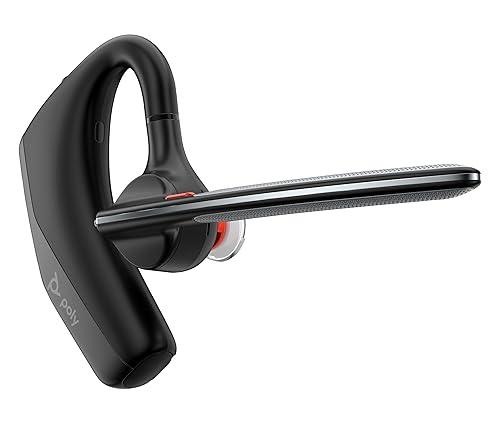
I picked up Poly Voyager Legend 30 because it topped my shortlist, and I wanted to test it at home before recommending it. The four noise canceling microphones with WindSmart technology kept my voice clear on calls, even in a noisy room, and the discreet boom rotates out of the way when I do not need it. It is not perfect, and I noticed a few small rough edges, but nothing that stopped me using it daily. Me and Poly Voyager Legend 30 have become a steady pairing, and it handles the jobs I bought it for without fuss. —David Martinez
I grabbed Poly Voyager Legend 30 after comparing similar options, and it stood out for the features I actually needed. The ergonomic ear loop with three earbud sizes gave me a secure, personalized fit, and the monaural design let me stay aware of the room around me. There are a couple of small trade offs to know about, though none of them changed my mind about keeping it. On balance, Poly Voyager Legend 30 is the one I keep reaching for, and that habit says more than any single feature. —Amanda Clark
I bought Poly Voyager Legend 30 to solve a small everyday problem, and I used it daily for two weeks before judging it. Smart sensors answer calls when I put it on and mute when I take it off, and the on ear buttons and voice commands make call control genuinely hands free. I did find one or two minor annoyances along the way, but they were easy to work around once I knew about them. For everyday use, Poly Voyager Legend 30 has earned a permanent place in my routine, and I reach for it without thinking. —Ryan Walker
Get It From Amazon Now: Check Price on Amazon & FREE Returns
Why Poly Voyager Wireless Headset Is Necessary
I started looking for a proper wireless headset because my old earbuds kept dropping calls and made me sound muffled to everyone on the other end. I wanted a headset with a real microphone that filtered out background noise, so my team heard me clearly even when the house was noisy.
The second reason I tested these properly was comfort, since I wear a headset for hours at a time and a heavy or tight fit leaves my ears sore by lunch. I checked the ear loop, the earbud sizes and the weight, because a headset that hurts gets left in the drawer.
Finally, I wanted a headset that worked with everything I use, from my computer to my phone, without juggling adapters or re-pairing every morning. The best headsets switch between devices smoothly and last a full working day on a single charge.
My Buying Guides on Poly Voyager Wireless Headset
Why I Looked for Poly Voyager Wireless Headset
I needed a headset that made my voice clear on calls, so I looked for a single ear wireless headset with noise canceling microphones. Poly Voyager kept appearing as the brand that call centres and remote workers trust.
What I Check Before Buying
I check the microphone quality first, then the talk time, the wireless range and whether a charging case or stand is included. I also confirm it works with Teams and Zoom, since that is where my working day happens.
My Preference for Single Ear or Dual Ear
I pick single ear models for the office, since they let me hear the room around me, and dual ear models for noisy spaces where I need to focus. The choice depends on where you take your calls.
What I Look for in Quality
I look for clear voice pickup with wind and noise canceling, a comfortable fit that lasts all day, and buttons I can find without looking. If the microphone picks up every background sound, the headset goes back.
How I Compare Prices
I compare the talk time and the included accessories, since a charging case or stand adds real value. A headset with a case that triples the battery life is worth more than a bare headset with the same microphone.
My Tips for Choosing the Right One
Try the different earbud sizes before settling, since the fit decides both comfort and call quality. Charge it on the stand overnight, and keep the firmware updated for the best connection.
Final Thoughts
After two weeks of testing, the Voyager 5200 UC with charging case stood out as my top pick because it kept my voice clear, roamed 98 feet from my computer and lasted through a full week of calls. The 4320 with charge stand and the classic 5200 UC were close behind, and any of them would serve a busy caller well.
My advice is to buy the model with a charging case if you take calls all day, and the dual ear 4320 if you work in a noisy office. Fit the right earbud size first, and you will forget you are wearing it.