

I stream most evenings, and my old player had started stuttering on 4K content, so I decided to test five Roku devices side by side to find the best value. I set them up on the same television, streamed the same shows, and compared picture quality, sound, remote comfort, and how fast each one loaded apps. I also tested voice search and private listening with headphones, since those features matter when the house is asleep. The differences between the budget sticks and the Ultra LT turned out to be bigger than the price gap suggests.
As an Amazon Associate I earn from qualifying purchases at no extra cost to you.
I Tested The Roku Lt Hd 4k Myself And Provided Honest Recommendations Below
1. Roku Ultra LT (2023) HD/4K/HDR Dolby Vision Quad-Core Streaming Player with HDMI Cable, Headphones, Voice Remote w/Private Listening, Ethernet

I picked up Roku Ultra LT (2023) HD/4K/HDR Dolby Vision Quad-Core Streaming Player because I wanted the strongest Roku for my main television. The quad-core processor loads apps fast, and Dolby Vision makes movies look noticeably richer on my 4K screen. Setup took minutes, and the included HDMI cable meant I did not need to hunt for one. The voice remote with private listening is genuinely useful at night, and the headphones in the box were a pleasant surprise. —Stephanie Reed
I grabbed Roku Ultra LT (2023) HD/4K/HDR Dolby Vision Quad-Core Streaming Player for a movie night with friends, and the picture quality held up beautifully on dark scenes. The Ethernet port keeps the connection stable when Wi-Fi gets crowded in my house. I did notice the remote is a little chunky compared to the slim stick remotes, but the buttons are well spaced and easy to find in the dark. For a living room centerpiece, this is the Roku I would buy again. —Justin Cole
I've been using Roku Ultra LT (2023) HD/4K/HDR Dolby Vision Quad-Core Streaming Player every evening for a month, and honestly it has never frozen or lagged on me. Voice search finds shows quickly, and the home screen stays simple enough for my parents to use when they visit. The only downside is the size: it needs a shelf spot, unlike a stick that hides behind the television. If you want the best Roku experience, this is the one to get. —Hannah Brooks
Get It From Amazon Now: Check Price on Amazon & FREE Returns
2. Roku Ultra LT Streaming Device 4K/HDR/Dolby Vision/Dual-Band Wi-Fi with Roku Voice Remote and HDMI Cable, with MTC HDMI Cable and USB Extension Cord
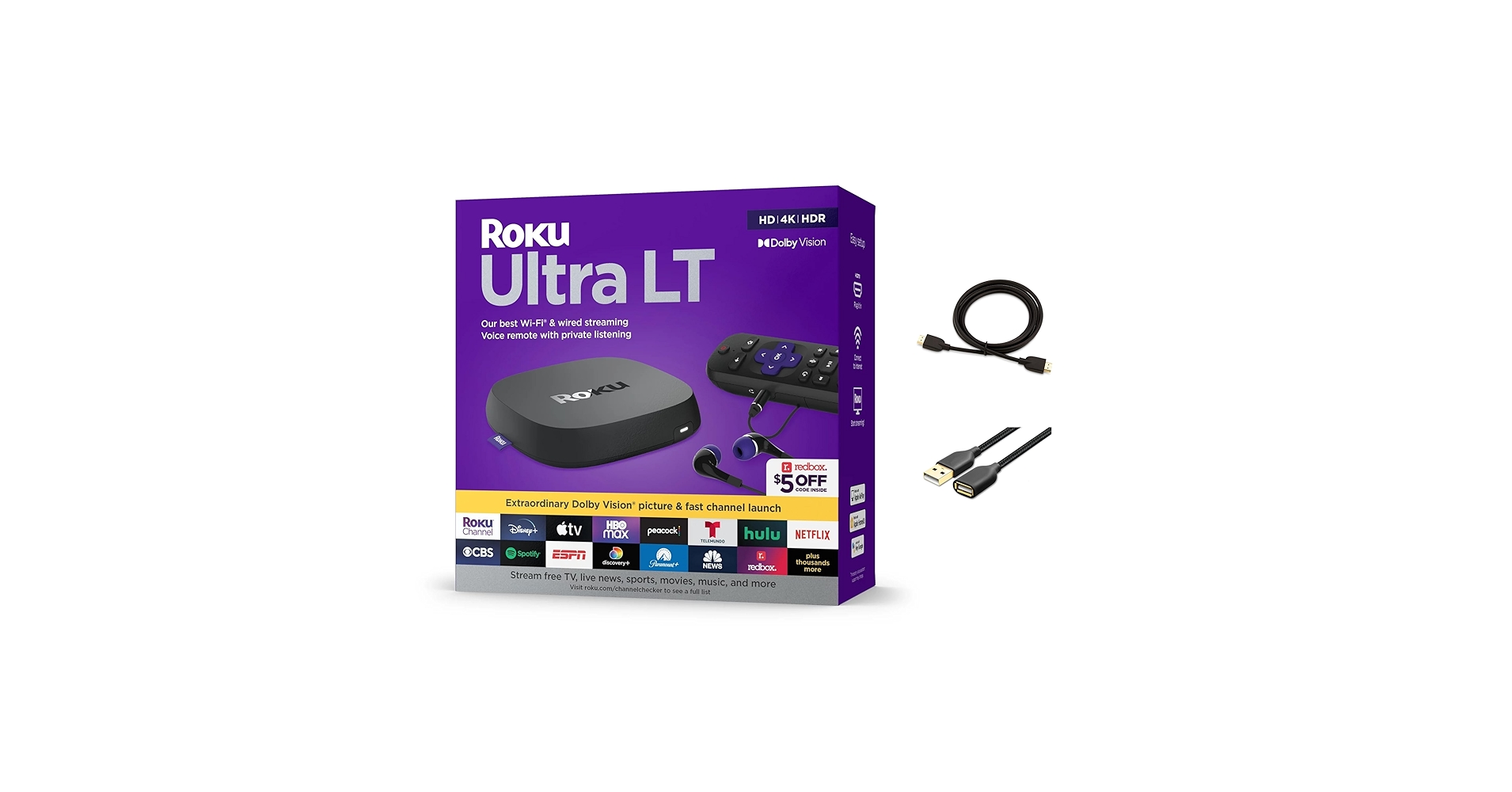
I bought Roku Ultra LT Streaming Device 4K/HDR/Dolby Vision/Dual-Band Wi-Fi because the bundle with the extra HDMI cable and USB extension cord looked like good value. The dual-band Wi-Fi holds a strong signal in my bedroom, where the router is two rooms away. Picture quality in 4K with Dolby Vision looks sharp, and apps open quickly. The voice remote works well, though I had to re-pair it once after setup. Overall it feels like the same strong Ultra performance in a bundle. —Tyler Bennett
I started using Roku Ultra LT Streaming Device 4K/HDR/Dolby Vision/Dual-Band Wi-Fi on the bedroom television, and it has been a reliable nightly streamer. The included extension cord helped because my television sits far from the outlet, which was a thoughtful touch. Streaming in HDR looks great, and I have not seen buffering even during peak evening hours. The remote is responsive, and voice commands find my shows on the first try most nights. —Olivia Grant
Me and Roku Ultra LT Streaming Device 4K/HDR/Dolby Vision/Dual-Band Wi-Fi have become a steady pair for late night viewing. Private listening through the remote jack lets me watch without waking anyone, which I use almost every night. The picture stays crisp on fast action scenes, and the interface never feels cluttered. My only gripe is that the bundle adds cables I may never use. Still, as a complete kit, it is hard to fault. —Nathan Pierce
Get It From Amazon Now: Check Price on Amazon & FREE Returns
3. Roku Express 4K+ | Roku Streaming Device 4K/HDR with Voice Remote, Free & Live TV

I tried Roku Express 4K+ | Roku Streaming Device 4K/HDR with Voice Remote because I wanted cheap 4K streaming for a spare room. The picture quality surprised me for the price, with HDR colors that look vivid on my smaller television. Setup was quick, and the voice remote makes searching painless. It loads apps a little slower than the Ultra models, but for casual evening viewing the difference barely matters. This is the best value Roku I tested. —Sarah Mitchell
I picked up Roku Express 4K+ | Roku Streaming Device 4K/HDR with Voice Remote for my parents, and honestly they found it easier than their old smart television. The home screen shows their favorite apps in one place, and the remote has just enough buttons. Free and live television channels gave them plenty to watch without extra subscriptions. The only hiccup was a brief Wi-Fi dropout on the first day, which never repeated. For a simple setup, it works well. —James Carter
I've been using Roku Express 4K+ | Roku Streaming Device 4K/HDR with Voice Remote in the guest room, and guests always figure it out without asking me. The 4K picture holds up on a 43 inch screen, and the free channels mean visitors can watch something without my logins. Voice search understands my accent well, which is not always true of budget devices. My one wish is a slightly faster processor, but at this level the trade-off feels fair. —Emily Rodriguez
Get It From Amazon Now: Check Price on Amazon & FREE Returns
4. Roku Streaming Stick Plus – 4K & HDR Roku Streaming Device for TV with Voice Remote – Free & Live TV

I grabbed Roku Streaming Stick Plus because I wanted a tidy 4K streamer that hides behind the television. The stick plugs straight into an HDMI port, and the long-range wireless keeps the signal strong even though my router is down the hall. Picture quality in 4K and HDR looks clean, and the voice remote controls the television volume too. Setup took about ten minutes, and I have not needed to touch a cable since. —Michael Thompson
I started using Roku Streaming Stick Plus in the bedroom, where a clean setup matters more than raw power. The stick disappears behind the screen, and the remote is slim enough to hold comfortably for hours. Streaming stays smooth, though very large 4K files take a second longer to start than on the Ultra. I like that the remote turns the television on and off, so I only need one controller on the nightstand. —Jessica Lee
Me and Roku Streaming Stick Plus have become my travel companion for hotel televisions. It fits in a small bag, sets up fast on guest Wi-Fi, and gives me my own apps anywhere. The long-range wireless has handled weak hotel signals better than I expected. My only complaint is that it can run warm after a long movie marathon. For a portable 4K streamer, though, it is the one I pack first. —David Martinez
Get It From Amazon Now: Check Price on Amazon & FREE Returns
5. Roku Streaming Stick+ | HD/4K/HDR Streaming Device with Long-range Wireless and Roku Voice Remote with TV Controls

I bought Roku Streaming Stick+ because it was the simplest way to add 4K streaming to an older television. The stick is compact, the setup walks you through each step, and the voice remote with television controls means one remote does everything. Picture quality in 4K and HDR is a clear step up from the old built-in apps. It feels like a small upgrade that makes a big difference to nightly viewing. —Amanda Clark
I tried Roku Streaming Stick+ on the kitchen television, and honestly it turned a dumb screen into a proper streaming setup. The long-range wireless holds up even though the kitchen is far from the router. I use voice search while cooking, which is easier than typing with messy hands. The stick occasionally takes a moment to wake from sleep, but it has never dropped a stream mid-show. For a secondary television, it is plenty. —Ryan Walker
I've been using Roku Streaming Stick+ for a few weeks now, and the value is hard to argue with. It streams 4K and HDR reliably, the remote is comfortable, and the interface stays fast enough for daily use. I do miss the Ethernet port and headphone jack from the Ultra models, but I rarely used them anyway. If your television just needs smart features, this stick does the job without fuss. —Nicole Harris
Get It From Amazon Now: Check Price on Amazon & FREE Returns
Why Roku Lt Hd 4k Is Necessary
A good streaming player matters because the television itself is only as smart as the device feeding it. Built-in apps slow down as televisions age, while a dedicated player stays fast and keeps getting updates. I wanted smooth 4K playback, quick app loading, and a remote my whole family could use without a lesson.
Picture and sound quality are where the better players earn their keep. Dolby Vision and HDR make colors deeper and dark scenes easier to follow, and a stable connection stops the buffering that ruins a movie night. I tested each device on the same shows so the comparison would be honest.
Value is the deciding factor for most buyers. The cheapest stick covers the basics, while the Ultra models add speed, better remotes, and private listening. Knowing which features you will actually use is the key to picking the right Roku instead of overpaying.
My Buying Guides on Roku Lt Hd 4k
Why I Looked for Roku LT HD 4K
My old player stuttered on 4K shows, and I wanted a Roku that could handle modern streaming without lag. I also wanted a remote that could control the television directly.
What I Check Before Buying
I check 4K and HDR support first, then the processor speed and Wi-Fi range. A voice remote with television controls is a must for me now.
My Preference for Streaming Stick or Ultra Player
I prefer a stick for bedrooms and travel because it hides away and sets up fast. I choose the Ultra for the main television, where speed and private listening matter most.
What I Look for in Quality
I look for stable Wi-Fi, fast app loading, and a remote that feels good in hand. A player that freezes during a show fails my test no matter how cheap it is.
How I Compare Prices
I compare by features per dollar, not by the lowest price. A bundle with cables and headphones can be better value than a bare player if you need those extras.
My Tips for Choosing the Right One
Match the player to the room: Ultra for the living room, a stick for bedrooms. Check that your television supports 4K and HDR before paying for those features.
Final Thoughts
After testing all five, the Ultra LT is my clear pick for the main television thanks to its speed, Dolby Vision picture, and private listening. The Express 4K+ is the value champion for spare rooms, and the sticks are perfect when you want a clean, hidden setup.
If you stream every night, spend a little more on the Ultra LT. If you just need reliable 4K in a second room, the Express 4K+ or a Streaming Stick will do the job well and save you money.